



Additional features
All features not covered earlier. You may not need them all, but some can be very useful. This functionality is used in production and is universal for any site.
Automatic actions
You don't have to do anything for this, but it helps to know how it works.
Automatic new word collection
After you add new fields on the first SeoFilter tab, the component tracks changes in resources limited by these settings:
| Setting | Default | Description |
|---|---|---|
| seofilter_classes | msProduct | Resource types (class_key) to track. Comma-separated for multiple. |
| seofilter_templates | Template ids to track. Comma-separated for multiple. |
Besides that, words can be added via snippet sfWord. That is a side effect of the snippet, not its main purpose: the word is added if it is not in the dictionary. Full snippet docs are on the Snippets page.
If you disabled resource tracking and do not call sfWord, the component still learns new words when working with mFilter2 via Ajax.
And if you disabled Ajax as well, the only option is to add words manually. The alias is filled automatically if you don't set it.
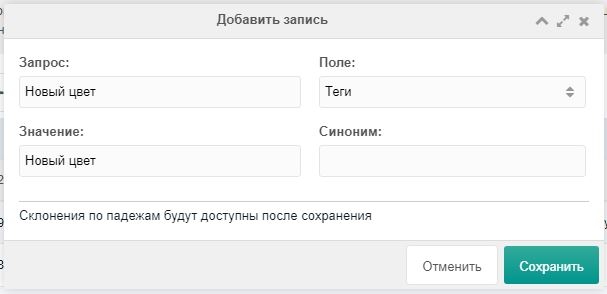
Aliases auto-update when field or dictionary changes
This makes life easier if you already use placeholders in templates, e.g. {$color} (alias in the filter and for the color field is color), and later decide that for SEO it would be better to use a transliterated word — cvet.
After you rename the alias in the field, all mentions in texts and URLs for that field will be updated.
This is experimental; double-check texts after large renames.
The same applies to a word's alias: when you change it, URLs of generated table pages change, and old URLs will return 404.
Word declensions
Declension by case is done via morpher.ru. Three settings control it. Register on the service, get a token and set it in the component system settings. Simple word declension returns cases and plural forms.
| Setting | Default | Description |
|---|---|---|
| seofilter_decline | No | Enable declension. Free limit 1000 requests per day. |
| seofilter_morpher_token | Token from morpher.ru |
When seofilter_decline is on, new words are declined automatically. Errors are written to the error log.
Field values in other tables
One of the most important features. Example from a real project: we keep IDs from external tables in msProductData fields for data integrity. The screenshot used add-on customExtra as the external table; the product had a “metro” field with a dropdown via msFieldsManager.
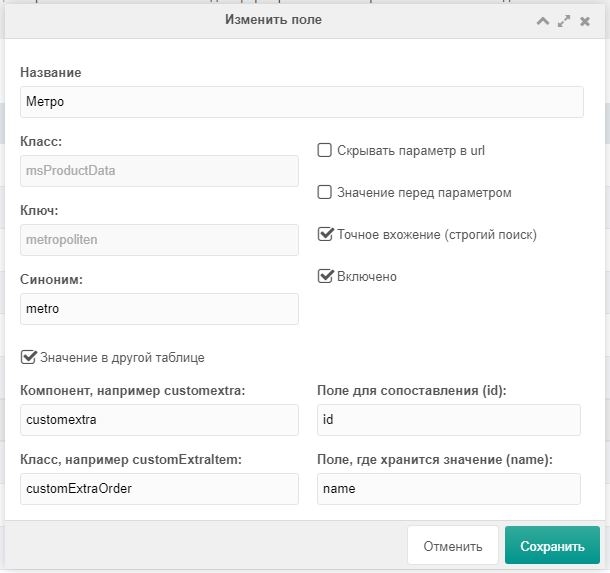
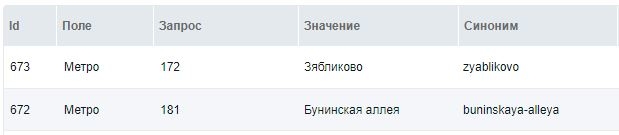
In that case the dictionary will have record IDs from the other table in queries and human-readable names in values. All declensions are built from Value.
Dependent fields and words
This is relatively new; when enabled, two more inputs appear.
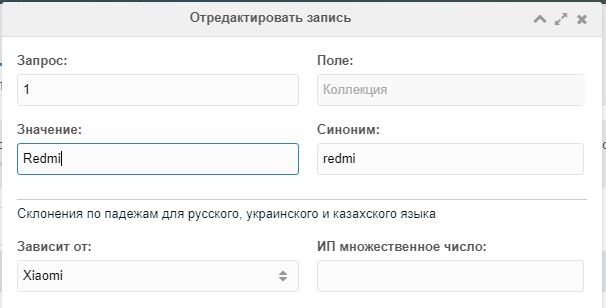
Example: car catalog. You already added field Brand, now adding Model. In “Depends on” select the Brand field; in “By column” enter marka. (Works well when brands and models are in the component’s own tables or e.g. customExtra.)
This avoids invalid combinations like: BMW Q5, BMW Hunter, UAZ X5, etc., and saves resources and messy links.
In the screenshot, field Collection depends on field Manufacturer.
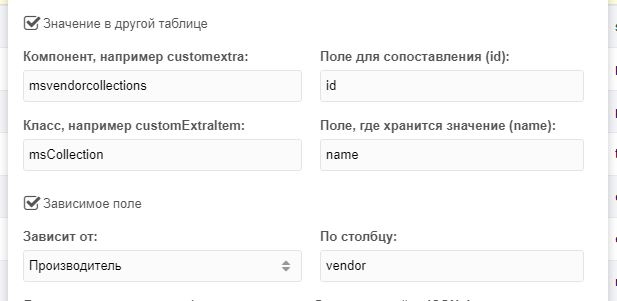
Words can depend on other words. The Depends on field appears when the value in Field depends on another field.
Field conditions in rules
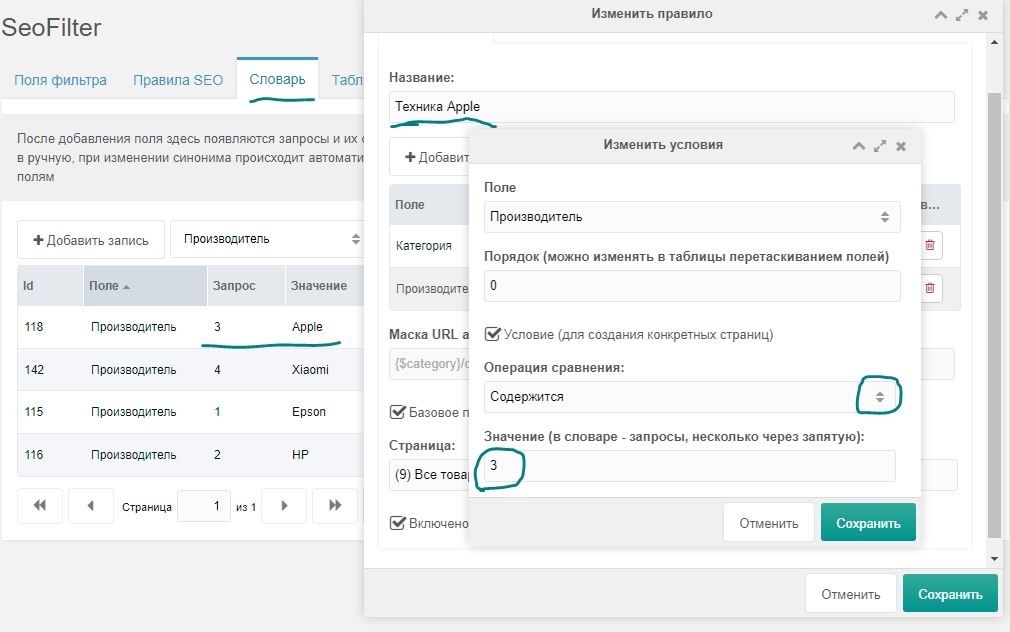
Use this to generate virtual pages only for certain field values. Abstract example: filtering by vendors (Apple, Epson) and categories (phones, laptops, printers). Apple doesn’t make printers; Epson doesn’t make phones or laptops. So it’s wrong to create one rule from Vendor + Category and use the same text templates for very different pages. Better:
- Create rules e.g. “Apple tech” and “Epson printers”.
- Add to each rule: Category and Vendor, and limit each field with conditions when adding it (see screenshot).
- Set the right SEO texts per rule.
- Save and check that it works.
Comparison operators
When adding a condition to a field you can choose:
- Contains — rule applies only to words whose queries are listed below (comma-separated).
- Not contains — rule applies to words whose queries are not in the list below.
- Greater — for numeric fields strictly greater than the value (single value).
- Less — for queries strictly less than the value.
- In range — two numbers comma-separated. For fields greater than the first and less than the second.
In Value you can enter one or more values comma-separated. Text queries work too, e.g. red,green without quotes. “Greater”, “Less” and “In range” help build “cheap” pages. You define what “cheap” is. When you add conditions to an existing rule, extra links are removed automatically; only those that satisfy the conditions remain.
Child count in rules
For phrases like “150 phones in our catalog”. Off by default. Implemented via pdoFetch from pdoTools; all conditions apply. Enable in system setting:
| Setting | Default | Description |
|---|---|---|
| seofilter_count | No | Enables child count and placeholder {$count} in SEO texts. |
After enabling, hidden fields appear in rule editing:
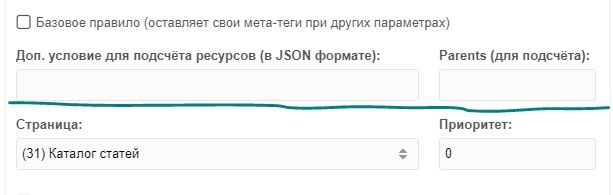
By default the count is unrestricted: it counts children of the selected page and only respects selected field values. It does not filter by published/hidden/deleted (each can have extra params). To control counting, each rule has two settings:
- Extra condition for resource count — JSON string, e.g.
{"published":1,"deleted":0}so the catalog shows only published, non-deleted. - Parents — same idea as pdoResources parents. Required when resources on the page come from several parents or the filter does not filter by the page’s children.
Min/max selections
Off by default; requires count enabled. For texts like “150 phones from 1000 rub”. Tightly tied to count; also uses pdoFetch and the same conditions. Two settings define what to select (comma-separated):
| Setting | Description | Example |
|---|---|---|
| seofilter_choose | Resource fields to take min/max from | msProductData.price |
| seofilter_select | Which fields to select from those two resources | id,msProductData.price,msProductData.made_in |
The number of placeholders is (min,max) × choose × select. Example: 2 × 1 × 3 = 6 placeholders with mask {$[min]_[choose]_[select]}:
{$min_price_id}— ID of cheapest item{$min_price_price}— price of cheapest item{$min_price_made_in}— country of cheapest item{$max_price_id}— ID of most expensive item, etc.
Shortening placeholders:
- In seofilter_choose you can add a synonym for the field key. E.g. for
msProductData.old_priceyou’d get{$max_old_price_id}; withmsProductData.old_price=opyou get{$min_op_price}. - In seofilter_select use " as ", e.g.
id,msProductData.old_price as op.
So you can shorten e.g. {$min_price_made_in} to {$min_p_in}.
PrepareSnippet for text processing
You might ask: if there’s Fenom, why process texts again? For flexibility and extra options. Same idea as in pdoTools: the snippet receives the param array before they are used in texts; you can change or add to it; it must return serialize($row). Params:
| Param | Description |
|---|---|
| $row | The replacement array (words, declensions, counts). Write new values here and modify existing ones. |
| $rule_id | Rule id (to handle only certain rules). If $rule_id is empty, default resource fields are being output; replacements work there too. |
| $page_id | Id of the page where results will be sent. |
| $input | Word query from the dictionary (for single-field rules). |
| $pdoTools / $pdoFetch | pdoFetch instance. |
| $seoFilter | SeoFilter instance (see code for public methods). |
Enable via seofilter_snippet (snippet name). Errors are logged.
URL table
The component was initially planned as fully dynamic (words + rules + URL mask, synonyms substituted on the fly). With the URL table you get:
- Custom URLs per page, even ignoring nesting
- Custom meta tags per page
- View counts to see popular pages
- Ability to disable pages you don’t need (e.g. no results or only one)
- Menu control and sitemap (in future versions)
Show in menu for generated links
Used in projects; selection is done with a custom snippet. Links are normal objects with fields (see component XML schema). A shared snippet for menu and sitemap is planned.
Reset view counters
In the table toolbar: More → Reset counters. Clears view counts for all links (and via Ajax). Use after testing or when you want to reset.
Recalculate results
In the table toolbar: More → Recalculate results. Recalculates results for every link. Make sure count is enabled and rule conditions are correct. Results are stored per link so menu and sitemap can work in fast mode without recalculating every time.
AJAX breadcrumbs
Default behavior uses chunk tpl.SeoFilter.crumbs.current (in the package). For pdoCrumbs users, set:
modx
[[!pdoCrumbs?
  ...
  &tplCurrent=`tpl.SeoFilter.crumbs.current`
]]
In the chunk you can uncomment code to return a link to the current page. For semantic crumbs with position there is idx. To disable replacements in crumbs use seofilter_crumbs_replace.
tvSuperSelect integration
tvSuperSelect turns a TV into a tag-like field (like miniShop2) and stores words in an external table.
To integrate: add a Field in SeoFilter with class modTemplateVar and key = your TV name. For correct counts, check Value in other table and enter tvsuperselect in the first “Component, e.g. customextra” field.
FrontendManager integration
FrontendManager lets you edit pages, settings and orders from the frontend. A custom controller was added for quick editing of virtual SEO pages. Integration is manual:
- In FrontendManager system settings you can override the top panel chunk and admin JS. Override only the chunk and admin JS so updates don’t overwrite your changes.
- In your copy of chunk tpl.frontendmanager.seo (e.g. .seo suffix), before the closing
</div>insert:
modx
<a href="[[++manager_url]]?a=seoedit&namespace=seofilter&id={$_modx->getPlaceholder('sf.seo_id')}" data-action="iframe" data-url="[[++manager_url]]?a=seoedit&namespace=seofilter&id=" class="fm-seofilter {if $_modx->getPlaceholder('sf.seo_id')?}{else}hidden{/if}"><span>SEO</span></a>- In your copy of the JS file (default: /assets/components/frontendmanager/js/mgr/manager.js), after the first line
Ext.onReady(function() {add:
js
if (Ext.getCmp('seofilter-panel-seoedit')) {
  Ext.getCmp('seofilter-panel-seoedit').on('success', function (e) {
    if (e.result.message) {
      top.window.location.href = e.result.message;
    } else {
      reloadFrontendManager();
    }
  });
}
How it works:
- SeoFilter sets placeholder sf.seo_id when the current page matches a rule and the URL is found in the table.
- With Ajax + mFilter2 the component updates the panel link on the fly using data-url + the received seo_id, so you don’t need to reload to open quick edit.
- If no rule matched or the URL doesn’t match, the SEO item is hidden via class hidden. SeoFilter’s own JS controls visibility; you can override it in system settings.
- The JS change is needed so FrontendManager reloads after your edit. If you change the custom URL, a normal reload would 404. To avoid that,
top.window.location.href = e.result.message;is used: when the URL changes, the SeoFilter controller puts the new URL in result.message and the page redirects there. - Quick edit looks like this (clickable):

Внимание
In this mode SEO fields (titles, texts) are shown by default. When you change them (except Content, which loads the Ace editor if installed), Use custom meta tags is checked automatically. If you change your mind, uncheck it manually or close without saving.
For questions, use modx.pro threads about SeoFilter.