

CallBack
Component for displaying, processing, and logging callback requests
Component for displaying, processing, and logging callback requests.
| Name | Default | Description |
|---|---|---|
| &tpl | tpl.callBack.item | Chunk for the link that opens the modal form. |
| &target | callBackModal | ID linking the button to the form. |
| ®isterBootstrap | 1 | Whether to load Bootstrap scripts. |
| ®isterCss | 1 | Whether to load default Bootstrap CSS. |
| &wrapperSnippet | AjaxForm | Snippet that adds ajax behavior to the form. |
| &toPlaceholder | Placeholder name to output the modal form separately from the button. |
| Name | Default | Description |
|---|---|---|
| &snippet | FormIt | Snippet that processes the form. |
| &form | tpl.callBack.form | Chunk for the callback request form. |
| &hooks | email,callBackLog | FormIt hooks: send email and write to log. |
| &validate | phone:required,name:required | Phone and name required by default. |
| &emailSubject | [[%callback.emailSubject]] | Email subject. |
| &emailTpl | tpl.callBack.email | Chunk for the admin email. |
| &successMessage | [[%callback.successMessage]] | Message shown on successful submit. |
| &emailTo | [[++emailsender]] | Recipient for the form data email. |
You can use any other AjaxForm and FormIt parameters.
The phone mask is set via the data-mask attribute, e.g.:
<input type="text" class="form-control" id="phone" name="phone" value="[[!+fi.phone]]" data-mask="+0(000)000-00-00">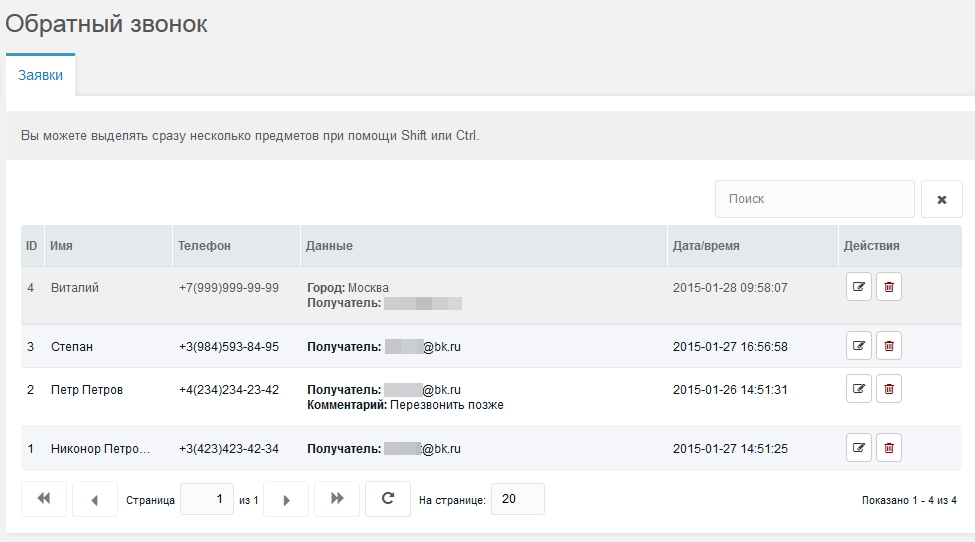
By default the log shows name, phone, all extra form fields, and submit time. The recipient email is also stored.
To show custom labels for extra fields, add lexicon entries like callback_item_fieldname. For example, for a city field create callback_item_city with value "City".
You can add a comment to each request or edit name and phone. You can also delete one or several entries.
[[!callBack]][[!callBack? ®isterBootstrap=`0` ®isterCss=`0`]][[!callBack? ®isterBootstrap=`0` ®isterCss=`0` &toPlaceholder=`modal_form`]]
...
[[+modal_form]]