


Snippets
parseMeasure
Outputs the "measure type". Must match a key in the array from system setting ms2efs_product_custom_measure.
Parameters
| Name | Description |
|---|---|
| &prefix | Text before the type name. |
| &postfix | Text after the type name. |
| &input | Array key name |
Call example:
modx
[[!parseMeasure?
  &input=`kg`
  &prefix=`in `
  &postfix=` per cubic meter`
]]
As modifier on product page:
modx
[[!+measure:parseMeasure=`prefix=" / "`]]msExtraFields
Outputs product properties in cart and as filters for mFilter2. Requires pdoTools. Parameter set varies by use case. You can pass pdoTools parameters. Placeholders inside parameters are supported.
General properties
| Name | Default | Description |
|---|---|---|
| &log_target | ECHO | FILE - log to file; HTML - to screen; ECHO, AUTO, SYSTEM - plain; PLACEHOLDER - to placeholder. |
| &showLog | false | pdoFetch log; when true data goes to my log. |
| &log_status | false | msExtraFields log when &showLog is on. |
| &log_filename | false | Log file name (name + date "_Y-m-d__H-i-s"). Path: MODX_CORE_PATH."cache/logs/". |
| &log_placeholder | log_msExtraFields | Placeholder for log. See price examples. |
| &log_detail | false | Extra system info in log. |
| &log_target | ECHO | FILE - log to file; HTML - to screen; ECHO, AUTO, SYSTEM - plain; PLACEHOLDER - to placeholder. |
| &log_isstyled | true | When HTML/PLACEHOLDER, wrap log lines in styled tags by level. |
| &log_selfmsg | true | Log only messages from this component. |
| &log_level | INFO | Log level: INFO, WARN, ERROR, FATAL, DEBUG. |
| &cacheTime | 1800 | Cache TTL in seconds. Used in ajax for edit mode. See price examples. |
| &cacheUid | Unique ID for edit mode; auto-generated. Tied to cacheTime. | |
| &plugins | ms2_core_path . 'plugins/' | Path to minishop2 plugins. |
| &plugins_processors | ms2_core_path . 'processors/mgr/msextrafields/' | Path to processors. |
| &tplPath | [[+plugins]]msextrafields/chunks | Path to chunks. +plugins = &plugins value. |
| &typeOfData | options | options - product properties; getFilters - filter properties for mFilter2; cart - cart properties. |
Product property output
Product parameters
| Name | Default | Description |
|---|---|---|
| &display | edit | edit, info, short - display mode; chunk parameter name is built as "tplProduct_" + "property type" + "" + "display value" + "" + "row or wrap". edit - property chunks without suffix (info or short), e.g. tplProduct_checkbox_row; user can change values to refine product before order; info - info template (e.g. tplProduct_checkbox_info_row); short - info only (e.g. tplProduct_checkbox_short_row), when inshort == 1; |
| &productId | null | id of msProduct or msCategory document for properties; if empty, current document is used |
| &fastGenerate | false | when true uses cached data from ms2_product from ms2_product.msextrafields; if page/snippet cached or doc changed but not saved, data may be stale |
| &fastMode | false | fast chunk mode; unprocessed tags stripped (see pdoTools). |
| &showUnpublished | false | when true, output all including unpublished |
| &showDeleted | false | when true, output including those marked for deletion |
| &showHidden | false | when true, output only documents with parameter "Hide from menu" |
Example
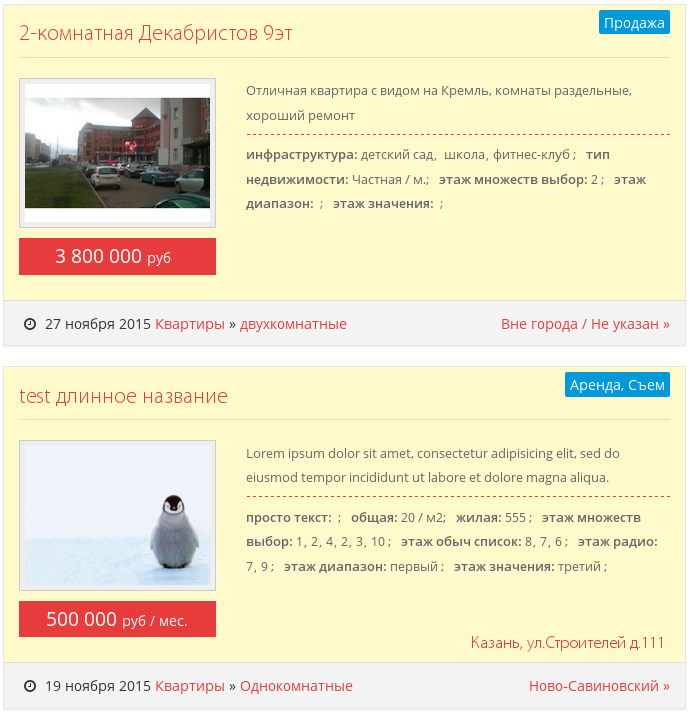
Call inside product group for shared property list; only properties with inshort set are returned.
modx
[[!msExtraFields?
  &display=`short`
  &productId=`[[+id]]`
  &tpl_group=``
]]
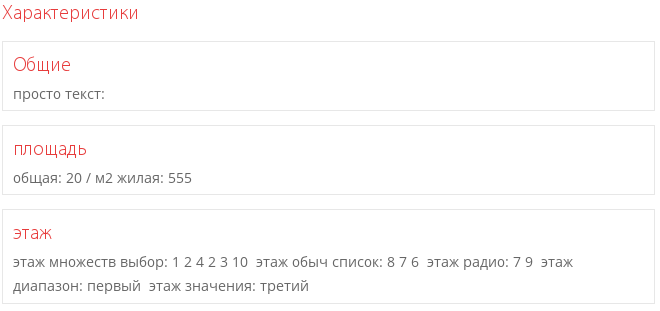
Same call inside product.
modx
[[!msExtraFields?
  &display=`short`
]]
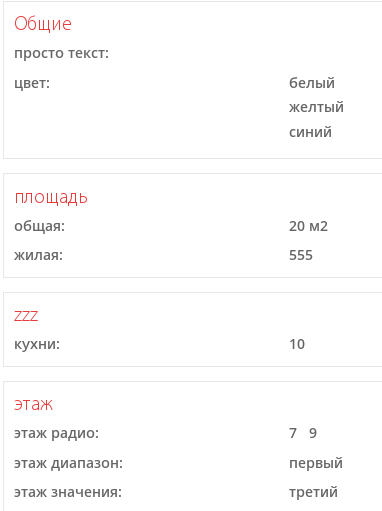
Call inside product with info display.
modx
[[!msExtraFields?
  &display=`info`
]]
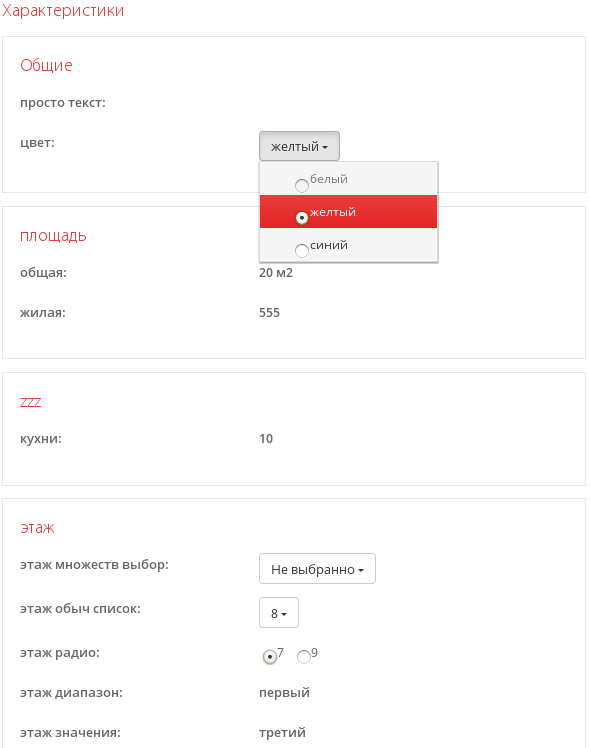
Call inside product with edit display.
modx
[[!msExtraFields?
  &display=`edit`
]]
Chunks
| Name | Default | Description |
|---|---|---|
| tpl_group | @FILE: products/group.tpl | Property group chunk. Accepts [[+group_name]] and [[+output]]. |
| tplOrder_discounts_row | @FILE: order/discounts_row.tpl | Discount info chunk, accepts [[+tip]]. |
| tplOrder_discounts_wrap | @FILE: order/discounts_wrap.tpl | Discount wrap chunk, accepts [[+output]]. |
| tplProduct_checkbox_info_row | @FILE: products/checkbox_info_row.tpl | Checkbox chunk for display==info. |
| tplProduct_checkbox_row | @FILE: products/checkbox_row.tpl | Checkbox chunk for display==edit. |
| tplProduct_checkbox_short_row | @FILE: products/checkbox_short_row.tpl | Checkbox chunk for display==short. |
| tplProduct_checkbox_wrap | @FILE: products/checkbox_wrap.tpl | Checkbox wrap chunk. |
| tplProduct_default_row | @FILE: products/default_row.tpl | Default property row chunk, used when no chunk for display type is defined. |
| tplProduct_default_wrap | @FILE: products/default_wrap.tpl | Default wrap chunk. |
| tplProduct_default_short_row | @FILE: products/default_short_row.tpl | Default property row chunk for display==short, when no specific chunk is defined. |
| tplProduct_default_short_wrap | @FILE: products/default_short_wrap.tpl | Default wrap chunk for short display type. |
| tplProduct_listbox_info_row | @FILE: products/listbox_info_row.tpl | Single list row chunk, for display==info. |
| tplProduct_listbox_info_wrap | @FILE: products/listbox_info_wrap.tpl | Wrap chunk. Fires when single property and price unchanged. |
| tplProduct_listbox_row | @FILE: products/listbox_row.tpl | Single list row chunk, for display==edit. |
| tplProduct_listbox_wrap | @FILE: products/listbox_wrap.tpl | Single list row wrap chunk, allows leaving value unselected. |
| tplProduct_listboxes_info_row | @FILE: products/listboxes_info_row.tpl | Multi-select list row chunk, for display==info. |
| tplProduct_listboxes_info_wrap | @FILE: products/listboxes_info_wrap.tpl | Multi-select list wrap chunk. |
| tplProduct_listboxes_row | @FILE: products/listboxes_row.tpl | Multi-select list row chunk, for display==edit. |
| tplProduct_listboxes_wrap | @FILE: products/listboxes_wrap.tpl | Multi-select list row wrap chunk, for display==edit. |
| tplProduct_option_row | @FILE: products/option_row.tpl | Single list row chunk, for display==edit. |
| tplProduct_option_wrap | @FILE: products/option_wrap.tpl | Single list wrap chunk, for display==edit, requires one value. |
| tplProduct_range_row | @FILE: products/range_row.tpl | Range property chunk, for display==edit. |
| tplProduct_range_wrap | @FILE: products/range_wrap.tpl | Range property wrap chunk, for display==edit. |
In chunks with prefix tplProduct_ and suffix _row (e.g.: tplProduct_checkbox_info_row), the following placeholders are passed:
| Placeholder | Description |
|---|---|
[[+idx]] | sequential property value ID |
[[+id]] | property record id in current document |
[[+res_id]] | id of current resource |
[[+prop_id]] | property id in miniShop2 settings |
[[+count]] | product stock quantity |
[[+article]] | product SKU |
[[+cond]] | condition for value validation |
[[+value]] | current property value |
[[+price]] | current property price |
[[+tip]] | property tip |
[[+disabled]] | disabled (0 or 1) |
[[+createdby]] | creator username |
[[+updatedby]] | updater username |
[[+createdon]] | record creation date in the format: YYYY-MM-DD HH:MM:SS |
[[+updatedon]] | record update date in the format: YYYY-MM-DD HH:MM:SS |
[[+group]] | group name |
[[+prop_name]] | property name |
[[+measure]] | measure type key, default 0 |
[[+measure_name]] | parsed measure type value |
[[+type]] | property type (text, listbox ...) |
[[+defaultval]] | default value |
[[+inshort]] | show in SHORT type, outputs 0 or 1 |
[[+onlyinfo]] | output only in INFO type, outputs 0 or 1 |
[[+active]] | whether record is active, set in general settings or in category settings, outputs 0 or 1 |
[[+prop_description]] | current property description, set in general settings. |
[[+cat_property_id]] | nearest category resource id where property is declared |
[[+cat_property_pagetitle]] | pagetitle of nearest category resource |
[[+chunkname]] | chunk field value in JSON format from nearest parent, that contains it, or from general settings |
[[+chunkname_prop]] | chunk field value in JSON format from nearest parent, that contains it |
[[+order_discount]] | discount array for current property |
In chunks with prefix tplProduct_ and suffix _wrap (e.g.: tplProduct_checkbox_wrap), wrap placeholders:
| Placeholder | Description |
|---|---|
[[+idx]] | sequential property ID |
[[+group_name]] | group name |
[[+prop_name]] | property name |
[[+prop_name]] | property id in miniShop2 settings |
[[+type]] | property type (text, listbox ...) |
[[+output]] | combined property values - concatenation of parsed chunk results of current property with suffix "_row" |
Chunk customization
Default chunks are in core/components/minishop2/plugins/msextrafields/chunks/. Grouped by display type, see &display. You can customize any, or use option to create custom property group.
In general property settings or categories (if you don't want to set display globally for all product categories), use the Chunk field. Accepts JSON to customize property display. Example entry:
json
{
  "row": {
    "edit":"@FILE: products/pics_row.tpl",
    "short":"@FILE: products/pics_short_row.tpl",
    "info":"@FILE: products/pics_info_row.tpl"
  },
  "wrap": {
    "edit":"@FILE: products/pics_wrap.tpl"
  }
}
This overrides default settings, i.e. to change only the info display type for a property value, just add {"row":{"info":"@FILE: products/pics_info_row.tpl"}}.
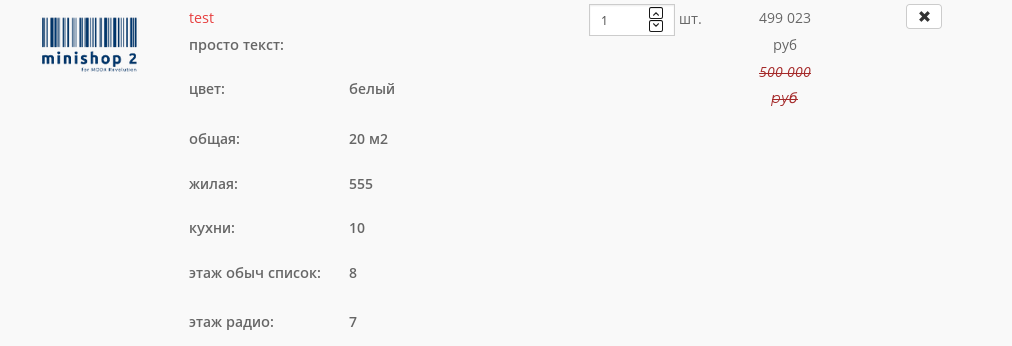
Product properties in cart
In this case all properties are output, and mutable properties return only values set by the user.
modx
[[!msExtraFields?
  &typeOfData=`cart`
  &productId=`[[+id]]`
  &display=`info`
  &tpl_group=`@INLINE:[[+output]]`
]]
Integration with mSearch2 (as mFilter2 filter)
Dynamic properties can be used as a filter for snippet mFilter2. With CSS it is hard to distinguish from standard properties. Filter criteria are added to URL as parameter &filters, and opening a link with criteria shows filtered results built on the server; JS (specified in system setting ms2efs_frontend_js) updates filter appearance based on criteria (indicating which properties are set) and fills the "You selected" block.
This file overrides standard filter mechanism and intercepts filter control, and when user clicks a filter not belonging to component msExtraFields, control passes to standard methods described in component mFilter2 JS.
Each property's appearance matches what we see when running msExtraFields in edit mode, but outputting list values as radio buttons in the filter would limit the user to a single value at a time when searching.
A feature was added to switch property types to multi-select on the fly. Controlled by system setting ms2efs_autotype.
Integration
Filters are easy to add: add them to parameters "filters" and create the corresponding chunks. Filter results including pagination are cached, per cache lifetime cacheTime. If filters do not show, check for value "msExtraFieldsFilter" in handler parameter mse2_filters_handler_class, in component settings "msearch2".
modx
[[!mFilter2?
  // add custom filter from file
  // core/components/msearch2/custom/filters/msextrafields.class.php
  &filters=`msextrafields|all:msextrafields`

  // for convenience set filter alias, it will appear in URL
  // as filter parameter
  &aliases=`msextrafields|all==filters_name`

  // set chunks, chunk suffix must match alias
  // row chunk optional, not used when building
  &tplFilter.row.filters_name=`@INLINE: [[+title]]`

  // wrap chunk calls filter-building snippet
  &tplFilter.outer.filters_name=`@FILE:categories/chunks/mFilter2_ms2efs_all_outer.tpl`

  // search result row chunk returns short product properties
  &tpl=`@FILE:categories/chunks/msProducts_row.tpl`

  // can pass extra params to msExtraFields, e.g. for log output,
  // prefix param name with "ms2efs_"
  &ms2efs_log_status=`1`
  &ms2efs_log_target=`FILE`
  &ms2efs_log_filename=`mse2_get_msProduct`
]]
Consider search result row chunk "msProducts_row.tpl". To fill price correctly, wrap it in class "e-price", wrap filters in class "short-options".
modx
[[+price:ne=`0`:then=`
  <div class="e-price">
    [[+price]]
    <span class="measure">
      [[%ms2_frontend_currency]] [[!+custom_measure:parseMeasure=`prefix="/ "`]]
    </span>
    [[+old_price]]
  </div>
`]]

<div class="short-options">
  [[!msExtraFields?
    &display=`short`
    &productId=`[[+id]]`
  ]]
</div>
Wrap chunk mFilter2_ms2efs_all_outer.tpl calls filter-building snippet, required: wrap all in class ms2efs_options. Note the parameter typeOfData - it builds filters in required form.
modx
<div id="[[+table]]" class="ms2efs_options" data-filterkey="[[+filter_key]]">
  [[!msExtraFields?
    &typeOfData=`getFilters`
    &filter=`[[+filter]]`
    &table=`[[+table]]`
  ]]
</div>
Borders (boundaries...)
With inheritance and nested categories, question arises about using properties declared in such documents as filter elements. Specifically, several tasks arise:
- filters inherited from parents;
- current category filters;
- collect properties from child categories;
- select properties from specified categories;
- get properties used in products;
- exclude documents when building filters;
- combine filter criteria;
Several parameters serve these tasks.
| Name | Default | Description |
|---|---|---|
| &resourceId | [[+id]] | current document id of "product category" class. If using filter on page of different class (e.g. modDocument), you must specify ID of document of class "msCategory", so border calculation shows correct property values. See also filter examples |
| &borders | <[[+id]] | document ids used to build filters, default: filters from parent documents |
| &excludeIds | null | comma-separated document ids to exclude |
| &filterType | category | category, product, all - outputs filters from corresponding document groups. |
Filters inherited from parents
By default, category filters inherit from parents from topmost product category in tree. Filter values come from nearest categories. For example, if top category has list property with values "1,2,3", and same property in parent has values "3,4,5". Then filter on current category page shows "3,4,5". If current category has this property, its value takes priority. mFilter2 runs without selection criteria. Selection with params can look like:
modx
[[!mFilter2?...
  &ms2efs_borders=`<[[+id]]`
  &ms2efs_filterType=`category`
]]
Current category filters
To show only current category properties, pass current category id to borders and set in filterType, get filters from category only:
modx
[[!mFilter2?
  &ms2efs_borders=`[[+id]]`
  &ms2efs_filterType=`category`
]]
Filter properties used in subcategories
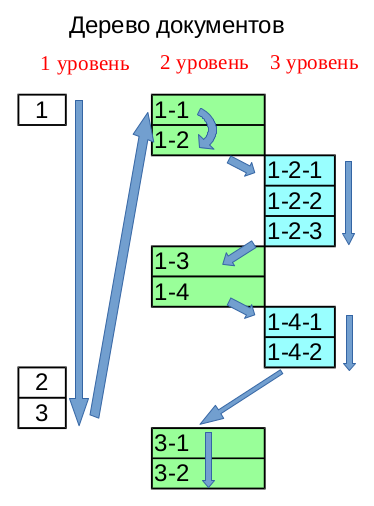
Sometimes filters are needed from all nested subcategories. In borders param you can use "<" and ">". Note that getChildIds tree traversal may return unexpected results. The diagram shows an example of how the tree is traversed downward, where the deepest document is "1-4-2", but properties come from document "3-2".
modx
[[!mFilter2?...
  &ms2efs_borders=`>[[+id]]`
  &ms2efs_filterType=`category`
]]
Properties from specified categories
To get properties from specific categories only, list document ids separated by commas. For example: &ms2efs_borders=`1,5,2` builds properties defined in current. ID order does not matter; data is obtained based on position in tree relative to current. Or use range with hyphen "-". Value of parameter &ms2efs_borders=`1-5` returns properties from categories in range, from tree traversal.
You can create separate "product category" documents and declare needed filters in them, these pages may not be used on site, but only for filter tuning.
Properties from products
Besides getting properties from categories, can return all properties from products that can be shown in filter. Category settings are considered if they are above the product in the tree. Then "borders" acts as product identifiers.
Getting properties used in all child products:
modx
[[!mFilter2?...
  &ms2efs_borders=`>[[+id]]`
  &ms2efs_filterType=`product`
]]
Getting properties from specific products:
modx
[[!mFilter2?...
  &ms2efs_borders=`1,2,3`
  &ms2efs_filterType=`product`
]]
Excluding documents from selection
You can exclude documents from filter building. Applies to both products and categories.
modx
[[!mFilter2?...
  &ms2efs_borders=`1-5`
  &ms2efs_excludeIds=`2,3`
  &ms2efs_filterType=`all`
]]
Combining filter criteria
Component allows flexible filter set management. For example:
modx
[[!mFilter2?...
  &ms2efs_borders=`<5,10-15,7,>12`
]]
This will get all documents needed for filter from existing tree. Input order does not affect selection, script builds chain from tree and rules.