


pdoTools
Fast retrieval of site pages and users

pdoParser is a replacement for modParser.
Its job is to parse MODX tags quickly without creating objects, unlike the original parser. pdoParser only handles simple tags — no filters or conditions:
[[%tag]] - lexicon string[[~id]] - link[[+tag]] - placeholders[[++tag]] - system placeholders[[*tag]] - resource placeholders[[#tag]] - FastField placeholdersFastField tags were proposed by Vitaly Kireev in the fastField addon. With author consent, pdoParser supports them.
It can:
[[#15.pagetitle]], [[#20.content]][[#15.date]], [[#20.some_tv]][[#21.price]], [[#22.article]][[#12.properties.somefield]], [[#15.size.1]][[#POST.key]], [[#SESSION.another_key]][[#15.colors]], [[#GET]], [[#12.properties]]The number after # is the resource id to pull data from. pdoTools processes these tags without creating modElement objects, so it is faster than native MODX. If a placeholder is called with parameters, it is passed to native modParser.
Since 2.0 pdoTools includes the Fenom templating engine. It runs only when pdoParser is enabled and allowed in system settings.
pdoTools::getChunk() and parseChunk() automatically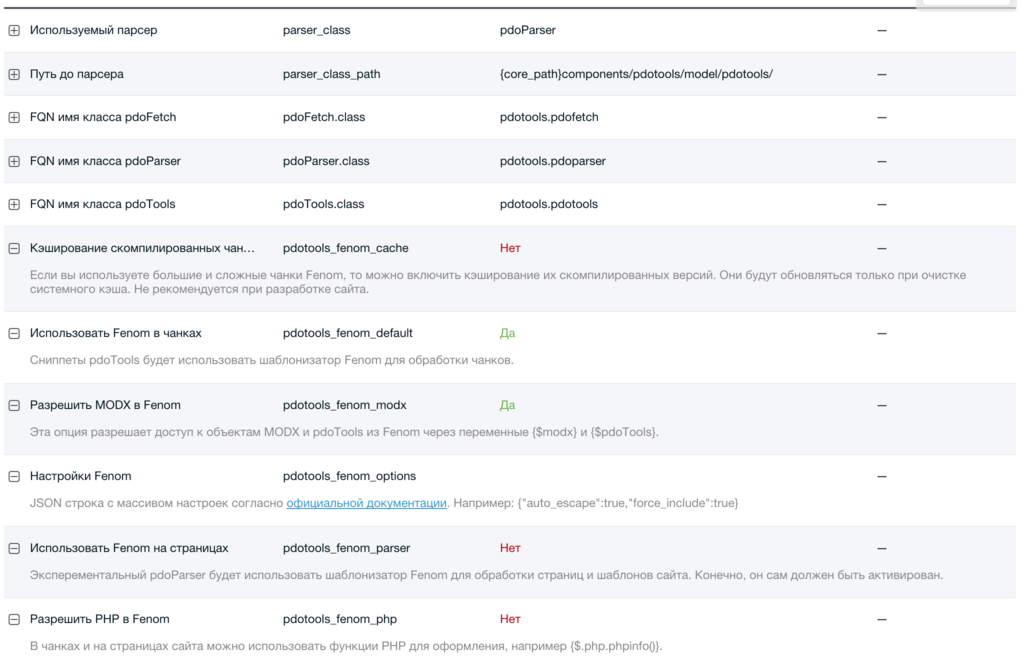
{$.php.function()}. Dangerous; off by default.{$modx} and {$pdoTools}. If you don't trust managers, turn it off; modX allows wiping the site.{core_path}cache/pdotools. pdoTools 3.1.0+ (MODX 3).Available in pdoTools 3.1.0+ (MODX 3)
Fenom compile and runtime errors name the chunk or resource, include a short source excerpt, and still keep the cache key as a content hash.
When pdoParser and pdotools_fenom_parser are enabled, the templating engine runs at this point. By then all cached chunks and snippets on the page are processed (or loaded from cache), so you can use Fenom to choose which snippet runs:
{if $.get.test == 1}
  [[!pdoResources?parents=`0`]]
{else}
  [[!pdoMenu?parents=`0`]]
{/if}
Depending on $_GET['test'], either one snippet or the other runs. The MODX parser would run both and only show one result. So you can implement more complex logic even with pdotools_fenom_php and pdotools_fenom_modx off. Fenom on pages is not cached.
Inside chunks, Fenom always runs first, so you can split content for MODX based on conditions.
This Fenom feature is off by default; in tests on small simple chunks there was no benefit. You may have larger chunks, so you can enable pdotools_fenom_cache; compiled templates are then stored in /cache/default/fenom/ by type.
Chunks from the DB are cached by their id; INLINE chunks by a hash of their content. So a DB chunk path looks like cache/default/fenom/chunk/90.cache.php, and an INLINE like cache/default/fenom/inline/35e115c27fdc3814b6f41a1015aa67e6.cache.php. DB chunks are cached until system cache is cleared; INLINE chunks get a new file when content changes, so you don't have to clear the whole cache.
Flow: on first run with empty cache, pdoTools gets the chunk, detects its type and passes it to Fenom. Fenom compiles and stores the result in pdoTools' in-memory cache via setStore() (RAM only, for the request — so the same chunk isn't compiled 10 times in one pdoResources call). If pdotools_fenom_cache is on, the compiled PHP is also written to disk; on the next request the MODX cache returns that code, Fenom builds a Fenom\Render from it and puts it in setStore(). Whether loading from disk or compiling again is faster depends on your chunks; use &showLog=1 to see compile and cache times.
Standard chunk tpl.Tickets.comments.wrapper from Tickets:
<div class="comments">
  [[+modx.user.id:isloggedin:is=`1`:then=`
  <span class="comments-subscribe pull-right">
    <label for="comments-subscribe" class="checkbox">
      <input type="checkbox" name="" id="comments-subscribe" value="1" [[+subscribed:notempty=`checked`]] />
      [[%ticket_comment_notify]]
    </label>
  </span>
  `:else=``]]

  <h4 class="title">[[%comments]] (<span id="comment-total">[[+total]]</span>)</h4>

  <div id="comments-wrapper">
    <ol class="comment-list" id="comments">[[+comments]]</ol>
  </div>

  <div id="comments-tpanel">
    <div id="tpanel-refresh"></div>
    <div id="tpanel-new"></div>
  </div>
</div>
Same chunk rewritten for Fenom:
<div class="comments">
  {if $modx->user->isAuthenticated($modx->context->key)}
    <span class="comments-subscribe pull-right">
      <label for="comments-subscribe" class="checkbox">
        <input type="checkbox" name="" id="comments-subscribe" value="1" {$subscribed != '' ? 'checked' : ''} />
        {$modx->lexicon('ticket_comment_notify')}
      </label>
    </span>
  {/if}

  <h4 class="title">{$modx->lexicon('comments')} (<span id="comment-total">{$total}</span>)</h4>

  <div id="comments-wrapper">
    <ol class="comment-list" id="comments">{$comments}</ol>
  </div>

  <div id="comments-tpanel">
    <div id="tpanel-refresh"></div>
    <div id="tpanel-new"></div>
  </div>
</div>