



City list management
The component has a page where you can manage the city list: add, edit and delete cities, and enable or disable them.
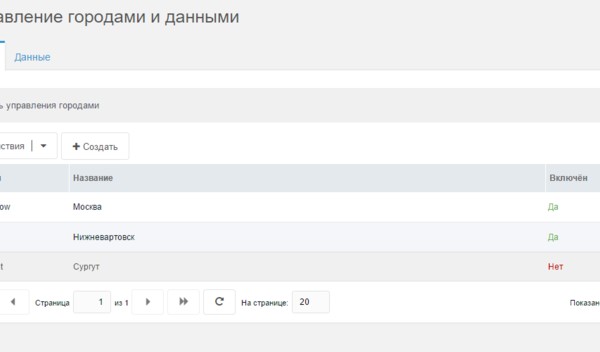
Cities are added manually. When detecting city by IP, the name from the SypexGeo database is compared with cities in the list. If the city is not in the list or is disabled, the default city is used.
Using domains, subdomains and subdirectories
To use a subdomain or subdirectory for a city, specify only the key (e.g. surgut) and enable the "City in domain" or "City in subfolders" option in settings. The city will then be available at surgut.site.ru or site.ru/surgut/ respectively. You can also use different full domains for different cities.
Domain and subdirectory detection can be used together. In that case the key is the full domain and subdirectory when needed.
When using domains, subdomains and subdirectories, add the current city URL to the base tag in the head block:
modx
<base href="[[!+cf.current_city.url]]" />And use this placeholder for the site home link:
modx
[[!+cf.current_city.url]]Outputting the city list and current city info
To output the city list with the ability to switch between cities, call the snippet:
modx
[[!cfCities]]On any page you also have access to the selected city info:
modx
[[!+cf.current_city]]     - Name
[[!+cf.current_city.id]]  - ID
[[!+cf.current_city.key]] - Domain or key
[[!+cf.current_city.url]] - City URL
Data management
On the same page there is a "Data" tab for managing information per city.
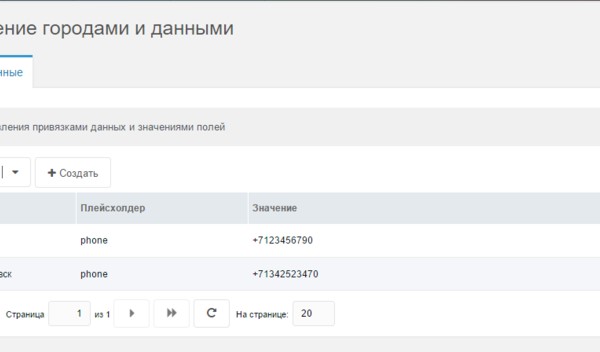
Data is added and edited on this page. For the placeholder you can enter your own name or choose from the list of existing ones.
Outputting data
The component has two ways to output unique information on site pages.
By default, fields are written to placeholders with a prefix. To output the value, add the placeholder to your chunks or templates and call it uncached. For example:
modx[[!+cf.phone]]Placeholders are written on page load, which can slow the system in some cases. You can disable writing fields to placeholders. Then use the
cfFieldsnippet with the required key/placeholder to output city-specific data:modx[[!cfField ?&key=`phone`]]