



Installation and setup
Getting started with the package is straightforward.
Main setup
- After installing the component, in the backend go to either the component page or the product page you want to link a coupon to, select the
Promo codestab and create a promo code. - On the page where the
msCartsnippet is called, call themspcFormsnippet uncached:{'!mspcForm' | snippet}or[[!mspcForm]]. Best to call it in the cart output chunk so the input field is hidden when the cart is empty. Can be called multiple times, e.g. before and after the cart. - For the price to update dynamically when a coupon is applied, do the following.
Dynamic product price update after coupon apply
miniShop2 v2.4
In chunk
tpl.msCartwrap the price output in selectorspan.price span.I.e. instead of:
fenom<span>{$product.price}</span> {'ms2_frontend_currency' | lexicon}use something like:
fenom<span class="price"><span>{$product.price}</span> {'ms2_frontend_currency' | lexicon}</span>Slightly below, wrap the old (strikethrough) price in selector
span.old_price span.Instead of:
fenom{if $product.old_price?} <span class="old_price">{$product.old_price} {'ms2_frontend_currency' | lexicon} {/if}use something like:
fenom<span class="old_price" style="{if !$product.old_price}display:none;{/if}"> <span>{$product.old_price}</span> {'ms2_frontend_currency' | lexicon} </span>
miniShop2 v2.2
In chunk
tpl.msCart.rowwrap the price in selectorspan.price span:modx<span class="price"><span>[[+price]]</span> [[%ms2_frontend_currency]]</span>[[+old_price]]In the quick placeholder
old_price(at the bottom of chunktpl.msCart.row) wrap the old (strikethrough) price in selectorspan.old_price span:modx<!--minishop2_old_price <span class="old_price"><span>[[+old_price]]</span> [[%ms2_frontend_currency]]</span>-->
Output discount amount
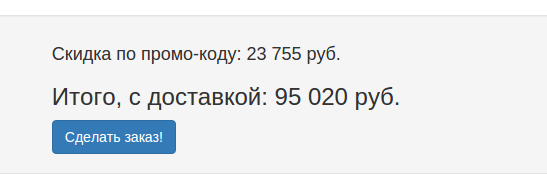
You can output the promo code discount anywhere on the page where mspcForm is called, using something like:
modx
<div class="mspc_discount_amount" style="display: none;">
  Promo code discount: <span>0</span> [[%ms2_frontend_currency]]
</div>
Внимание
The discount amount is written to selector span.mspc_discount_amount span without currency. That is where the amount is displayed and updated.