


msBundles
Product bundles for miniShop3 with shared pricing, discounts, and cart sync
- MODX 3
- PHP 8.2
- miniShop3
- Vue 3

With msBundles you build product sets in miniShop3 and sell them as one offer. The shopper clicks one button. Every product in the set lands in the cart. Price and discount follow the rules you set in the manager. When the shopper changes quantity or removes the set, the lines move together.
Start here: Quick start.
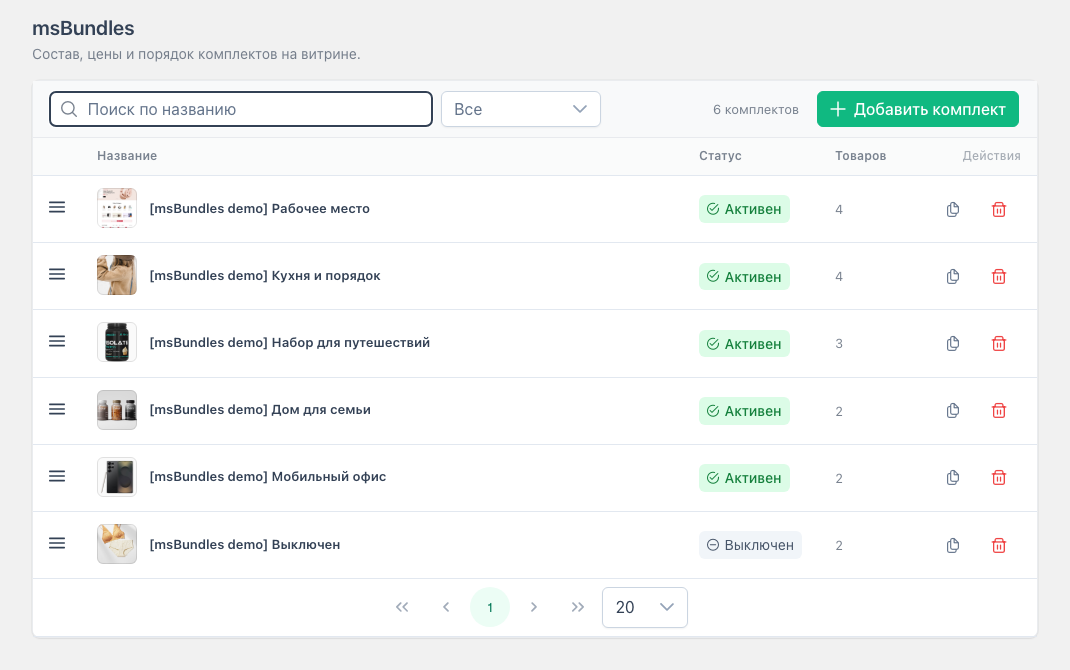
Extras → msBundles runs on Vue 3 and PrimeVue via VueTools. You search by name, filter by activity and context, and reorder rows by dragging.
In the editor you set the storefront context (context_key), name, description, image, and composition. Product search is limited to the selected context. You cannot change context on an active bundle: turn Active off, save, then switch context. Duplicate a ready set in one click, check the “As on storefront” preview, and save with a stock check. Access needs msbundles_view and msbundles_save.
Screens and walkthroughs: Interface, Flows.
Each composition line has its own price mode:
| Mode | What happens |
|---|---|
| Original | Product price from miniShop3 |
| Fixed | You set the unit price |
| Discount % | Percent off the product price |
| Discount amount | Amount subtracted from the product price |
| Free | The line costs 0 |
A line can be required or optional. The editor footer shows the bundle total and savings vs regular prices. The bundle card appears on pages for every product in the set in the same context as the bundle, not only a “main” one. For multilingual sites, create a separate bundle per context (en, de, …): Duplicate, then change context, name, and composition.
How the storefront reacts when a required line is short is controlled by msbundles_stock_behavior:
| Value | What the shopper sees |
|---|---|
block | Card stays, Add button disabled |
message | Card stays, text from stock_message |
hide | No card |
An optional line with zero stock does not block the whole set. On add that line is skipped. How many bundles you can take at once is limited by msbundles_max_bundle_quantity. Keys and permissions: System settings.
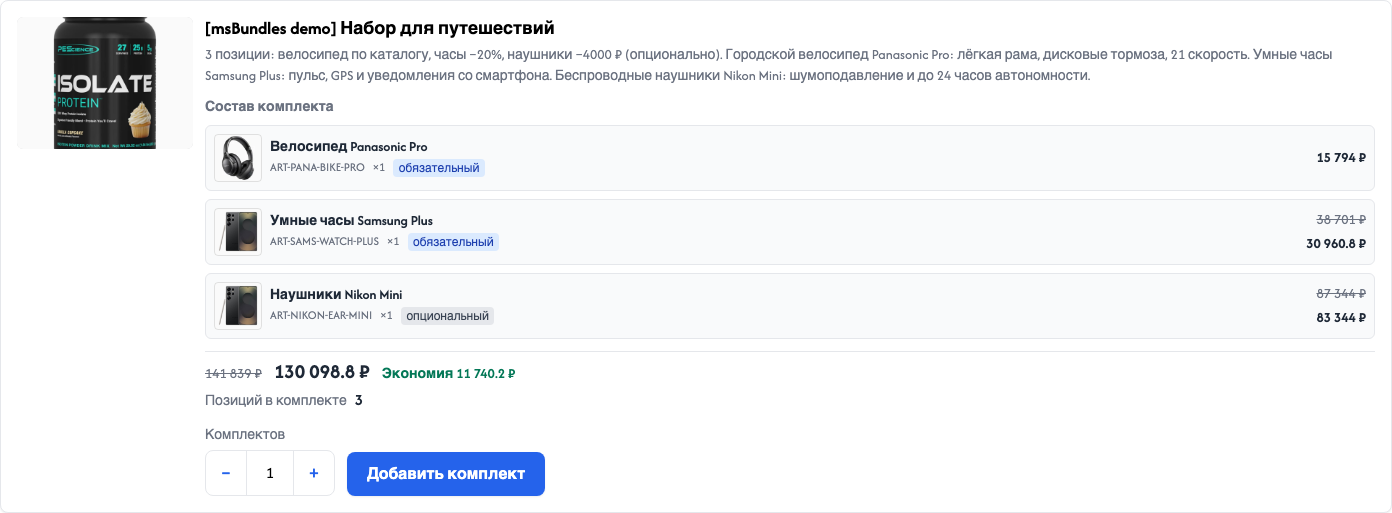
Call the msBundles snippet on the product page. On a dedicated bundles page pass bundles (comma-separated IDs) or list=all (all bundles in the current context). The snippet, REST routes, and cart add only expose bundles for the current request context.
Put msBundles.initialize in <head>. The shopper changes the bundle count with “−” / “+” or the quantity field. The price recalculates without a full page reload.
You can replace the stock Fenom chunks. Custom templates need data attributes (data-msbundles, data-ms-bundle, data-msbundles-action), not specific CSS class names. Match your theme with --msbundles-* variables.
Code and placeholders: Frontend, Snippets.
A bundle sits in the cart as several miniShop3 rows linked by a shared bundle_hash.
The main row shows a “Bundle” badge, a quantity field, and “Remove bundle”. Other rows show “Part of bundle…”, quantity locked, per-item × hidden. Change quantity on the main row. The rest follow. Remove any row of the set. The whole set leaves.
For the on-page cart block to refresh after add, msCart needs selector. Call tplMsBundlesCartInfo in the cart chunk.
Storefront REST routes: calculate, add, remove, get via the miniShop3 router. Custom price, stock, and CRUD rules use msOnBundle* events. Plugin examples: Events.
| Component | Why |
|---|---|
| MODX Revolution 3 | Core |
| miniShop3 | Cart and API |
| VueTools ≥ 1.1.2-pl | Manager UI |
| pdoTools | Fenom storefront chunks |
| PHP 8.2+ | Server |
After install, give the manager role msbundles_view (section and list) and msbundles_save (create, edit, delete).
| Task | Page |
|---|---|
| Install and build the first bundle | Quick start |
| Configure stock and qty limit | System settings |
| Wire the card and cart into a template | Frontend |
msBundles parameters | msBundles |
| Load CSS/JS | msBundles.initialize |
| Manager screens | Interface |
| Walkthroughs A–E | Flows |
| Write a plugin on events | Events |
| Fix a common issue | FAQ |