


PageBuilder
Visual section builder for MODX 3: draft and publish without overwriting resource content
- MODX 3
- PHP 8.2
- Vue 3

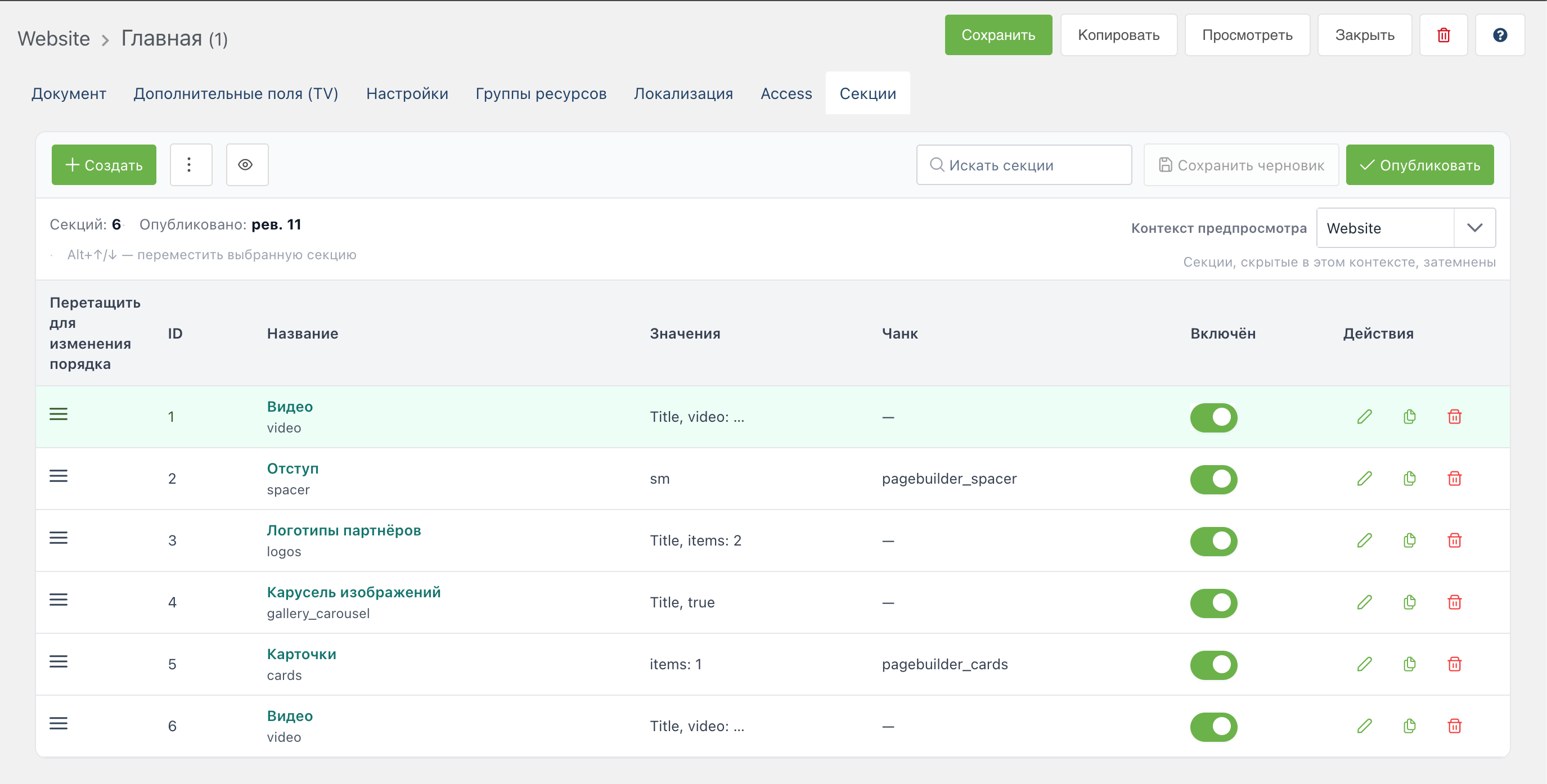
You build a page from sections on the Sections tab in MODX. Autosave writes the draft. Save on the MODX resource validates fields and publishes sections to the site. The resource Content field is not used for sections. The PageBuilder snippet outputs the blocks on the site.
Start here: Quick start.
The Sections tab holds the editor:
pagebuilder_resource_view_mode, toggle in the toolbar)Autosave writes the draft only. Save on the MODX resource: validate → draft → publish to published_json. Unpublish clears the published version. The draft remains. On save the server compares revision numbers so concurrent edits are not overwritten.
11 built-in types: hero, richtext, faq, cta, cards, contact, stats, testimonials, image, spacer, video.
Pro creates a new gallery (authoring: pro). Rendering an existing gallery stays in Free.
In the control panel (Blocks):
35 field types in Free and 27 in Pro (62 total): text, richtext, repeater, migx, file, select, and more. With pagebuilder_responsive_editor_enabled, the inspector shows per-device value tabs.
pagebuilder_catalog_examples_enabled)image-cropvideo section is created in FreeThe Tables tab stores large row sets in the database: filters, CSV/JSON import, bulk delete. On the site, PageBuilderTableRows outputs rows. The data_table section (Pro) embeds a small table in section JSON.
The UTM registry in the control panel requires capability utm (Pro). Already published rules still run in Free. Visibility rules (context, UTM, Pro conditions) open via Visibility in the inspector when pagebuilder_inspector_visibility_enabled is on. Snippets PageBuilderUtmSession and PageBuilderUtmUrl help on landing pages. Fields support the {{utm:key}} placeholder.
Requires PageBuilder Pro and capability collections. With collections_enabled, resource tabs (sections, tables, iframe, and more) are configured in the control panel. Without the capability the tabs are absent. Components → PageBuilder opens the type builder and Pro tabs. The CMP has no resource list. The section editor is the resource tab.
| What | Why |
|---|---|
PageBuilder | section HTML |
PageBuilderResource | sections from another resource |
PageBuilderSitemap | XML sitemap |
| Public API | published sections as JSON (api.php) |
pbOn* events | plugins on save, publish, render, and type registration |
| Requirement | Value |
|---|---|
| MODX Revolution | 3.0.3+ |
| PHP | 8.2+ |
| VueTools | 1.1.2+ (manager editor) |
| pdoTools | 3.0+ (Fenom in section chunks) |
| miniShop3 | optional, for Pro catalog sections |
| Package | Version | Contents |
|---|---|---|
pagebuilder | 1.0.17-beta | Free: core, sections, control panel, snippets, MIGX, responsive, Save = publish, type filter and custom previews |
pagebuilderpro | 1.0.17-beta | Pro: requires pagebuilder ≥ 1.0.17, quiz, library pull, page templates, section journal |
MODX namespace: pagebuilder.
| Need | Document |
|---|---|
| Feature overview | Key features |
| Install and build the first page | Quick start |
All pagebuilder_* keys | System settings |
| Draft, publish, basket | Workflow |
| Blocks, UTM, Collections, Pro basket | Control panel |
Permissions, pbOn* events, data model | Manager and events |
| Template, preview, snippet cache | Frontend output |
| CSS tokens and section BEM | Design system |
| JSON for headless | Public API |
| Snippets and parameters | Snippets |
| Pro, basket, examples | PageBuilder Pro |
| Scripts and agents | Agent API |
| Custom sections and extensions | Developer |
| Landing, lists, forms, UTM, REST | Recipes |
| 62 inspector field types | Field type reference |
| 50 built-in blocks | Section catalog |
| Common issues | FAQ |
| URL / path | Purpose |
|---|---|
Component pagebuilder → index | Section type builder and Pro tabs. There is no resource list. The section editor is the resource tab |
assets/components/pagebuilder/connector.php | MGR API (VueTools) |
assets/components/pagebuilder/preview.php | Draft preview in iframe |
assets/components/pagebuilder/api.php | Public API: published sections JSON (headless) |
assets/components/pagebuilder/api/v1.php | REST API v1 (Pro): Bearer tokens, scopes pages.read / catalog.read |
Snippet [[!PageBuilder]] | Published section HTML on the site |
| Permission | Purpose |
|---|---|
pagebuilder_view | Sections tab, type catalog, preview token. save_document opens the same |
pagebuilder_save | Draft save and publish (also save_document) |
pagebuilder_manage_types | Control panel section types (no view substitute) |
Access to a specific resource is also checked by the MODX policy (view, save).