


PageBuilder
Visual section builder for MODX 3: draft and publish without overwriting resource content
- MODX 3
- PHP 8.2
- Vue 3

A frequently asked questions block. Each row is a question title and answer text. Answers may include richtext HTML.
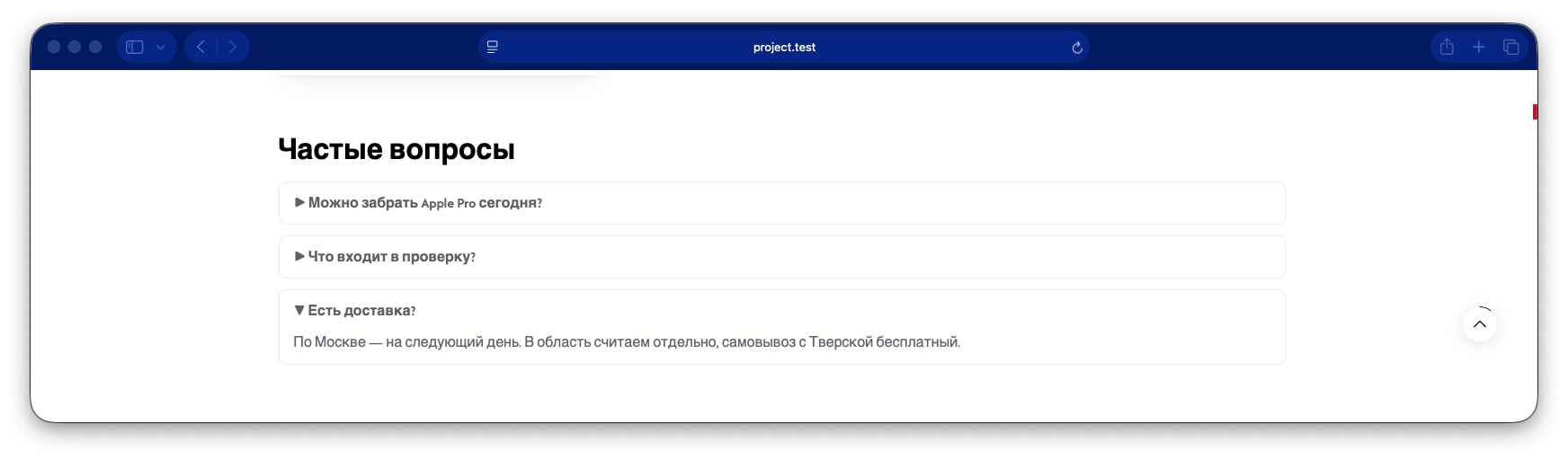
Questions repeater: Question and Answer per row. Row order matches front-end order.
| Parameter | Value |
|---|---|
| key | faq |
| Layer | Free |
| Category | content (content) |
| Chunk | pagebuilder_faq |
| Requires | — |
Fill these fields in the section inspector. Field types are documented in the field types reference.
title) Type text. Optional.
items) Type repeater. Required. Repeatable rows. "Add" button in the inspector.
Each row:
| Field | Type | Label | Required |
|---|---|---|---|
question | text | Question | yes |
answer | richtext | Answer | yes |
pb-faq with a question list. Markup supports accordion via pagebuilder-sections.js or a static list in your theme.
Example payload after save. Media, video, and map values may be enriched on output:
{
  "title": "Section title",
  "items": [
    {
      "_rowId": "00000000-0000-4000-8000-000000000001",
      "question": "How do I place an order?",
      "answer": "<p>Add a product to the cart and proceed to checkout.</p>"
    }
  ]
}Fenom chunk pagebuilder_faq:
<section class="pb-section pb-section--faq pb-faq{if $cssClass} {$cssClass|escape}{/if}" data-pb-section="faq"{if $id} id="pb-{$id|escape}"{/if}>
  <div class="pb-section__inner pb-faq__inner">
    {if $title}
      <h2 class="pb-heading pb-faq__title">{$title|pb_text}</h2>
    {/if}
    <div class="pb-faq__list">
      {foreach $items as $item}
        <details class="pb-faq__item">
          <summary class="pb-faq__question">{$item.question|pb_text}</summary>
          <div class="pb-faq__answer pb-richtext__content">{$item.answer}</div>
        </details>
      {/foreach}
    </div>
  </div>
</section>