


PageBuilder
Visual section builder for MODX 3: draft and publish without overwriting resource content
- MODX 3
- PHP 8.2
- Vue 3

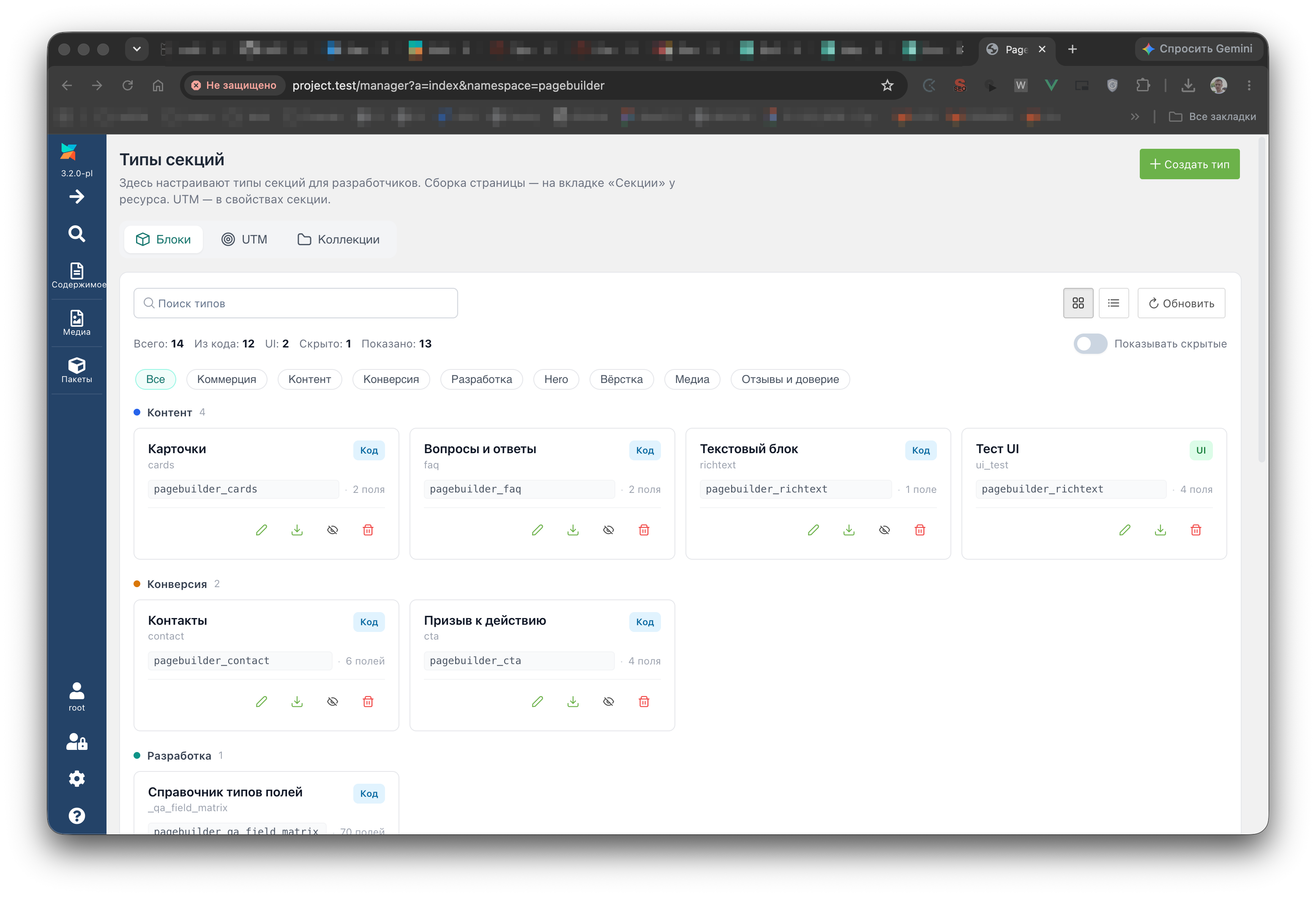
Manager component: Components → PageBuilder (namespace pagebuilder, controller index).
In the control panel:
pagebuilder_manage_types): UI types, hide and restore built-in JSON typesbasket): global basket for deleted sections and table rowspagebuilder_collections_* are enabledThe control panel has no list of resources with sections and no link into the resource Sections tab. The editor on the resource form and in the control panel uses one Vue bundle via VueTools. Manager API entry:
assets/components/pagebuilder/connector.php
Main page record: table pb_pages (prefix modx_pb_).
| Field | Purpose |
|---|---|
resource_id | Link to modResource |
draft_json | Section document draft |
published_json | Published version |
revision | Draft revision number (optimistic locking) |
published_revision | Last publish revision |
publishedon / publishedby | Publish time and user |
editedon / editedby | Last draft change |
PageBuilder does not overwrite modResource.content.
Page basket stores deleted sections in document.trash. When a draft save has non-empty trashedSectionIds, pbOnBeforeTrash and pbOnAfterTrash fire. The package plugin on pbOnAfterSave writes those sections to pb_basket_items. Another plugin on pbOnAfterSave can read record.draft.trash. Global restore and permanent delete use Pro connector actions (mgr/basket/*).
Resource table data lives in separate pb_* tables (Tables tab).
The pagebuilderpro component adds shared blocks, section journal, catalog examples, breakpoint fields, 27 advanced field types, global basket in the control panel, and Agent API.
Details: PageBuilder Pro. Storefront sections require miniShop3.
On install and upgrade the component registers 23 pbOn* events in MODX. The twenty-first is still pbOnAfterMediaCrop. The next two are pbOnBeforeTableGetList and pbOnTableRowSave. Subscribe a plugin under System → Events or use the static plugin from the package.
| Event | Data |
|---|---|
pbOnRegisterSectionDefinitions | registry: SectionRegistry, add custom types |
pbOnRegisterFeatureProviders | registry: FeatureProviderRegistry |
| Event | When | Data |
|---|---|---|
pbOnBeforeSave | Before the draft is stored | resourceId, document, documentBag, revision, userId, mode=draft, changes |
pbOnAfterSave | After the draft is stored | resourceId, record, userId, mode=draft, changes |
pbOnBeforePublish | Before publish | resourceId, document, revision, userId |
pbOnAfterPublish | After publish | resourceId, record, userId |
pbOnBeforeUnpublish | Before unpublish | resourceId, record, revision, userId |
pbOnAfterUnpublish | After unpublish | resourceId, record, userId |
pbOnBeforeTrash | Before trash, only when sections were removed | resourceId, sectionIds, document, userId |
pbOnAfterTrash | After the draft save, same ids | resourceId, sectionIds, record, userId |
documentBag is a PageDocumentBag. A listener replaces the document before saveDraft. changes is the DocumentChangeSet array: addedSectionIds, removedSectionIds, trashedSectionIds, restoredSectionIds, updatedSectionIds, enabledSectionIds, disabledSectionIds. Trash events run inside the same saveDraft. There is no separate trash action.
| Event | Data |
|---|---|
pbOnBeforeCopySections | sourceResourceId, targetResourceId, userId |
pbOnAfterCopySections | + record |
Manual registration
The installer does not create pbOnLibraryItemSave. Add the event under System → Events if you need a plugin.
| Event | When | Data |
|---|---|---|
pbOnLibraryItemSave | After a Library item is stored | id, name, item |
| Event | Data |
|---|---|
pbOnBeforeGetList | resourceContext |
pbOnAfterGetList | resourceContext, items, result (FieldValuesBag, key items) |
pbOnFieldValues | Catalog: resourceContext, fieldValues. In mgr/field/options: field, fieldValues |
pbOnCheckSectionRequirement | requirement, result (FieldValuesBag, key satisfied) |
pbOnCheckSectionVisibility | section, conditions, result (FieldValuesBag, key visible) |
| Event | Data |
|---|---|
pbOnBeforeTableGetList | table, query, and criteria by reference. The row query reads search, filters, page, limit, and criteria pairs other than table_id |
pbOnTableRowSave | table, data by reference, row_id |
| Event | Data |
|---|---|
pbOnBeforeRenderDocument | resourceId, document, pipeline, options |
pbOnBeforeRenderSection | resourceId, pipeline with one section, index, options |
pbOnGetValues | resourceId, document, values (SectionValuesBag). The snippet when return_values=1, and Public API when include contains values |
| Event | When | Data |
|---|---|---|
pbOnAfterMediaCrop | After the crop file is stored, before the manager response | sourceUrl, sourcePath, path, geometry, result (MediaCropResult) |
A plugin appends $result->variants. They land in the image field crops. Example: image field.
Example section registration in a plugin:
<?php

use PageBuilder\Section\SectionDefinition;

switch ($modx->event->name) {
    case 'pbOnRegisterSectionDefinitions':
        /** @var \PageBuilder\Section\SectionRegistry $registry */
        $registry = $modx->event->params['registry'];
        $path = $modx->getOption('core_path') . 'components/mypackage/sections/custom.json';
        $payload = json_decode((string) file_get_contents($path), true);
        if (!is_array($payload)) {
            break;
        }
        $payload['source'] = 'code';
        $payload['readOnly'] = true;
        $registry->register(SectionDefinition::fromArray($payload));
        break;
}
Custom JSON definitions must match built-in section schema: fields, chunk, category.
The editor writes the draft via connector. Publish copies the snapshot to published_json. The site snippet reads only the published version.