



msOneClick
Внимание
For those upgrading from version 1.1.0, be sure to change [[+selector]] in chunk tpl.msOneClick.btn from id to class
modx
<a href="[[~[[+id]]]]#[[+selector]]" class="[[+selector]] btn_one_click" data-hash="[[+hash]]" data-product="[[+id]]">[[%msoc_btn_one_click]]</a>The add-on creates an order in the minishop2 e-commerce store, and can also send the order as an email to the specified address. Currently the add-on does not pass any parameters from msOptions and other modifications. This is because there is a difference between adding to cart and modification on the client side. To use it, insert the snippet on the product page [[!msOneClick]], and you will get a "buy in 1 click" button. Works with MODX Revolution 2.2 and higher.
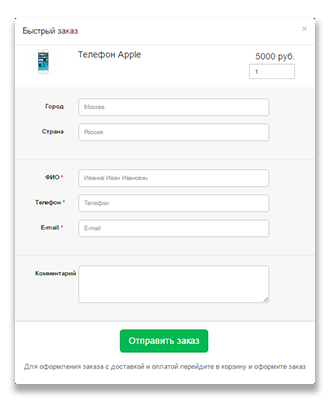
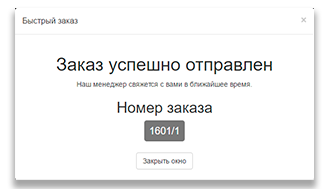
In miniShop2 add the delivery method and payment method "Quick order" and assign them for creating orders via modal window. You can change these methods in the add-on settings.
Two operating modes:
- MS — create order in minishop2
- MAIL — send to manager email without creating order in minishop2
Quick start
To create an order in miniShop2:
modx
[[!msOneClick?
  &id=`5`
  &create_order=`MS`
]]
To send a message to email:
modx
[[!msOneClick?
  &id=`5`
  &create_order=`MAIL`
  &email_method_mail=`mail@mail.ru`
]]
On product page
modx
[[!msOneClick]]In categories and on other pages
modx
[[!msOneClick? &id=`[[+id]]`]]msOptionsPrice2 integration
When integrating, follow the instructions from the add-on https://modstore.pro/packages/ecommerce/msoptionsprice2
Insert the add-on code into chunk tpl.msoneclick.form as an example. For msOptionsPrice2 to work you need to include js:
js
$(document).on('msoneclick_after_init', function (e, data) {
  if (msOneClick.form.hasClass('msoptionsprice-product') && jQuery().msOptionsPrice) {
    msOptionsPrice.initialize();
  }
});
Внимание
If you included the js code and it initialized correctly, for msOptionsPrice2 configuration questions contact the msOptionsPrice2 author
Settings parameters
| Parameter | Default | Name | Description |
|---|---|---|---|
| required_fields | receiver,email,phone | Required user fields | |
| payments | Quick order | Default payment method | Specify default payment method for quick order |
| deliverys | Quick order | Default delivery method | Specify default delivery method for quick order |
| mask_phone | true | Enable phone mask | Mandatory mask +7 (999) 999 9999 will be added to the phone field |
| mask_phone_format | +9 (999) 999-9999 | Phone mask | Input format must be: +9 (999) 999-9999 |
| framework | default | Include framework | By default default will include its own script for modal. Can specify default,bootstrap,semantic,materialize,uIkit — these frameworks have defined modal functions |
| frontend_css | [[+cssUrl]]web/default.css | frontend_css | By default assets/components/msoneclick/css/web/default.css |
| frontend_js | [[+jsUrl]]web/default.js | Frontend js | By default assets/components/msoneclick/js/web/default.js |
msOneClick snippet parameters
| Parameter | Default | Description |
|---|---|---|
| method | MS | Order method: MS — send order to minishop2; MAIL — send order to email specified in miniShop2 for manager, or default (ms2_email_manager or emailsender) |
| default_images | /assets/components/minishop2/img/web/ms2_small.png | Default product image when image is missing |
| field_required_class | msoc_field__required | CSS class for required field |
| email_method_mail | Email for MAIL method. If empty, ms2_email_manager or emailsender settings will be used | |
| tplBtn | tpl.msOneClick.btn | Chunk for "quick order" button |
| tplModal | tpl.msOneClick.modal | Chunk for modal window |
| tplForm | tpl.msOneClick.form | Chunk for order form |
| tplSendSuccessMS | tpl.msOneClick.MS.send | Chunk for successful form submission message |
| tplSendSuccessMAIL | tpl.msoneclick.MAIL.send | Chunk for message after form submission with MAIL method |
| tplMAILmessage | tpl.msoneclick.email.message | Chunk for MAIL method message sent to email |
Examples
Overriding js for modal window
js events
| Parameter | Description |
|---|---|
| msoneclick_load | Fires after ajax data is received |
| msoneclick_after_init | Fires after script initialization |
Added js events
js
// Example including your scripts
$(document).on('msoneclick_load', function (e, data) {

});

// Example including your scripts
$(document).on('msoneclick_after_init', function (e, data) {
  if (msOneClick.form.hasClass('msoptionsprice-product') && jQuery().msOptionsPrice) {
    msOptionsPrice.initialize();
  }
})
Overriding modal methods
js
msOneClick.Modal.show = function () {
  console.log('show');
}
msOneClick.Modal.hide = function () {
  console.log('hide');
}
Example code for msOptionsPrice2
Insert into chunk tpl.msoneclick.form
modx
<form class="ms2_form msoptionsprice-product" id="[[+formid]]" method="post" >
  <input type="hidden" name="method" value="[[+method]]">
  <input type="hidden" name="pageId" value="[[+pageId]]">
  <input type="hidden" name="ctx" value="[[+ctx]]">
  <input type="hidden" name="hash" value="[[+hash]]">
  <input type="hidden" name="payment" value="[[+payment]]">
  <input type="hidden" name="delivery" value="[[+delivery]]">
  <input type="hidden" name="id" value="[[+product.id]]"/>
  <input type="hidden" name="mssetincart_set" value="[[+product.id]]">
  <input type="hidden" name="key" class="key-product" value="">
  <input type="hidden" name="options" value="[]">

  <div class="forder-popup__goods " >
    <div id="msCart">
      <div id="dynamicmodal">
        <div class="msoc_product_line" id="[[+product.key]]">
          <div class="msoc_product_line_image">
            <img src="[[+product.thumb]]" />
          </div>
          <div class="msoc_product_line_pagetitle">
            <span>[[+product.pagetitle]]</span>
          </div>
          <div class="msoc_product_line_count">
            <div class="product__add-cart ">
              <div class="text-right">
                <span class="forder-popup__price">
                  <span id="[[+selector]]_price" class="msoptionsprice-cost msoptionsprice-[[+product.id]]">[[+product.price]]</span>
                  [[+product.old_price:is=`0`:then=``:else=`<span  id="[[+selector]]_price_old" class="old_price msoptionsprice-old-cost msoptionsprice-[[+product.id]]">[[+product.old_price]]</span>`]]
                </span>
              </div>
              <div class="text-right">
                <input type="hidden" name="price" value="[[+product.price]]">
                <input type="hidden" name="product_id" value="[[+product.id]]">
                <div class="count-field input-group input-prepend">
                  <span class="count-field-control count-field-control-down" onselectstart="return false" onmousedown="return false">+</span>
                  <input value="[[+product.count]]" placeholder="0" type="text" autocomplete="off" name="count" class="count-field-input">
                  <span class="count-field-control count-field-control-up" onselectstart="return false" onmousedown="return false">-</span>
                </div>
              </div>
            </div>
          </div>

          <!-- msOptionsPrice2 -->
          <div class="modal-options msoptionsprice-[[+product.id]]">
            {'msOptionsPrice.option' | snippet: [
              'product' => $product.id,
              'options' => 'color,size',
              'processColors' => 1,
              'constraintOptions' => [
                'phytomodule_color' => ['sizes'],
                'equipment' => ['sizes', 'phytomodule_color'],
                'frame_color' => ['sizes', 'phytomodule_color', 'equipment'],
              ],
            ]}
          </div>

        </div>
      </div>
    </div>
  </div>

  <div class="msoneclick_form" >
    <div class="forder-popup__block forder-popup__block--grey">
      <div class="msoneclick_form-group">
        <label for="msoc_city" class="msoneclick_form-label [[+city_required]]">[[%msoc_field_city]]</label>
        <div class="msoneclick_form-field">
          <input type="text" value="[[!+order.city]]" name="city"  id="msoc_city" placeholder="[[%msoc_field_city_ple]]">
        </div>
      </div>

      <div class="msoneclick_form-group">
        <label for="msoc_addr_country" class="msoneclick_form-label [[+addr_country_required]]">[[%msoc_field_country]]</label>
        <div class="msoneclick_form-field">
          <input type="text" value="[[!+order.addr_country]]" name="addr_country" id="msoc_addr_country" placeholder="[[%msoc_field_country_ple]]">
        </div>
      </div>
    </div>
    <div class="forder-popup__block forder-popup__block--grey">
      <div class="msoneclick_form-group">
        <label for="msoc_receiver" class="msoneclick_form-label [[+receiver_required]]">[[%msoc_field_receiver]]</label>
        <div class="msoneclick_form-field">
          <input type="text" value="[[!+order.receiver]]" name="receiver" id="msoc_receiver" placeholder="[[%msoc_field_receiver_ple]]">
        </div>
      </div>
      <div class="msoneclick_form-group">
        <label for="msoc_phone" class="msoneclick_form-label [[+phone_required]]">[[%msoc_field_phone]]</label>
        <div class="msoneclick_form-field">
          <input type="text" name="phone" value="[[!+order.phone]]" autocomplete="off" id="msoc_phone" placeholder="[[%msoc_field_phone_ple]]">
        </div>
      </div>

      <div class="msoneclick_form-group">
        <label for="msoc_email" class="msoneclick_form-label [[+email_required]]">[[%msoc_field_email]]</label>
        <div class="msoneclick_form-field">
          <input type="email" name="email" value="[[!+order.email]]" id="msoc_email" placeholder="[[%msoc_field_email_ple]]">
        </div>
      </div>
    </div>

    <div class="forder-popup__block forder-popup__block--grey">
      <div class="msoneclick_form-group">
        <label for="msoc_comment" class="msoneclick_form-label">[[%msoc_field_comment]]</label>
        <div class="msoneclick_form-field">
          <textarea autocomplete="off" placeholder="[[%msoc_field_comment_ple]]" id="msoc_comment" name="comment">[[!+order.comment:default=``]]</textarea>
        </div>
      </div>
    </div>

    <div class="modal-footer">
      <button type="submit"  name="msoc_send_from" class="mso_button btn_send">[[%msoc.button]]</button>
      <p class="msoc-muted">
        [[%msoc_form_footer_text]]
      </p>
    </div>
  </div>
</form>
Loading selected msOptionsPrice2 options from page
Users can select options while on the page. When the modal opens, options will not be selected because they are only stored on the page.
To have options automatically selected in the modal, add a class with the product id to the form where options are selected:
Example forms:
modx
<form class="ms2_form msoptionsprice-product-[[+id]]" method="post">modx
<form class="ms2_form msoptionsprice-product-[[*id]]" method="post">Add code to your included JS file
js
$(document).on('msoneclick_after_init', function (e, data) {
  // After modal opens, form on page is searched
  var form = $('.msoptionsprice-product-' + msOneClick.Product.product_id)
  if (form.length) {
    // If form found, request is sent to update modal form data
    msOptionsPrice.Product.action('modification/get', form)
  }
})