



Thank you
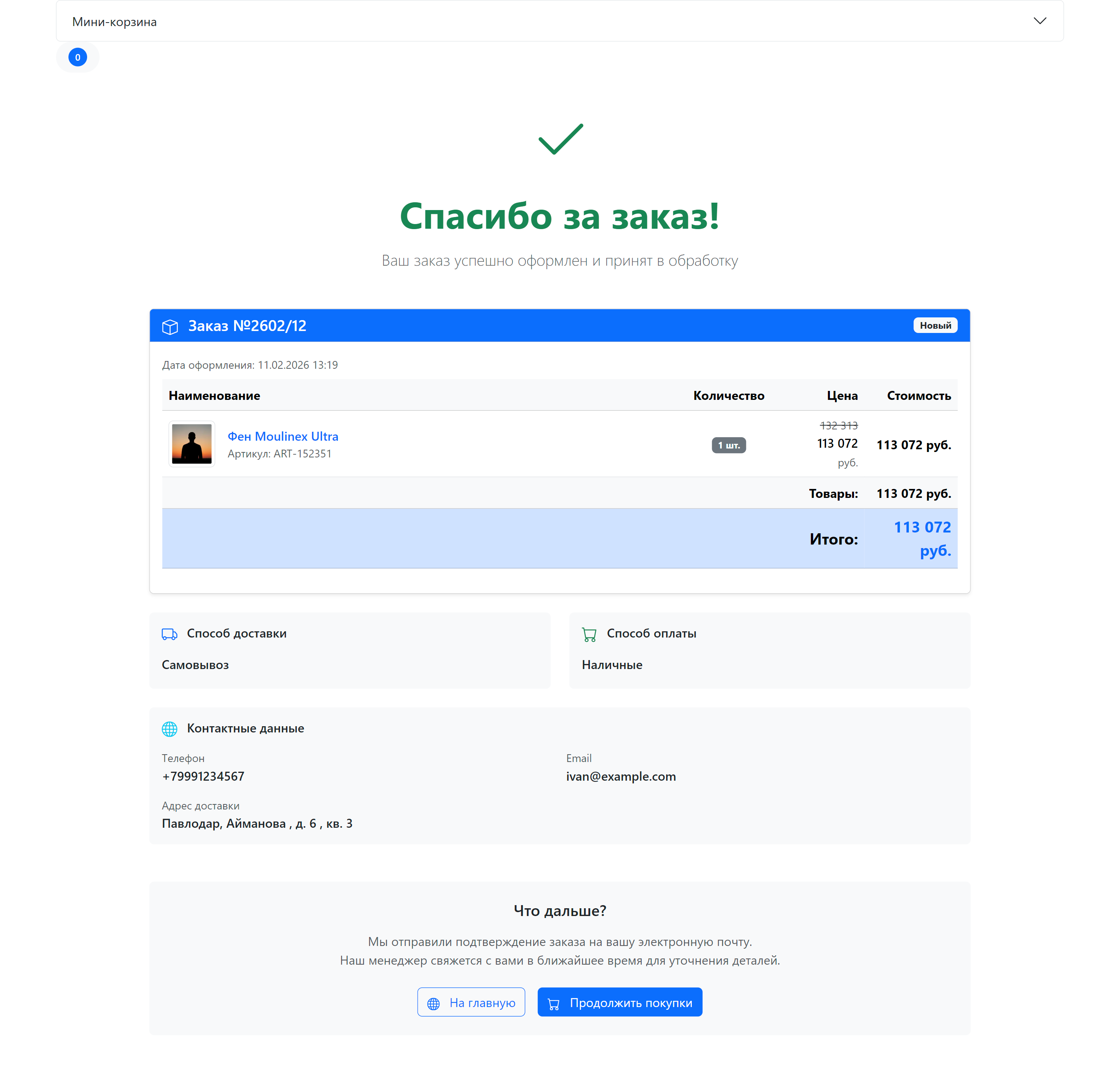
The thank-you page is shown after a successful checkout. It displays order details and next steps for the customer.
Page structure
| Component | File | Purpose |
|---|---|---|
| Page template | elements/templates/thanks.tpl | Thank-you page layout |
| Order chunk | elements/chunks/ms3_get_order.tpl | Placed order details |
Page template
Path: core/components/minishop3/elements/templates/thanks.tpl
The template extends the base template and contains three sections.
Page sections
| Section | Description |
|---|---|
| Success header | Icon, "Thank you for your order!" title, subtitle |
| Order details | msGetOrder snippet call |
| "What's next?" block | Information and navigation buttons |
Template code
fenom
{extends 'file:templates/base.tpl'}
{block 'pagecontent'}
    <div class="container my-5">
        <main>
            {* Success header *}
            <div class="text-center mb-5">
                <div class="mb-4">
                    <svg class="text-success" width="80" height="80" fill="currentColor">
                        <use xlink:href="#icon-check"/>
                    </svg>
                </div>
                <h1 class="display-5 fw-bold text-success mb-3">Thank you for your order!</h1>
                <p class="lead text-muted">Your order has been placed and is being processed</p>
            </div>

            {* Order details *}
            <div class="row justify-content-center">
                <div class="col-lg-10">
                    {'!msGetOrder'|snippet:[
                        'tpl' => 'tpl.msGetOrder',
                    ]}
                </div>
            </div>

            {* "What's next?" block *}
            <div class="row justify-content-center mt-5">
                <div class="col-lg-10">
                    <div class="card border-0 bg-light">
                        <div class="card-body text-center py-4">
                            <h5 class="card-title mb-3">What's next?</h5>
                            <p class="card-text text-muted mb-4">
                                We sent an order confirmation to your email.<br>
                                Our manager will contact you shortly to confirm the details.
                            </p>
                            <div class="d-flex gap-3 justify-content-center flex-wrap">
                                <a href="[[~[[++site_start]]]]" class="btn btn-outline-primary">
                                    Home
                                </a>
                                <a href="[[~[[++ms3.page_id.catalog:default=`0`]]]]" class="btn btn-primary">
                                    Continue shopping
                                </a>
                            </div>
                        </div>
                    </div>
                </div>
            </div>
        </main>
    </div>
{/block}
Caching
The order is resolved from the msorder GET parameter (or from the id call parameter), so the result must not be served from the page cache.
In MODX syntax the prefix is required — [[!msGetOrder]]. In Fenom the call runs on every request even without the prefix: pdoTools processes the whole Fenom markup on the parser's uncacheable pass. The exclamation mark in {'!msGetOrder'|snippet} does not change that — it only controls how registered scripts are carried over. It does no harm and is kept in the demo template for consistency.
How order detection works
After checkout the customer lands on the thank-you page with the order UUID in the URL:
/thanks/?msorder=a1b2c3d4-e5f6-7890-abcd-ef1234567890The msGetOrder snippet resolves the order from the msorder GET parameter: a 36-character value is treated as a UUID, anything else as a numeric id. The identifier can also be passed straight into the call through the id parameter.
A UUID in the link exposes neither the sequential order number nor the total number of orders in the shop — unlike a numeric id.
When the thank-you page is skipped
The redirect to it is only built when the payment handler did not return a redirect of its own. A payment service with its own payment page takes the customer over right after the order is submitted, skipping the thank-you page — see OrderSubmitHandler.
Order details
The order details block is rendered by the msGetOrder snippet and the tpl.msGetOrder chunk.
The chunk shows:
- Order number and status
- Product table with prices
- Total cost
- Delivery and payment methods
- Contact details and address
- Payment link (if available)
Payment link
If the payment method supports online payment, a "Pay order" button appears in the payment block:
fenom
{if $payment_link?}
    <a href="{$payment_link}" class="btn btn-success">
        Pay order
    </a>
{/if}
The payment handler returns the link from getPaymentLink(), and PaymentLinkResolver decides whether to show it: the order status must be listed in the ms3_payment_link_statuses system setting (CSV of status ids). When that setting is empty, ms3_status_new is used — so by default the link is only visible on a freshly created order.
Redirect configuration
The address of the thank-you page comes from system settings:
| Setting | Default | Description |
|---|---|---|
ms3_order_redirect_thanks_id | 1 | Resource ID of the "Thank you" page used after orderAPI.submit |
ms3_order_success_page_id | 0 | Where to land after a successful payment (the return_url of the payment service). With 0 the service picks the address itself: the order page or the thank-you page |
There is no ms3.page_id.thanks key in the package. The demo thanks.tpl reads a non-existent ms3.page_id.catalog for its "Continue shopping" link (issue #817).
The redirect address comes back in the orderAPI.submit response — read it in the afterSubmitOrder hook:
javascript
ms3Hooks.addHook('afterSubmitOrder', async ({ response }) => {
  if (response.success && response.data.redirect) {
    window.location.href = response.data.redirect
    // e.g. /thanks/?msorder=<uuid>
  }
})
The URL carries the order UUID, not the numeric id. msGetOrder still accepts ?msorder=15 if you pass it by hand, but checkout never produces such a link.
Customization
Changing the template
- Copy
thanks.tplto your theme - Change markup and styles
- Assign the template to the thank-you page resource
Changing the order chunk
Create your own chunk and specify it in the call:
fenom
{'!msGetOrder' | snippet : [
    'tpl' => 'tpl.myGetOrder',
    'includeThumbs' => 'small'
]}
Adding product thumbnails
fenom
{'!msGetOrder' | snippet : [
    'tpl' => 'tpl.msGetOrder',
    'includeThumbs' => 'small,medium'
]}
Adding a recommendations block
After the order block, you can add recommended products:
fenom
{* After order details *}
<div class="row justify-content-center mt-5">
    <div class="col-lg-10">
        <h4 class="mb-4">You may also like</h4>
        {'!msProducts' | snippet : [
            'parents' => 0,
            'where' => ['Data.popular' => 1],
            'limit' => 4,
            'tpl' => 'tpl.msProducts.row'
        ]}
    </div>
</div>
parents => 0 is required here: without it msProducts falls back to the current resource id, and the thank-you page has no child products — the block would come out empty. The Data. prefix in where points at the msProductData table, where the popular flag lives.
Notifications
After checkout, notifications are sent automatically:
| Recipient | Template | Description |
|---|---|---|
| Customer | tpl.msEmail.new.customer | Order confirmation |
| Manager | tpl.msEmail.new.manager | New order notification |
The names tpl.msEmail.order.new and tpl.msEmail.order.manager are not part of the package — they only survive in a stale lexicon hint. The emails are sent by the Notification center on the order_status_changed event. The order_created event exists in the interface, but nothing is sent for it (#811).
Setup: Events → Notifications.
Responsive layout
The page uses Bootstrap 5 Grid:
| Screen | Content width |
|---|---|
| < 992px | 100% |
| ≥ 992px | 10 columns (~83%) |
html
<div class="row justify-content-center">
    <div class="col-lg-10">
        {* Centered content *}
    </div>
</div>