



Notification center
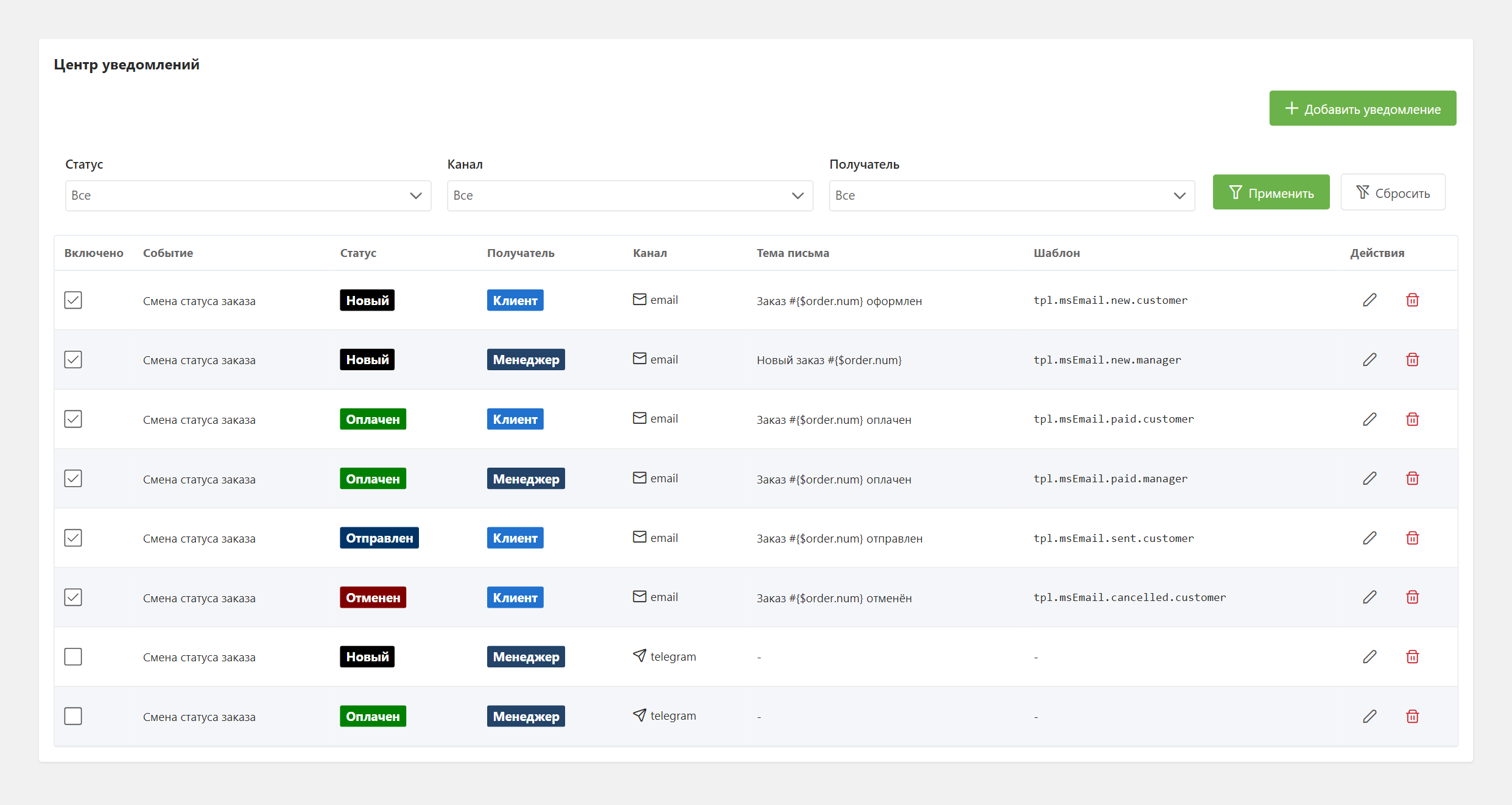
Open Extras → MiniShop3 → Notifications. Here you set who gets a message on an order status change, through which channel and from which template.
Typical records
- Email to the customer when an order is created.
- Email to the manager about a new order.
- Customer notification when the order moves to Paid, Shipped or Delivered.
- Duplicate notification to a Telegram channel for managers.
- Any combination of "event → status → recipient → channel".
Notification fields
| Field | Type | Description |
|---|---|---|
event | string | Event type: order status change, order creation |
status_id | int | Order status ID. Only for "status change" events. Empty = trigger on any status |
recipient_type | string | Recipient: customer or manager |
channel | string | Delivery channel: email, telegram, etc. |
enabled | bool | Enabled / disabled |
subject | string | Email subject. Email only, takes order placeholders |
template | string | Chunk name for the message body. Empty: the email is not sent; Telegram and SMS build a default message |
delay | int | Send delay in seconds. Works only with the ms3_use_scheduler setting on and Scheduler installed |
position | int | Send order when multiple notifications exist for one event |
config | JSON | Internal channel setting. Empty by default, not editable in the form — code only |
Events
The record is picked by event and status_id.
| Event | ID | Works now |
|---|---|---|
| Order status changed | order_status_changed | Yes |
| Order created | order_created | No — the option is in the form, but nothing is sent for it |
order_created
You can pick order_created in the form, but notifications with it are not sent — neither on a frontend form submit nor on draft finalization. Tracking: MiniShop3#811. Until the bug is closed, configure new order alerts through order_status_changed and the status_id you need.
Recipients
| Recipient | Where contacts come from |
|---|---|
Customer (customer) | From the order: email, phone, Telegram chat_id if set |
Manager (manager) | From channel system settings: ms3_email_manager, ms3_telegram_manager (Telegram), ms3_phone_manager (SMS) |
Channels
Email (built-in)
Default channel. Uses MODX SMTP settings.
System settings:
ms3_email_manager— manager addresses, comma-separated. Empty —emailsenderis used.emailsender(MODX core setting) — sender address; the sender name comes fromsite_name. The store has no separate "from" setting.
The email subject (subject) takes order placeholders in three shapes:
fenom
Order #{num} — status change
Order #{$num} — status change
Order #[[+num]] — status change
All three are equivalent. Before 1.14.2-beta1 the plain {num} form combined with any Fenom construct on the same line produced an empty subject — for instance Order #{num} / {$status_name}.
Telegram
The bot writes to the customer by chat_id or to a manager channel (chat).
System settings:
ms3_telegram_bot_token— bot token from@BotFather.ms3_telegram_manager— manager chat IDs, comma-separated.
The channel writes to a customer only when the order has telegram_chat_id — a custom field or Telegram bot authorization. Without it the customer gets nothing.
SMS and custom channels
An SMS channel skeleton exists in code. Any extra registers its own channel through the msOnRegisterNotificationChannels event, see Notification events. Registered channels appear in the form list.
Message templates
The template field holds a MODX chunk name; Fenom renders its body.
| Placeholder | Contents |
|---|---|
{$order} | Order fields: num, cost, status_id and so on. Without token and idempotency_key, uuid is there |
{$customer} | The customer's public fields and their custom fields. No password, no token |
{$address} | Order address fields |
{$delivery}, {$payment} | Delivery method and payment method. Five fields only: id, name, description, price, logo |
{$products} | Order line items |
{$total} | Totals with formatted sums |
{$status_name}, {$old_status_name} | Order statuses, status change event only |
{$site_name} | Store name (the site_name setting) |
Customer data in a template is text, not markup
MODX tags and Fenom constructs that end up in an order comment, a name or an address are not executed in the email — before 1.14.2-beta1 they were parsed on the server. The shipped chunks escape customer fields, and your own chunks should do the same, or a customer can slip their own link or image into the email a manager reads:
fenom
<td>{$address.comment | e}</td>Minimal chunk example tpl.msEmail.order.new:
fenom
<h1>Thank you for order #{$order.num}</h1>
<p>Total: {$order.cost}</p>
<ul>
{foreach $products as $product}
    <li>{$product.name} × {$product.count}</li>
{/foreach}
</ul>
No chunk: the email is not sent, Telegram and SMS build a default message from the lexicon. Chunk set but missing: sending fails with an error in the MODX log.
Send delay
The delay field (in seconds) defers sending: an email 24 hours after payment, or 7 days after delivery.
Delay works only with the ms3_use_scheduler system setting on and Scheduler installed: the notification is queued and sent on schedule. With the setting off (the default) or without Scheduler, delay is ignored and the notification is sent immediately.
Multiple notifications per event
You can configure any number of records for one event. The position field defines send order within one event: lower value sends earlier.
Typical setup for a new order:
| Position | Event | Status | Recipient | Channel | Subject / Template |
|---|---|---|---|---|---|
| 1 | order_status_changed | "New" ID | customer | "Thank you for order #{$num}" / tpl.msEmail.order.thanks | |
| 2 | order_status_changed | "New" ID | manager | "New order #{$num}" / tpl.msEmail.order.new.manager | |
| 3 | order_status_changed | "New" ID | manager | telegram | — / tpl.msTelegram.order.new |
Grid filters
Three filters above the notification list:
- Order status — show only notifications for a specific status.
- Channel — filter by channel type (email / telegram / ...).
- Recipient — customer or manager.
Filters apply on Apply and reset on Clear.
Actions
- Add notification — opens the create dialog.
- Edit (pencil icon) — edit dialog for the record.
- Enable / disable — checkbox in the first grid column toggles
enabledwithout opening the editor. - Delete (trash icon) — with confirmation.
Related sections
- System settings —
ms3_email_manager,ms3_telegram_bot_token,ms3_telegram_manager,ms3_use_scheduler, etc. - Order status directory — defines available
status_idvalues for binding. Configured in the admin area (MiniShop3 → Settings → Statuses). - Notification events — plugin subscriptions, custom channel registration.
FAQ
Emails are not sent.
Check:
- the
templatefield is filled: without a chunk the email channel sends nothing; - the
emailsendersender setting and MODX SMTP settings; - the MODX error log: a channel send error is logged with
[ms3] Notification error; - the Enabled flag on the record in the Notification center.
The email went to an address other than the one from the order form.
The email from the order address (msOrderAddress) is taken first. The msCustomer email is used only when that field is empty.
I want a custom delivery channel (for example, push to a mobile app).
You need a plugin on msOnRegisterNotificationChannels that registers a channel class implementing ChannelInterface. See notification events.