



Grid columns cookbook
Configure admin table columns: visibility, type, badge, relation, inline edit.
Full reference: Grid columns.
Goal
Change orders, customers, or category product lists without editing Vue components. Config is stored in ms3_grid_fields.
grid_key in 1.13
| grid_key | Screen |
|---|---|
orders | Orders list |
order_products | Products inside an order |
customers | Customers |
vendors | Vendors |
category-products | Product table on a category resource |
Inline edit
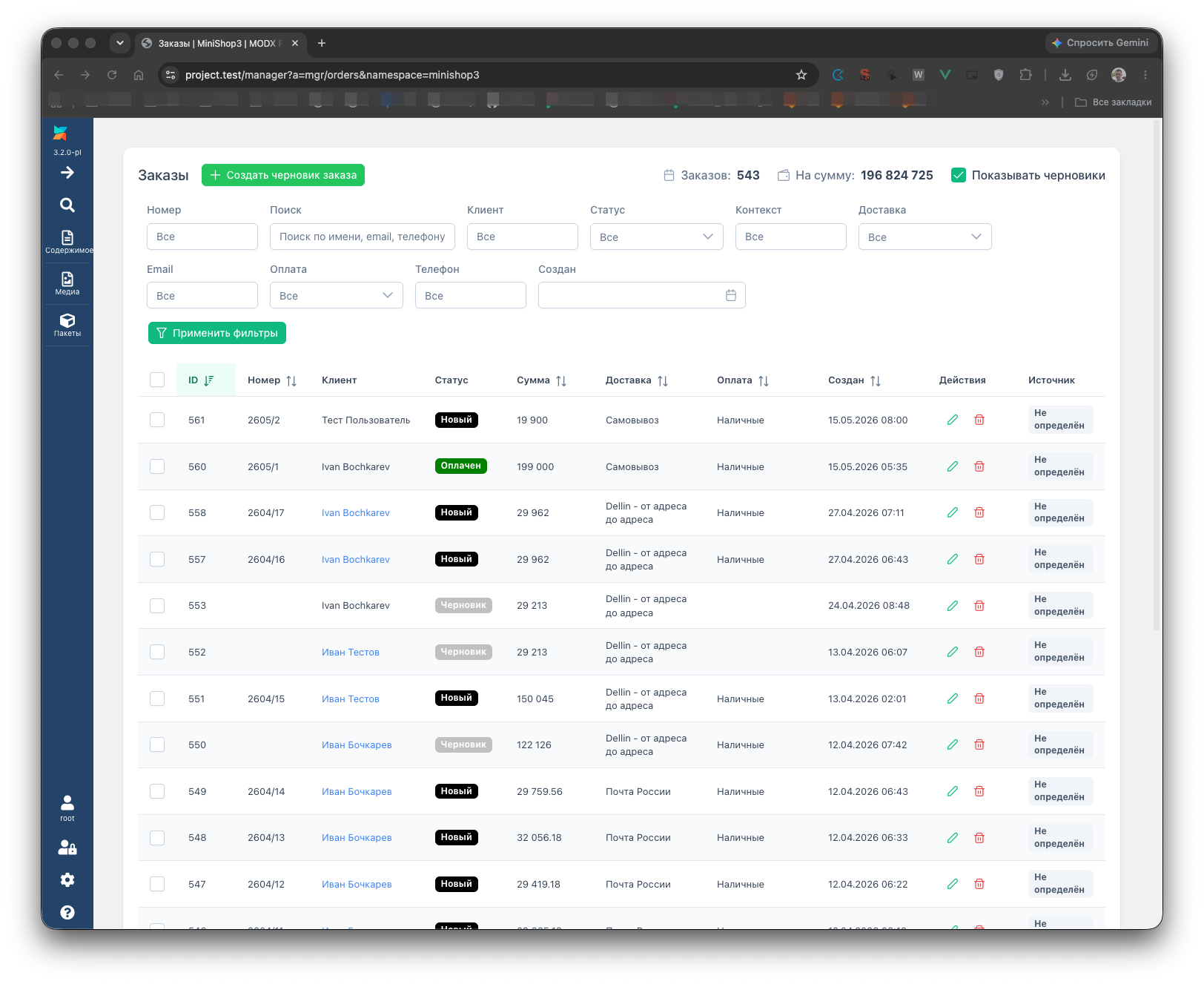
Cell editing is enabled only for category-products. There is no inline edit on orders in 1.13. For the orders list use badge, relation, or model columns.
Case: status badge in orders
The default MS3 setup uses column order_status:
- hidden relation columns
status_nameandstatus_colorload text and HEX frommsOrderStatus - visible column
order_statuswith typebadge
Badge config (from ms3_grid_fields):
json
{
  "type": "badge",
  "source_field": "status_name",
  "color_field": "status_color"
}
Custom badge column
- Utilities → Grid columns → grid orders.
- Add hidden relation columns if you need
source_field/color_fieldfrom a related table. - Add a Badge column:
- Value source field — column with label text
- Color field — column with HEX (e.g.
#3b82f6)
- Save column order.
Via API:
http
POST /api/mgr/grid-config/orders/fieldjson
{
  "field_name": "my_badge",
  "label": "Badge",
  "type": "badge",
  "config": {
    "type": "badge",
    "source_field": "status_name",
    "color_field": "status_color"
  },
  "visible": true
}
Case: relation with aggregation (customers)
“Order count” for a customer:
- Grid customers → new column, type relation.
- Parameters:
- table:
msOrder - foreignKey:
customer_id - displayField:
id - aggregation:
COUNT
- table:
Aggregations: COUNT, SUM, AVG, MIN, MAX. Relation aggregation is not supported for category-products.
Case: inline edit + select (category-products)
- Grid category-products → pick a column (e.g.
vendor_nameor a product extra field). - Enable Inline cell edit.
- Editor type:
select. - editor_options — array of
[value, label]pairs:
json
[
  ["1", "Warehouse A"],
  ["2", "Warehouse B"]
]
For a combo editor backed by an API reference, use editor_type: combo and a key from editor_references in GET /api/mgr/grid-config/category-products.
Case: product option column
- Grid category-products → add column.
- Type option, config
option.key= option key (e.g.color). - Column name must not collide with built-in product fields (use a prefix like
option_colorif needed).
Case: price, weight, datetime
Types price, weight, and datetime format model column values without PHP.
Price in category-products:
- Column
price, type price. - displayConfig:
json
{
  "decimals": 2,
  "currency": "₽",
  "currency_position": "after",
  "thousands_separator": " "
}
Weight:
json
{
  "decimals": 2,
  "unit": "kg",
  "unit_position": "after"
}
Order created date (grid orders, field createdon):
json
{
  "format": "dd.MM.yyyy HH:mm"
}
Case: computed column
Type computed calls a PHP class on the server. Config must include computed.className:
json
{
  "type": "computed",
  "computed": {
    "className": "MyVendor\\Ms3\\Columns\\MarginColumn"
  }
}
The class must be in MODX autoload and implement ComputedFieldInterface. For simple price or date formatting use price / datetime instead.
API appendix
Read (view_document):
http
GET /api/mgr/grid-config/orders?include_hidden=1Response:
json
{
  "columns": [ ... ],
  "direct_filter_keys": ["query", "status_id", "delivery_id"],
  "editor_references": []
}
direct_filter_keys are filters sent without the filter_ prefix in list queries. For orders the source is OrdersController::getDirectFilterKeys().
Save order and metadata (mssetting_save):
http
PUT /api/mgr/grid-config/ordersjson
{
  "fields": [
    { "name": "id", "label": "ID", "visible": true, "sortable": true, "type": "model" },
    { "name": "order_status", "label": "Status", "visible": true, "type": "badge", "source_field": "status_name", "color_field": "status_color" }
  ]
}
The PUT body expects array fields, not columns.
| Method | Path |
|---|---|
| POST | /api/mgr/grid-config/{grid_key}/field |
| PUT | /api/mgr/grid-config/{grid_key}/field/{field_name} |
| DELETE | /api/mgr/grid-config/{grid_key}/{field_name} |
Troubleshooting
| Symptom | Action |
|---|---|
| 403 on PUT | mssetting_save |
| Badge without color | Check color_field and HEX in row data |
| Combo editor error | editor_references whitelist only for category-products |
| Column missing in orders list | visible: true, reload the grid |