



Orders
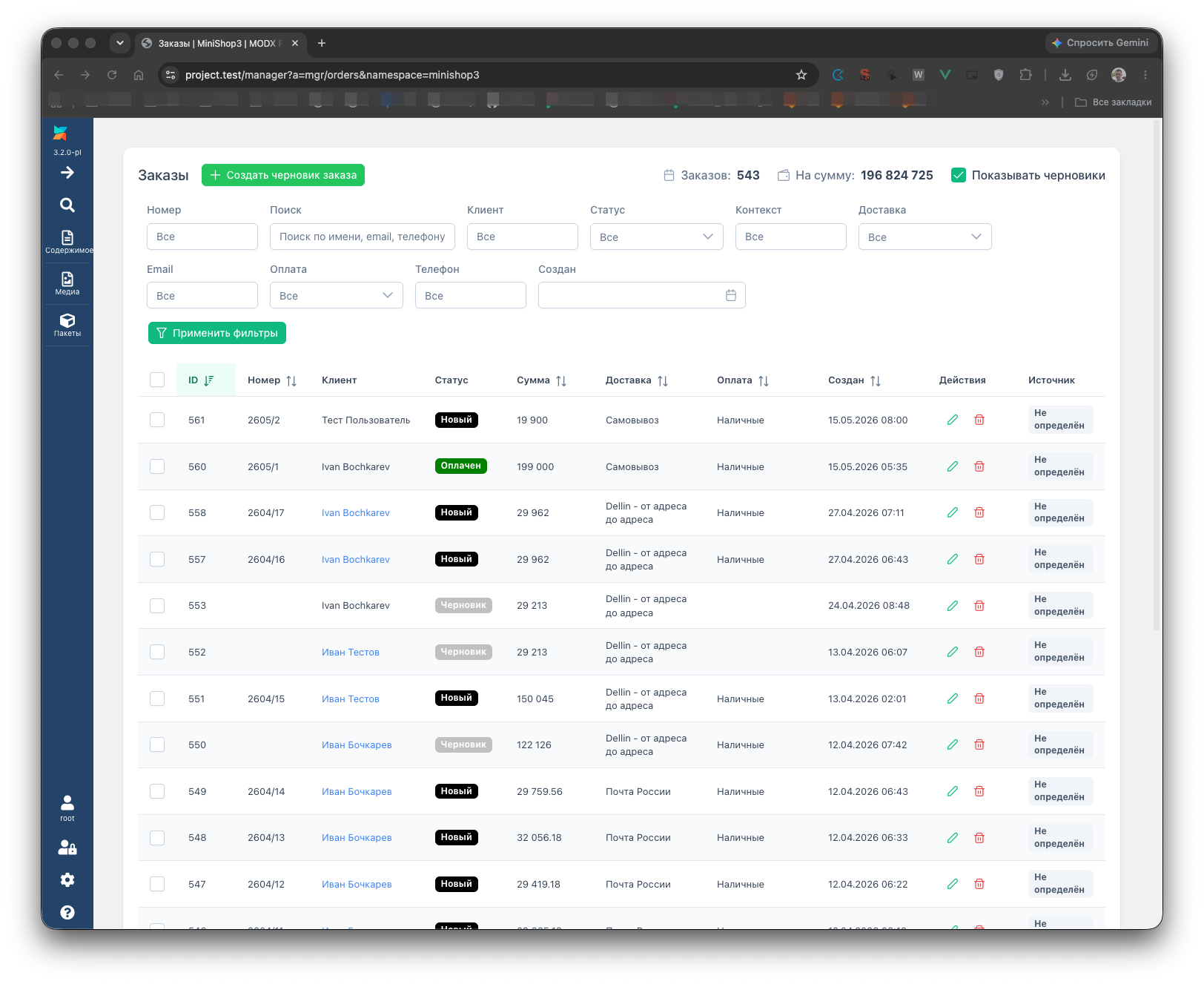
Open Extras → MiniShop3 → Orders. On the left is the grid of all orders; a click opens the card.
List
The OrdersGrid grid filters and sorts rows. Search covers number, email, phone, and other columns from the grid config. A click on a row opens the card.
Filter summary (status counts, totals) loads separately: GET /api/mgr/orders/stats with the same query parameters as the list.
Create order from manager
The “Create order” button calls POST /api/mgr/orders — an empty or partially filled order without the frontend. Then add lines and finalize. Events: msOnBeforeMgrCreateOrder, msOnMgrCreateOrder.
Drafts
Until the customer clicks Submit on the frontend, the DB holds an order with draft status (ms3_status_draft). System setting ms3_order_show_drafts controls whether drafts appear in the grid by default.
The toolbar has a “Show drafts” toggle. The browser stores the choice in localStorage (ms3_orders_show_drafts) and sends show_drafts to the API.
Scheduler cleans old drafts by ms3_delete_drafts_after. See Scheduler.
Card
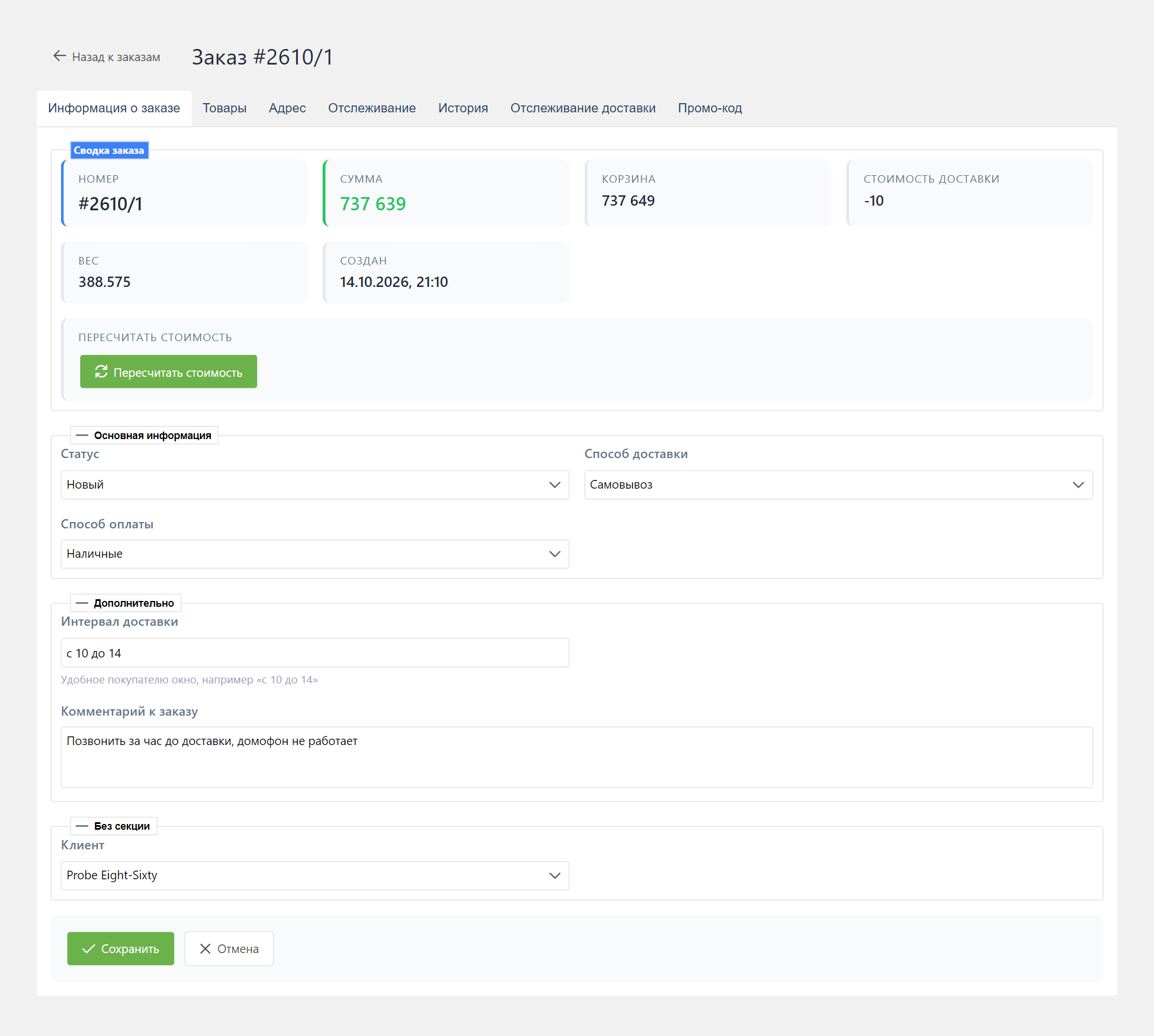
The OrderView card holds tabs: items, customer, delivery and payment, comments, plus addon tabs if you registered them.
Status
Change status_id in the form. Save goes as PUT /api/mgr/orders/{id}. A status change can trigger emails and Telegram per Notification center rules.
Turn a draft into a real order with the finalize button: POST /api/mgr/orders/{id}/finalize. That is not the same path as frontend submit.
Order extra fields
Create custom order columns via extra fields. In the DB and on POST the class is MiniShop3\Model\msOrder. In 1.13.x the order card requests GET /api/mgr/extra-fields?class=msOrder (short alias): the filter is exact, so the section can be empty even when the field was created correctly. Details and workaround are in the example troubleshooting.
Save: PUT /api/mgr/orders/{id} with the field key at the top level of the JSON body (msorder_save). Extra-field metadata loads only with mssetting_save.
Cost recalculation
On the summary of a saved order, click recalculate. Request:
POST /api/mgr/orders/{id}/recalculate-cost
Modes: auto, manual, force_provider. The button is disabled while a save is in progress, a recalculation is running, or you have unsaved delivery and payment edits.
Recalculation recomputes cart, delivery, and payment from current providers. Response details: Order Backend API.
Delivery and payment
Pick a pair you linked on the delivery card. Otherwise save or finalize returns an invalid-pair error.
Permissions and API
All operations go through Manager API /api/mgr/orders/* under a MODX session. Read — permission msorder_list, changes — msorder_save. Route skeleton: API Router.
Order line events (msOnBeforeCreateOrderProduct, etc.) when adding lines from the card: Order product events.