



Mapex2
The component adds to MODX a new input field type: Yandex.Map (mapex.yandexMap).
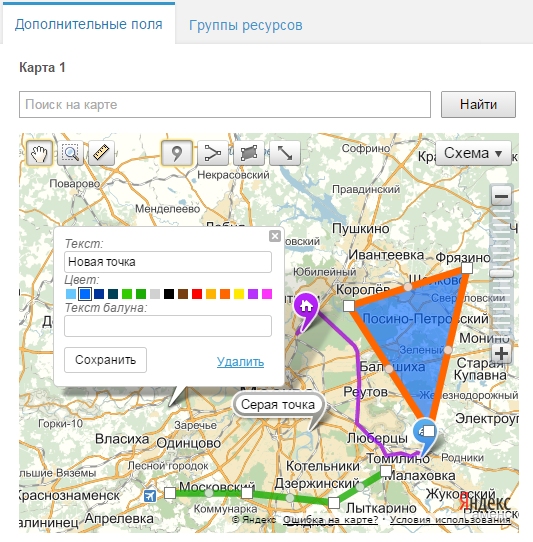
Features
The component lets you draw the following objects on the map:
- Points. Any number of points; for each you set Text, Color (from Yandex.Maps presets), Balloon text
- Lines. Any number of lines; for each: line color, width, opacity, balloon text
- Polygons. Any number of polygons; for each: border color, fill color, line width, opacity, balloon text
- Route. You can add one route between two points on the map.
For each map its settings are saved:
- map type (map, satellite, hybrid, public map, public + satellite),
- map center coordinates,
- map zoom level.
This lets the site display the map exactly as in the admin interface.
The admin includes search on the map by address or name.
You can add several maps to one resource by creating multiple TV fields.
Snippets
mapexMap
The snippet renders the map on the frontend using Yandex.Maps API 2.0.
Snippet parameters:
| Name | Default | Description |
|---|---|---|
| &tvName | Name of the TV parameter that holds the map. Use together with &resource | |
| &resource | current resource | Id of the resource that has the map. Use together with &tvName |
| &map | JSON string with the map. Alternative way to specify which map to show. If set, &tvName and &resource are ignored. Example: [[mapexMap? &map=`[[*tvMap]]`]] | |
| &mapId | mapexMap | Map id. Used when generating javascript. If there are several maps on one page, use different mapId |
| &width | 500px | Map width, e.g. 500px or 100%. Always specify units. |
| &height | 400px | Map height |
| &containerCssClass | CSS class for the wrapper block around the map | |
| &mapTpl | mapex.Map.Tpl | Main chunk for map output |
| &placemarkTpl | mapex.Placemark.Tpl | Chunk for point output |
| &polygonTpl | mapex.Polygon.Tpl | Chunk for polygon output |
| &polylineTpl | mapex.Polyline.Tpl | Chunk for line output |
| &routeTpl | mapex.Route.Tpl | Chunk for route output |
| &controls | mapTools typeSelector zoomControl searchControl miniMap trafficControl scaleLine | Set of controls on the map. See Yandex.Maps 2.0 docs |
| &includeJS | 1 | Whether to include the Yandex.Maps script on the page |
mapexMap21
The snippet renders the map on the frontend using Yandex.Maps API 2.1.
Snippet parameters are almost the same; only differences are listed:
| Name | Default | Description |
|---|---|---|
| &mapTpl | mapex.Map21.Tpl | Main chunk for map output |
| &placemarkTpl | mapex.Placemark21.Tpl | Chunk for point output |
| &polygonTpl | mapex.Polygon21.Tpl | Chunk for polygon output |
| &polylineTpl | mapex.Polyline21.Tpl | Chunk for line output |
| &routeTpl | mapex.Route21.Tpl | Chunk for route output |
| &controls | default | Set of controls on the map. See Yandex.Maps 2.1 docs |
Component settings
In component settings (System settings, namespace mapex2) you can set the initial position, zoom and map type in the admin, and show or hide the internal field that stores the map state in JSON.
The component requires jQuery. In settings you can set where to load it from. If another admin component also uses jQuery, conflicts may occur from loading it twice; in that case clear the mapex2_manager_jquery_url setting.
Yandex.Maps API support
The component admin uses Yandex.Maps API 2.0. So far it has not been possible to switch it to API 2.1, as the API changed significantly.
On the frontend, both API 2.0 (snippet mapexMap) and 2.1 (snippet mapexMap21) are supported.
Note: API 2.1 supports multi-routes, but because the admin uses the older API, this feature is not available in the component.