



MIGX points with custom icons on the frontend
This case shows what you can do with the ymOnLoadObjects plugin event. We load points from a MIGX table and allow a custom icon per point.
Step 1
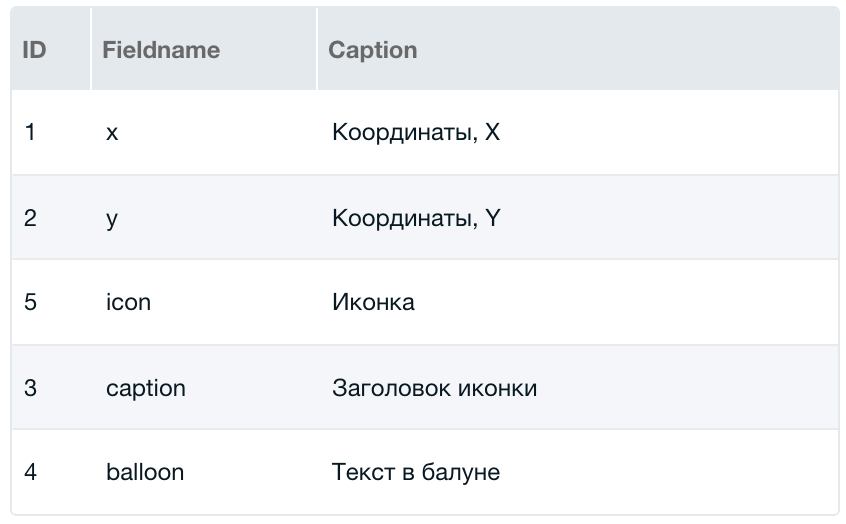
Create a MIGX TV ym2objects with these fields:
Step 2
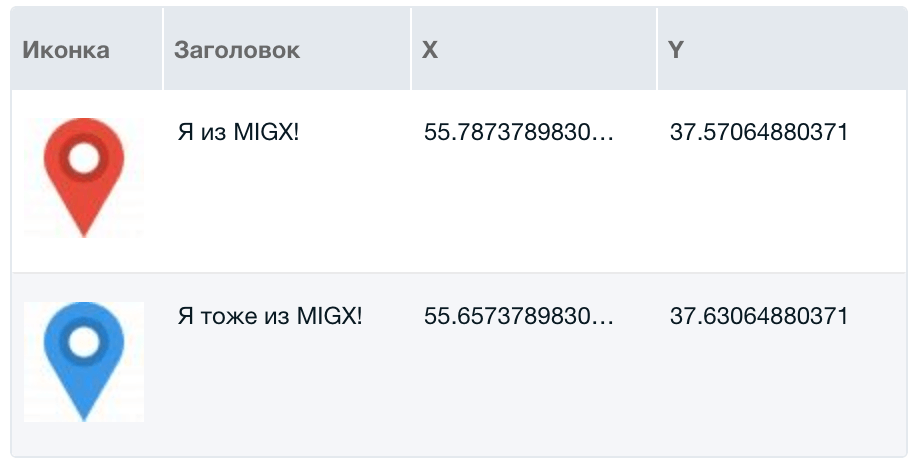
Fill the field in the resource as needed:
Step 3
Call the map where needed:
fenom
{'!YandexMaps2' | snippet: [
  'parent' => $_modx->resource.id,
  'class' => 'modDocument',
  'map' => 'ym2map-migx',
]}
Step 4
Create a plugin for ymOnLoadObjects:
php
$sp = &$scriptProperties;
switch ($modx->event->name) {
  case 'ymOnLoadObjects':
    if (!in_array($snippetProperties['map'], ['ym2map-migx'])) {
      break;
    }
    if (!$resource = $modx->getObject('modResource', ['id' => (int)$data['parent']])) {
      break;
    }
    if (!$ym2 = $modx->getService('yandexmaps2', 'YandexMaps2', MODX_CORE_PATH . 'components/yandexmaps2/model/yandexmaps2/')) {
      break;
    }
    $ym2->initialize($modx->context->key);

    // Get data from resource MIGX field
    if ($ym2objects = $resource->getTvValue('ym2objects')) {
      $ym2objects = $ym2->tools->isJSON($ym2objects) ? $modx->fromJSON($ym2objects) : $ym2objects;
    }
    $ym2objects = is_array($ym2objects) ? $ym2objects : [];

    $objects = [];
    foreach ($ym2objects as $v) {
      $object = [
        'type' => 'placemark',
        'geometry' => [],
        'options' => [],
        'properties' => [
          'iconContent' => '',
          'iconCaption' => '',
          'balloonContent' => '',
        ],
      ];
      $object['geometry'] = [$v['x'], $v['y']];
      $object['properties']['iconCaption'] = $v['caption'];
      $object['properties']['balloonContent'] = $v['balloon'];
      if (empty($v['icon'])) {
        $object['options'] = [
          'fillOpacity' => 0.5,
          'fillColor' => '#ed4543',
          'strokeOpacity' => 0.9,
          'strokeColor' => '#ed4543',
          'strokeWidth' => 6,
          'iconColor' => '#b3b3b3',
          'preset' => 'islands#icon',
        ];
      } else {
        $object['options'] = [
          'iconLayout' => 'default#image',
          'iconImageHref' => $v['icon'],
          'iconImageSize' => [36, 36],
          'iconImageOffset' => [-18, -36],
        ];
      }
      $object = $ym2->setDefaultValues($object, $snippetProperties);
      $objects[] = $object;
      unset($object);
    }

    $modx->event->returnedValues['objects'] = $objects;
    break;
}
Important
For the plugin to process the resource with the map, save it once with the YandexMaps2 tab open.