


pdoTools
Fast retrieval of site pages and users

Snippet pdoPage paginates the output of other snippets.
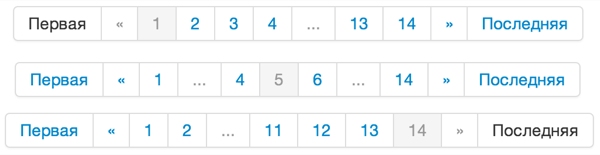
It differs from getPage in several ways:
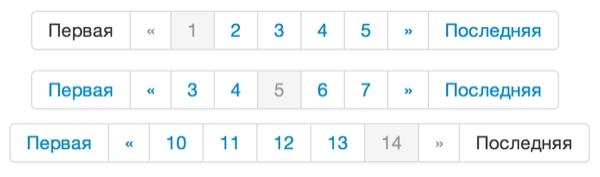
When calling pdoPage, pass the parameters of the snippet being paginated. That snippet must accept &page and &limit. pdoPage accepts all pdoTools parameters plus:
| Name | Default | Description |
|---|---|---|
| &plPrefix | Prefix for pagination placeholders | |
| &limit | 10 | Maximum results per page. Must be greater than 0. |
| &maxLimit | 100 | Maximum allowed limit. Overrides the limit from the URL. |
| &offset | 0 | Number of results to skip. |
| &page | 1 | Current page number. Overridden by the URL. |
| &pageVarKey | page | URL parameter name for the page number. |
| &totalVar | page.total | Placeholder name for total result count. |
| &pageLimit | 5 | Number of page links to show. If >= 7, advanced display mode is used. |
| &element | pdoResources | Name of the snippet to run. |
| &pageNavVar | page.nav | Placeholder name for the pagination block. |
| &pageCountVar | pageCount | Placeholder name for total page count. |
| &pageLinkScheme | Template for page URLs. Enables SEO-friendly pagination. See below. | |
| &tplPage | Chunk for a regular page link. | |
| &tplPageWrapper | Chunk for the whole pagination block. | |
| &tplPageActive | Chunk for the current page link. | |
| &tplPageFirst | Chunk for the first page link. | |
| &tplPageLast | Chunk for the last page link. | |
| &tplPagePrev | Chunk for the previous page link. | |
| &tplPageNext | Chunk for the next page link. | |
| &tplPageSkip | Chunk for skipped pages in advanced mode (&pageLimit >= 7). | |
| &tplPageFirstEmpty | Chunk when no link to first page. | |
| &tplPageLastEmpty | Chunk when no link to last page. | |
| &tplPagePrevEmpty | Chunk when no link to previous page. | |
| &tplPageNextEmpty | Chunk when no link to next page. | |
| &cache | 0 | Snippet result caching. |
| &cacheTime | 3600 | Cache lifetime in seconds. |
| &cache_user | Force visitor ID for cache, by default cache includes visitor ID | |
| &toPlaceholder | If set, the snippet stores all data in a placeholder with this name instead of outputting. | |
| &showLog | 0 | Log in a placeholder (since 3.0), not HTML. Requires mgr session. Details. |
| ajax | Enable ajax support. | |
| ajaxMode | Ajax pagination out of the box. 3 modes: "default", "button", "scroll". | |
| ajaxElemWrapper | #pdopage | jQuery wrapper selector with results and pagination. |
| ajaxElemRows | #pdopage .rows | jQuery results selector. |
| ajaxElemPagination | #pdopage .pagination | jQuery pagination selector. |
| ajaxElemLink | #pdopage .pagination a | jQuery page link selector. |
| ajaxElemMore | #pdopage .btn-more | jQuery load-more button selector when ajaxMode = button. |
| ajaxHistory | Save page number in URL when using ajax mode. | |
| frontend_js | [[+assetsUrl]]js/pdopage.min.js | JS file URL for snippet. |
| frontend_css | [[+assetsUrl]]css/pdopage.min.css | CSS file URL for snippet styling. |
| setMeta | 1 | Register meta tags for prev and next page links. |
| strictMode | 1 | Strict mode. pdoPage redirects on load to non-existent pages. |
| Template | Default |
|---|---|
| &tplPage | @INLINE <li><a href="[[+href]]">[[+pageNo]]</a></li> |
| &tplPageWrapper | @INLINE <div class="pagination"><ul class="pagination">[[+first]][[+prev]][[+pages]][[+next]][[+last]]</ul></div> |
| &tplPageActive | @INLINE <li class="active"><a href="[[+href]]">[[+pageNo]]</a></li> |
| &tplPageFirst | @INLINE <li class="control"><a href="[[+href]]">[[%pdopage_first]]</a></li> |
| &tplPageLast | @INLINE <li class="control"><a href="[[+href]]">[[%pdopage_last]]</a></li> |
| &tplPagePrev | @INLINE <li class="control"><a href="[[+href]]">«</a></li> |
| &tplPageNext | @INLINE <li class="control"><a href="[[+href]]">»</a></li> |
| &tplPageSkip | @INLINE <li class="disabled"><span>...</span></li> |
| &tplPageFirstEmpty | @INLINE <li class="control"><span>[[%pdopage_first]]</span></li> |
| &tplPageLastEmpty | @INLINE <li class="control"><span>[[%pdopage_last]]</span></li> |
| &tplPagePrevEmpty | @INLINE <li class="disabled"><span>«</span></li> |
| &tplPageNextEmpty | @INLINE <li class="disabled"><span>»</span></li> |
| ajaxTplMore | @INLINE <button class="btn btn-default btn-more">[[%pdopage_more]]</button> |
Available in pdoTools 3.1.0+ (MODX 3)
Each pagination slot (tplPage, tplPageActive, tplPageSkip, …) gets these flags as 0 / 1. Dedicated tpl* chunks still win when set.
| Placeholder | Meaning |
|---|---|
isFirst | Page number is 1 |
isLast | Page number equals total pages |
isActive | This is the current page (not a skip slot) |
isSkip | Ellipsis / skip slot in advanced mode |
Available in pdoTools 3.1.0+ (MODX 3)
When rendering &tplPageWrapper (and related pagination chunks), pdoPage merges the snippet call properties into the placeholders. You can read your own &limit, &element, custom keys, etc. inside those templates.
pdoPage can output JSON and stop processing when request matches three conditions:
page.Set &ajax=`1` and send page a GET request like:
$.get('document.html?page=5', function (response) {
  console.log(response);
}, 'json');
Response includes JSON with results, pagination and metadata: page number, total pages, total results. Since pdoPage is a wrapper, you can run many snippets via ajax.
Since 1.10 pdoPage loads pages via ajax. Wrap the call in this markup:
<div id="pdopage">
  <div class="rows">
    [[!pdoPage?
      &parents=`0`
      &ajaxMode=`default`
    ]]
  </div>

  [[!+page.nav]]
</div>
Inside [[+page.nav]] is a div with class pagination by default.
Change markup selectors with these params:
#pdopage.#pdopage .rows#pdopage .pagination#pdopage .pagination aLast two selectors assume default &tplPageWrapper layout. Requires JS from &frontend_js. &ajax=`1` is optional; non-empty &ajaxMode enables it.
Unlike standard pagination, user scrolls down loading more; pagination block moves. Place it at top:
<div id="pdopage">
  [[!+page.nav]]
  <div class="rows">
    [[!pdoPage?
      &parents=`0`
      &ajaxMode=`button`
      &limit=`5`
    ]]
  </div>
</div>
Same selectors apply, plus:
#pdopage .btn-more.On click loads &limit items into results. If nothing to load, button hides. Pagination block shows current page and quick nav; those clicks are not ajax. Set display:none in css if pagination block not needed.
Same as button mode but no button; loads automatically on scroll.
<div id="pdopage">
  [[!+page.nav]]
  <div class="rows">
    [[!pdoPage?
      &parents=`0`
      &ajaxMode=`scroll`
    ]]
  </div>
</div>pdoPage uses History API. With &ajaxMode enabled, snippet can store page number in URL; reload keeps state. Back/forward work. Use &ajaxHistory to enable/disable. Default: default mode uses History API; scroll/button do not. When &ajaxHistory off, pagination block is hidden.
Functions called before and after ajax load:
pdoPage.callbacks.before = function (config) {
  console.log('Config before load!', config);
};

pdoPage.callbacks.after = function (config, response) {
  console.log('Config after load!', config);
  console.log('Server response!', response);
}
Since 1.11.0-pl you can listen for pdopage_load:
$(document).on('pdopage_load', function (e, config, response) {
  console.log(e, config, response);
});
Config data lets you distinguish pdoPage calls on one page.
Since 2.2.2 use &pageLinkScheme for URL pattern. Two placeholders:
[[+pageVarKey]] - page var name. Default page.[[+page]] - page numberExample:
[[!pdoPage?
  &parents=`0`
  &pageLinkScheme=`/[[+pageVarKey]]-[[+page]]`
]]

[[!+page.nav]]
Links will look like:
/res/news/
/res/news/page-2
/res/news/page-3
Except first page, these URLs return 404. Add a plugin to handle them:
<?php
// OnPageNotFound only
if ($modx->event->name == 'OnPageNotFound') {
  // Request key from settings
  $req = $modx->getOption('request_param_alias');
  // Page var key
  $pageVarKey = 'page';
  // If request matches "pageVarKey-page" pattern
  if (preg_match("#.*?({$pageVarKey}-(\d+))#", $_REQUEST[$req], $matches)) {
    // Extract URI
    $uri = str_replace($matches[1], '', $matches[0]);

    // Find resource by URI
    $id = 0;
    // Try with trailing slash
    if (!$id = $modx->findResource($uri)) {
      // If not found, try without slash
      $id = $modx->findResource(rtrim($uri, '/'));
    }

    // If found
    if ($id) {
      // Add page number to globals for pdoPage
      $_GET[$pageVarKey] = $_REQUEST[$pageVarKey] = $matches[2];
      // Load page
      $modx->sendForward($id);
    }
    // If not found - let another plugin handle
  }
}
Plugin handles friendly URL pagination.
pdoPage uses pdoResources by default. Simple call outputs child resources:
[[!pdoPage?
  &tpl=`@INLINE <p>[[+idx]] <a href="/[[+uri]]">[[+pagetitle]]</a></p>`
]]

[[!+page.nav]]
Output all site documents:
[[!pdoPage?
  &tpl=`@INLINE <p>[[+idx]] <a href="/[[+uri]]">[[+pagetitle]]</a></p>`
  &parents=`0`
]]

[[!+page.nav]]
Pagination with page gaps. If pages < 7, standard pagination is used.
[[!pdoPage?
  &tpl=`@INLINE <p>[[+idx]] <a href="/[[+uri]]">[[+pagetitle]]</a></p>`
  &parents=`0`
  &pageLimit=`7`
]]

[[!+page.nav]]
Enable cache for 30 min:
[[!pdoPage?
  &tpl=`@INLINE <p>[[+idx]] <a href="/[[+uri]]">[[+pagetitle]]</a></p>`
  &parents=`0`
  &pageLimit=`7`
  &cache=`1`
  &cacheTime=`1800`
]]

[[!+page.nav]]
Max limit. Whatever user sets in url, max 10 results per page.
[[!pdoPage?
  &tpl=`@INLINE <p>[[+idx]] <a href="/[[+uri]]">[[+pagetitle]]</a></p>`
  &parents=`0`
  &pageLimit=`7`
  &cache=`1`
  &cacheTime=`1800`
  &maxLimit=`10`
]]

[[!+page.nav]]