miniShop2
Flexible and fast e-commerce component for MODX Revolution

To change how one of the default services works, you need to register a PHP file with its logic. You can do this in two ways.
First — place a file named any_name.class.php in the directory MODX_CORE_PATH . 'components/minishop2/custom/service_type/'. This method is deprecated and should not be used.
The correct way is to create a php file and register it via the miniShop2::addService() method:
if ($miniShop2 = $modx->getService('miniShop2')) {
  $miniShop2->addService('payment', 'CustomerAccount',
      '{core_path}components/msprofile/model/msprofile/customeraccount.class.php');
}
Run this code once in a snippet on a page or in the Console component. You do not need to register the php file every time.
The method takes these parameters:
{base_path}, {core_path} and {assets_path}.Remove a service via the miniShop2::removeService() method:
if ($miniShop2 = $modx->getService('miniShop2')) {
  $miniShop2->removeService('payment', 'CustomerAccount');
}
Here you only need to specify the type and unique name of the registered service.
Suppose we need to zero the delivery cost when the order total is over 5000. We create a php file msdeliveryhandlermsk.class.php in any directory, e.g. /core/components/minishop2/custom/delivery, with this content:
<?php

if (!class_exists('msDeliveryInterface')) {
  require_once dirname(dirname(dirname(__FILE__))) . '/model/minishop2/msdeliveryhandler.class.php';
}

class msDeliveryHandlerMsk extends msDeliveryHandler implements msDeliveryInterface {

  public function getCost(msOrderInterface $order, msDelivery $delivery, $cost = 0) {

    $freedeliverysumm = 5000;
    $cart = $order->ms2->cart->status();
    $cart_cost = $cart['total_cost'];

    if ($cart_cost > $freedeliverysumm) {
      return $cost;
    } else{
      $delivery_cost = parent::getCost($order, $delivery, $cost);
      return $delivery_cost;
    }
  }
}
Then register the service at this path by running the code below in a snippet or in Console:
if ($miniShop2 = $modx->getService('miniShop2')) {
  $miniShop2->addService('delivery', 'MskDelivery',
      '{core_path}components/minishop2/custom/delivery/msdeliveryhandlermsk.class.php');
}
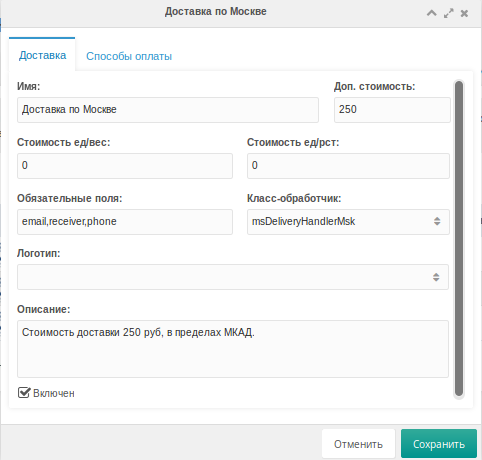
Now we only need to select the handler class in the minishop2 settings