

RBK Money
RBK Money payment module for miniShop2
RBK Money allows you to choose the payment method on the e-commerce site. In this case, when proceeding to payment in RBK Money, the user will immediately be offered this payment method, bypassing the selection screen. For example, if you specify bankcard, the user will immediately go to the card number entry page.
One way to implement this based on the mspRbk module is as follows:
In miniShop2 settings, add all necessary payment options, specifying the RBK payment class for them, and do not forget to link these options to delivery methods.
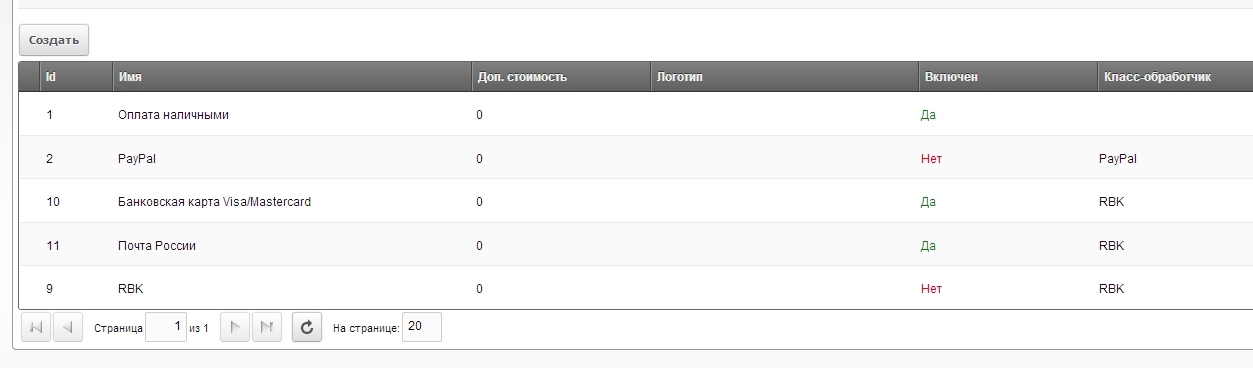
Next we need to specify the RBK payment option for each method. For this, create a plugin on the msOnBeforeCreateOrder event:
<?php

$rbkPaymentMap = array(
  10 => 'bankcard',
  11 => 'postrus'
);

switch ($modx->event->name) {
  case 'msOnBeforeCreateOrder':
    $payment = $msOrder->get('payment');
    if (isset($rbkPaymentMap[$payment])) {
      $props = $msOrder->get('properties');
      if (!is_array($props))
          $props = array();
      $props['payments']['rbk']['preference'] = $rbkPaymentMap[$payment];
      $msOrder->set('properties', $props);
    }
    break;
}
In it, in the first lines of the $rbkPaymentMap array (here as an example of settings for the option as in the screenshot), the correspondence is set between the miniShop2 payment method id (check the id in payment settings) and the RBK payment method.