



Quick start
In 10–15 minutes you can install the panel and apply the first bulk operation with preview.
Requirements
| Requirement | Version |
|---|---|
| MODX Revolution | 3.0+ |
| PHP | 8.2+ |
| MiniShop3 | installed |
| VueTools | installed |
Step 1: Install the package
- Connect ModStore if installing from the catalog.
- Extras → Installer → Download Extras → msBulkEditor → Download → Install.
- Ensure MiniShop3 and VueTools are installed.
- Manage → Clear Cache.
After install
| Item | Expectation |
|---|---|
| Menu | Extras → msBulkEditor |
| Namespace | msbulkeditor |
| Permissions | msbulkeditor_view, edit, rollback, presets, import_export |
| Tables | msbe_operations, msbe_operation_items, msbe_presets, msbe_user_states |
| Settings | area msbulkeditor |
Step 2: Permissions
In Security → Access Policies give store managers at least:
| Permission | Why |
|---|---|
msbulkeditor_view | Open the panel, grid, preview, history |
msbulkeditor_edit | Apply and inline |
For rollback, presets, and files add msbulkeditor_rollback, msbulkeditor_presets, msbulkeditor_import_export. Full table: System settings.
Step 3: Open the panel
- Sign in with an account that has
msbulkeditor_view. - Extras → msBulkEditor.
- Direct URL:
manager/?a=index&namespace=msbulkeditor.
If you see a VueTools warning, install the package and clear the cache. See FAQ.

Step 4: First operation (10% discount)
- On Products, filter a category and check rows, or enable expert mode for the full filtered set.
- Click Run operation.
- Type: Price → mode −% → value
10. Optionally transfer toold_price. - Preview. Check the summary and before/after table.
- Uncheck rows you do not want to change.
- Apply. Wait for progress.
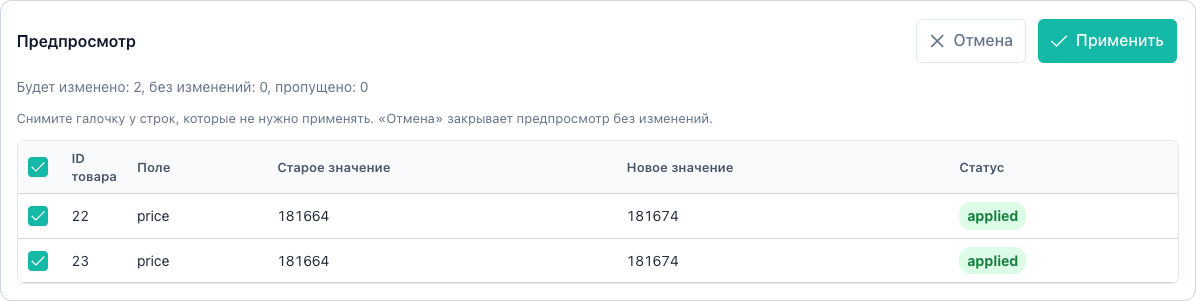
More on price: Product and prices. Full cycle: Flow A.
Step 5: Verify and rollback
- Open the History tab.
- Find the completed operation.
- On error click Rollback, or open Changes and roll back selected items.
Requires msbulkeditor_rollback. See History.
Next
| Task | Document |
|---|---|
| All flows A–J with screenshots | Flows |
| Filters and expert mode | Products grid |
| Import stock from Excel | Import and export |
| Limits and Scheduler | System settings |
| Plugins on apply | MODX events |