



TV and option binding wizard
Before Preview on TV and Option operations, the app checks that the field is bound to the templates or categories in your selection.
The dialog opens when bindings/check finds gaps.
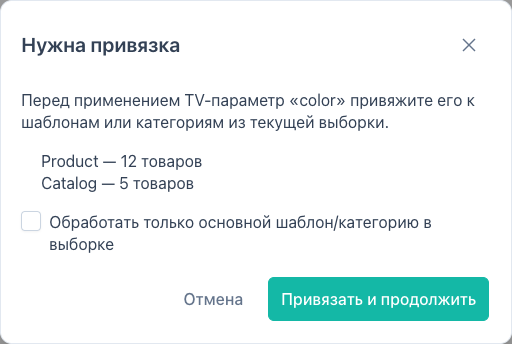
When it appears
| Operation type | Check |
|---|---|
tv | TV bound to product templates in site_tmplvar_templates |
option | option key bound to categories in ms3_category_options |
The wizard does not run for price, text, template, and other types.
Trigger: Run operation → fill TV/option → Preview (or apply a preset with TV/option).
Dialog contents
- Intro — TV name or option key and binding kind.
- Gap list — template or category missing the binding, with affected product count.
- Apply and continue — calls
bindings/apply, creates links, then continues preview. - Cancel — preview is aborted.
If the TV/option does not exist in MODX/MS3, the apply button is hidden; an entity-not-found error is shown.
If there are no gaps, the dialog reports bindings are OK and preview continues without DB changes.
Mixed templates / categories
When the selection spans different templates (TV) or parents (option), a checkbox is available:
Process primary template / category only (skipMixedScopes).
When checked:
- binding is created for the primary scope (template or category with the most products);
- preview selection is narrowed with a
templateorparentfilter to that scope.
Without the checkbox, bindings apply to all scopes in the gap list.
Permissions
| Action | Permission |
|---|---|
bindings/check | msbulkeditor_view |
bindings/apply | msbulkeditor_edit |
API
| Route | Body (summary) |
|---|---|
bindings/check | selection + kind (tv or option) + name |
bindings/apply | same + scopeIds[] |
Details: MODX events.