


EasyCookies
A cookie banner for MODX 2 and 3 — a simple notice or law-compliant consent, with counters and a consent log

Laws like GDPR require not only asking for consent but also being able to prove it. A compliant banner with "Keep a consent log" on records every visitor's answer: the first one and every change of choice. New profiles have it on.
A simple banner keeps no log: "Got it" allows nothing beyond what already runs.
The log is on the Consent log tab of the component page.
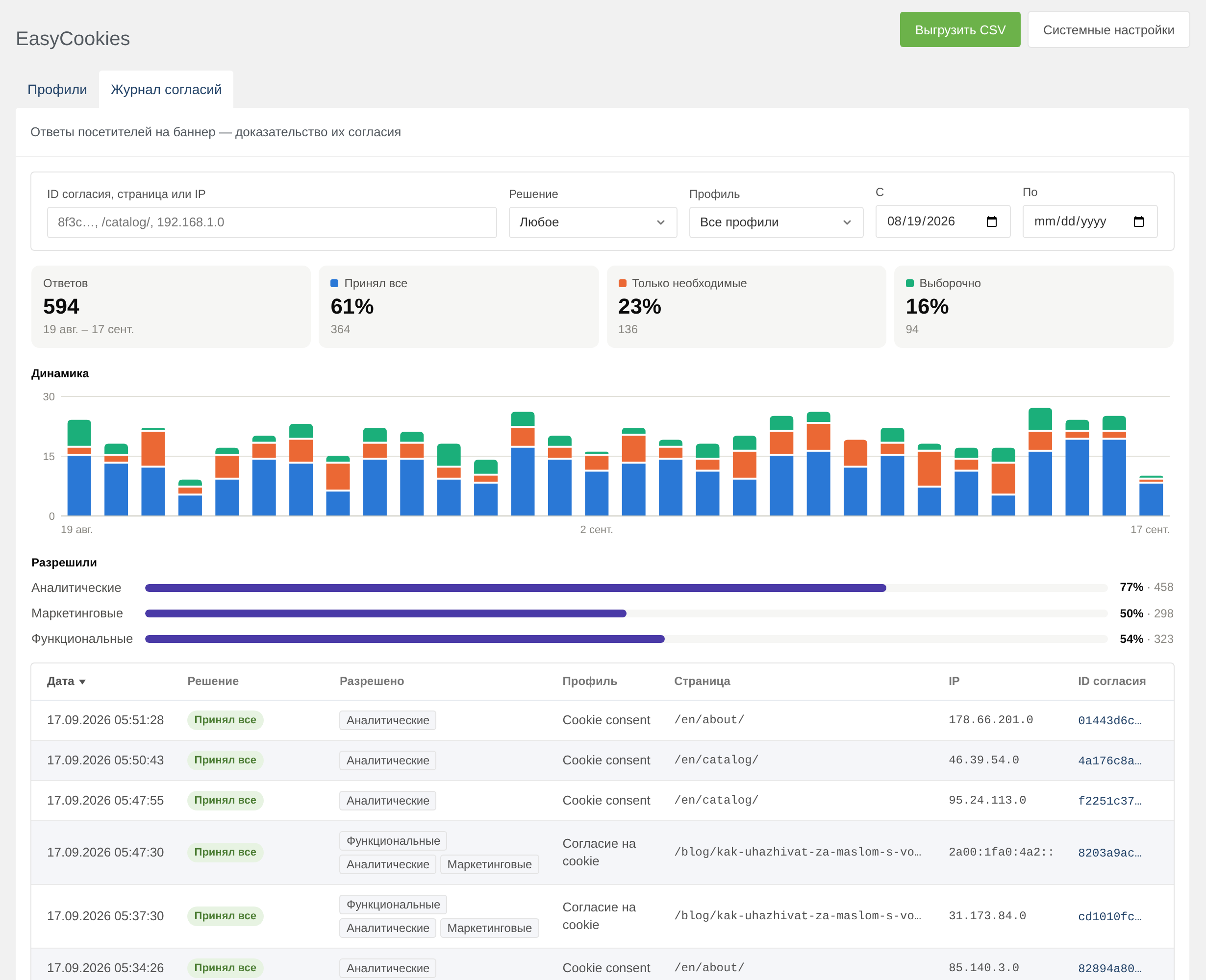
| Field | Description |
|---|---|
| Date | When the visitor answered |
| Consent ID | The same one stored in the visitor's cookie — it finds the whole history of their choice |
| Decision | "Accepted all", "Only necessary" or "Chose some" |
| Allowed and refused | Categories and allowed services |
| Profile, revision, language | Which banner asked and in which language |
| Page | Path without query parameters: they may carry tracking tags and email addresses |
| IP | Shortened: the last byte of IPv4 and everything after /48 of IPv6 are zeroed. It can be left out entirely with the easycookies.log_ip setting |
| Browser | The User-Agent string |
Recording consent sets no cookies for the visitor: the assets/components/easycookies/consent.php endpoint works without a session.
The endpoint accepts requests only from the site's pages: the banner script sends a page signature valid for a week. One address can send no more than 60 entries an hour, and the same answer sent again within a minute is not recorded twice.
Above the table is a summary for the chosen period:
Filters: search by consent ID, page or IP, decision, profile and the "From" — "To" period. The last 30 days are shown by default. The summary, table and export use the same filters.
The table sorts by date, decision, profile, page, IP and consent ID. Clicking an ID copies it.
From the profile list, the number in the "Consents" column leads to the log filtered by that profile.
"Export CSV" saves everything matching the filters, up to 50,000 rows at a time. The file is UTF-8 with a BOM, so Excel opens it without questions.
| Column | Content |
|---|---|
date | Date and time Y-m-d H:i:s |
consent_id | Consent ID |
decision | all, necessary or custom |
accepted, rejected | Categories separated by spaces |
services | Allowed services: analytics:ym|ga4 marketing:vk |
profile | Profile name |
revision, mode, language | Revision, kind of banner, language |
page, ip, user_agent | Page, shortened IP, browser |
Entries older than easycookies.log_days days (365 by default) are removed automatically — occasionally, along with recording new answers. 0 keeps them forever.
The "Cookie consents" widget shows the same summary for the last 30 days and a link to the log. Users with the settings permission see it.
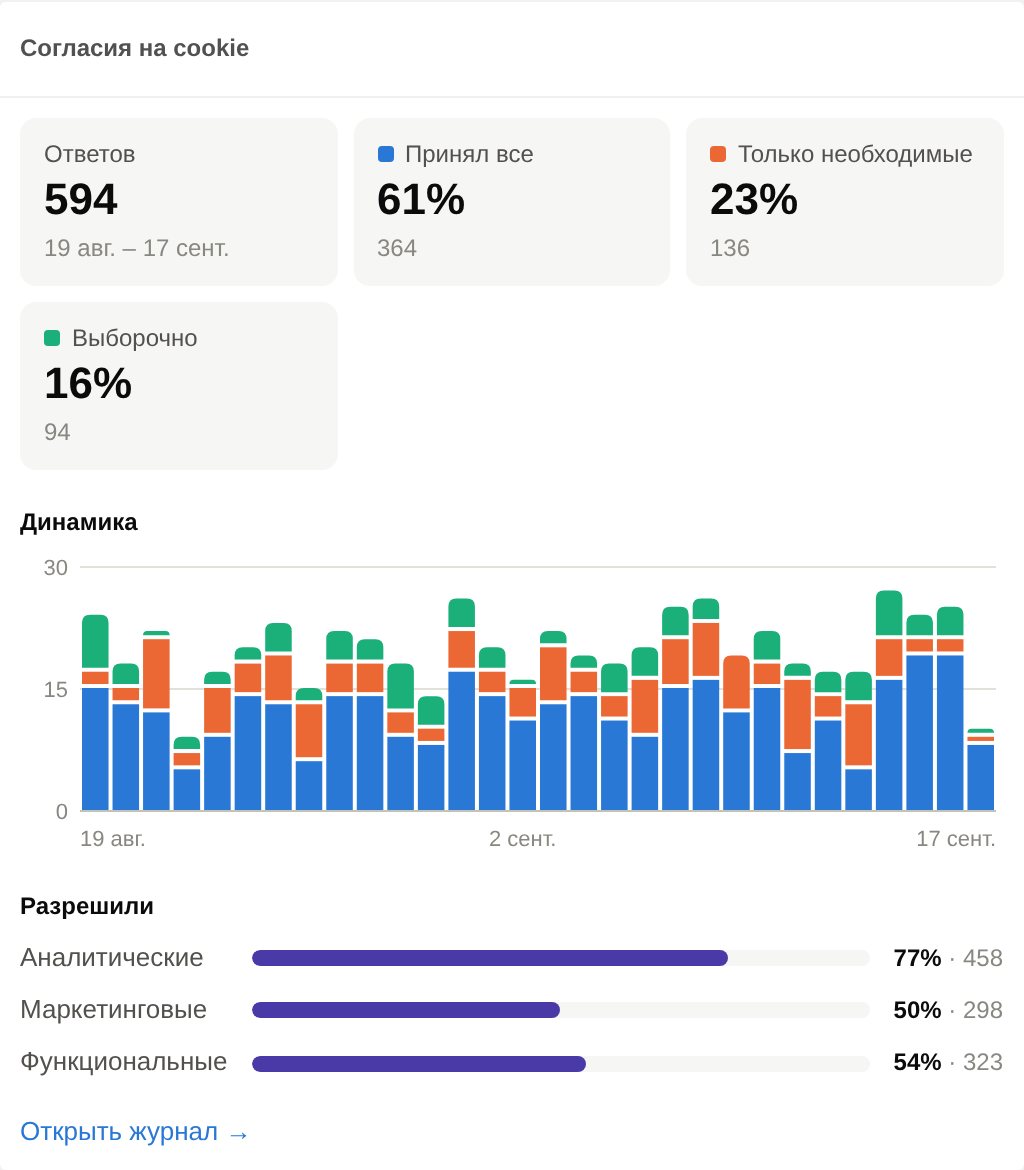
Подсказка
If the widget is not on the dashboard, add it by hand in dashboard management or with the "Add" button on the MODX 3 dashboard itself.