



ResVideoGallery for MODX 3
ResVideoGallery is a MODX Revolution 3.x component for video galleries on your site. Videos from YouTube, Vimeo, RuTube, VK, Dailymotion, Coub, Google Drive, TikTok, Instagram and Facebook are attached to resources, displayed with a tag cloud and played in a modal window or right inside the card. Visitors can add videos by link themselves, authors can manage their videos in a personal account, and the administrator can review them before publication.
Requirements: MODX Revolution 3.x, PHP >= 8.4, pdoTools.
Key features of the component
Gallery
- Videos are attached to resources: a "Video gallery" tab on the resource page, each resource has its own video order.
- Video output via pdoTools (including pagination with pdoPage and loading more by a button).
- Tag cloud with gallery filtering, sorting by popularity and collapsing of a long list.
- Playback in a modal window or right inside the card, autoplay.
- Five ready-made card hover effects.
Video services
- YouTube, Vimeo, RuTube, VK, Dailymotion, Coub, Google Drive, TikTok, Instagram and Facebook.
- Title, description, duration, cover and tags are fetched from the video service by link.
- Short TikTok and Facebook links (
vm.tiktok.com/…,fb.watch/…) are expanded to the full address. - Vertical videos (TikTok, Instagram, Facebook Reels) play in a vertical 9:16 window.
- Covers are stored on your own server in the selected media source; thumbnails of the required sizes and formats (including WebP and AVIF) are generated automatically.
Videos from visitors
- A form for adding a video by link — on the page or in a modal window.
- For guests or only for logged-in users, by user groups; a per-user video limit and a daily limit for guests.
- Visitor's own tags with suggestions, a tag limit, an "existing tags only" mode.
- Choice of the section the video goes to.
My videos
- The author's personal list of videos with the statuses "Published", "Draft", "Pending moderation".
- Editing the title, description and tags, unpublishing and deleting — each action is enabled separately.
- Tag cloud, search and filter by sections.
Moderation
- A visitor's video appears on the site only after approval in the manager.
- Re-review after the author edits it.
- User groups whose videos are published without review.
Security
- Protection against CSRF attacks, request rate limiting.
- reCAPTCHA 3 and Yandex SmartCaptcha.
- Works correctly behind Cloudflare and other reverse proxies.
- Form parameters are signed on the server — they cannot be tampered with from the browser.
For developers
- System events for loading, saving and removing videos — with the ability to reject the action or change the data.
- Open REST API.
- Appearance customization via CSS variables, a JS event on video upload.
Demo
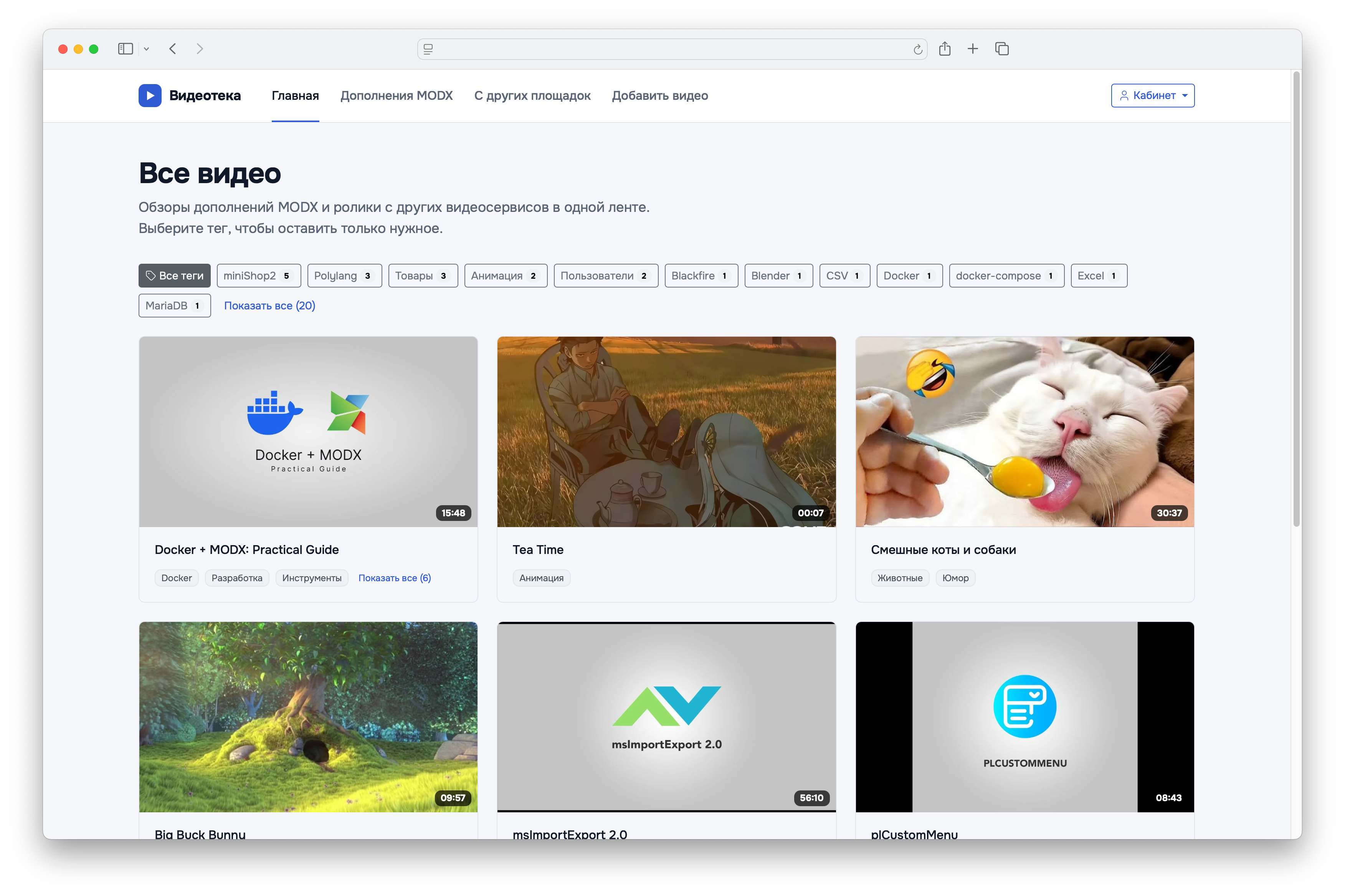
Gallery with a tag cloud and pagination.
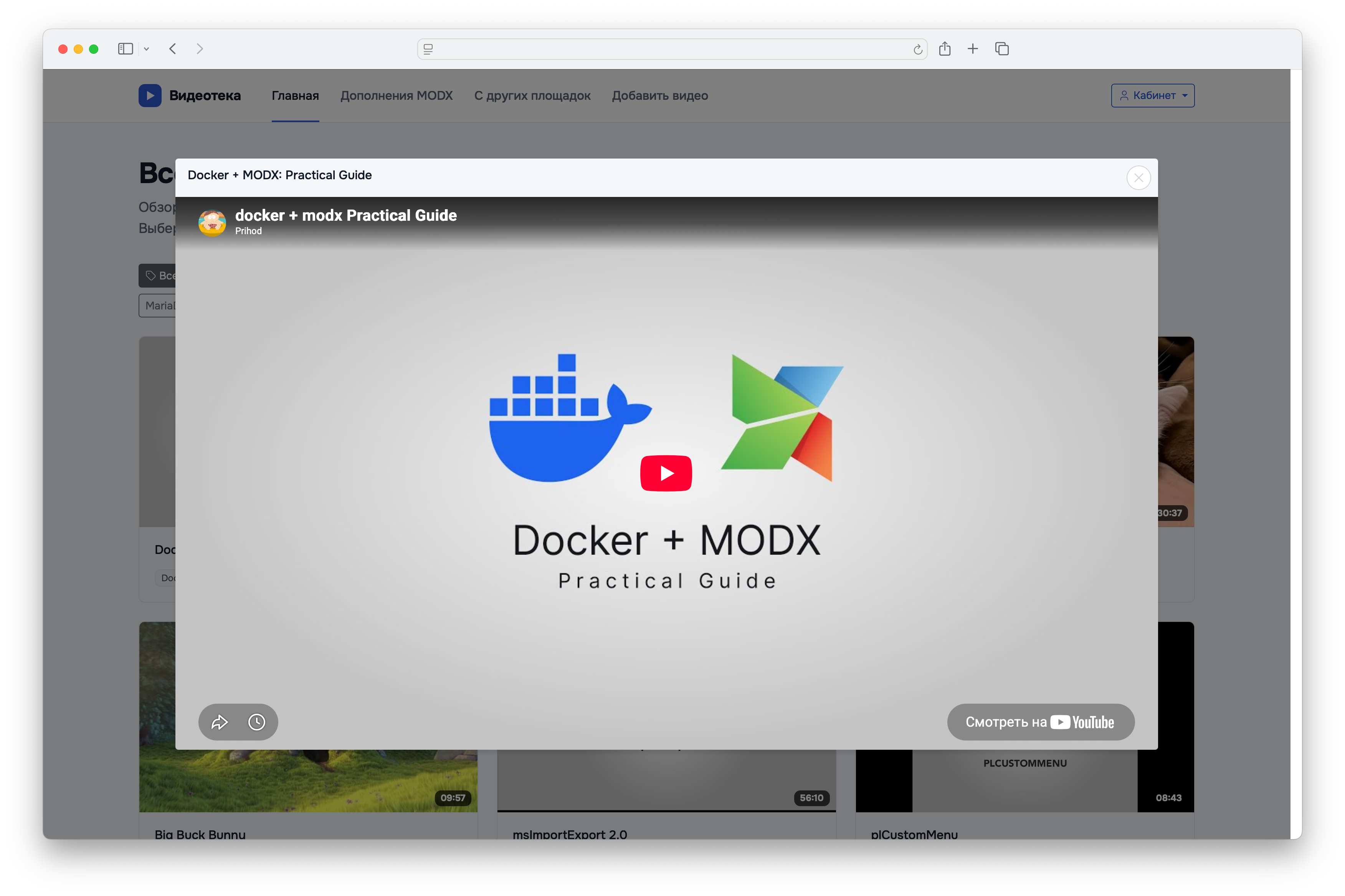
Video playback in a modal window.
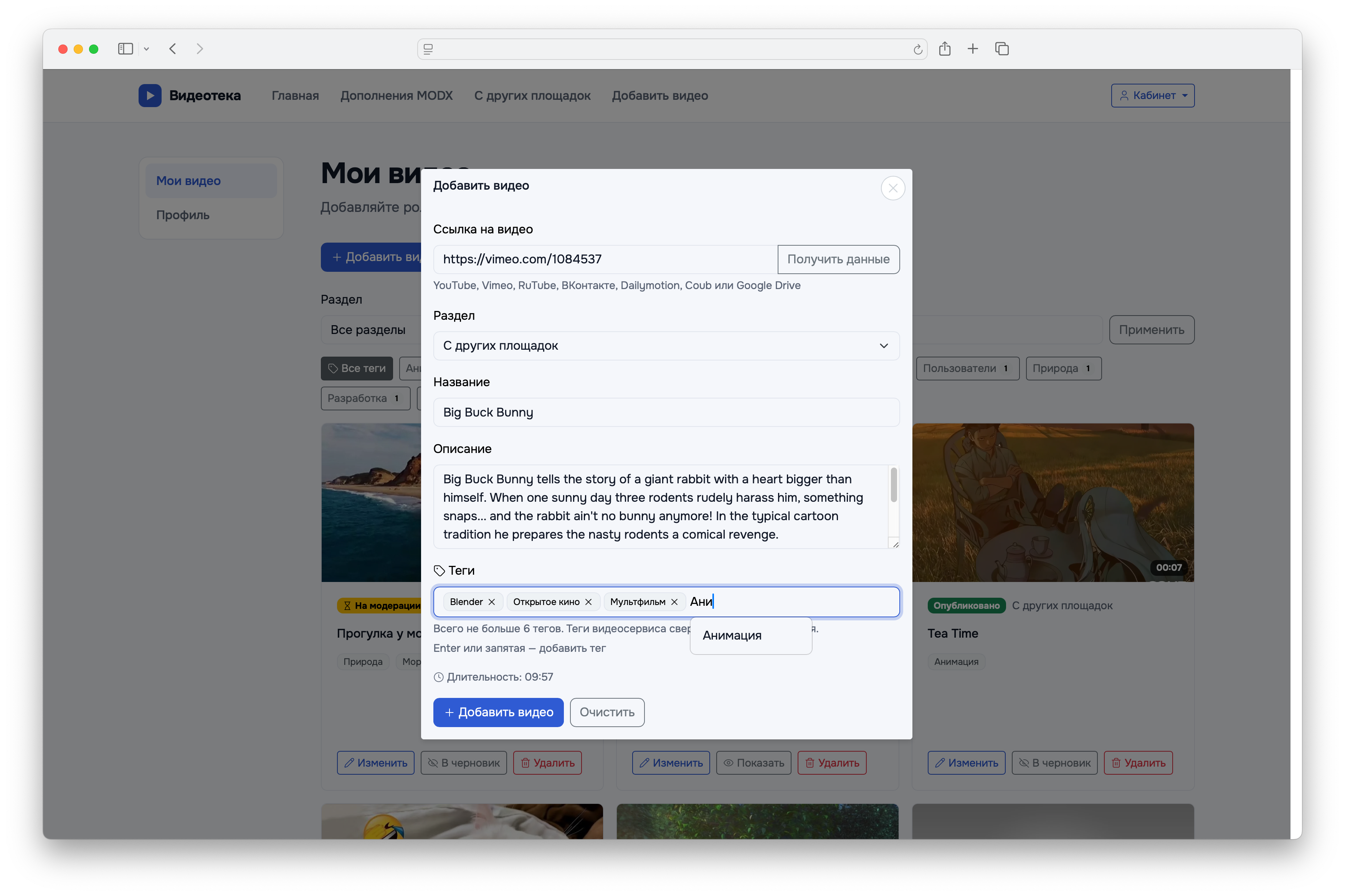
A visitor's video upload form: the data was fetched from the video service by link.
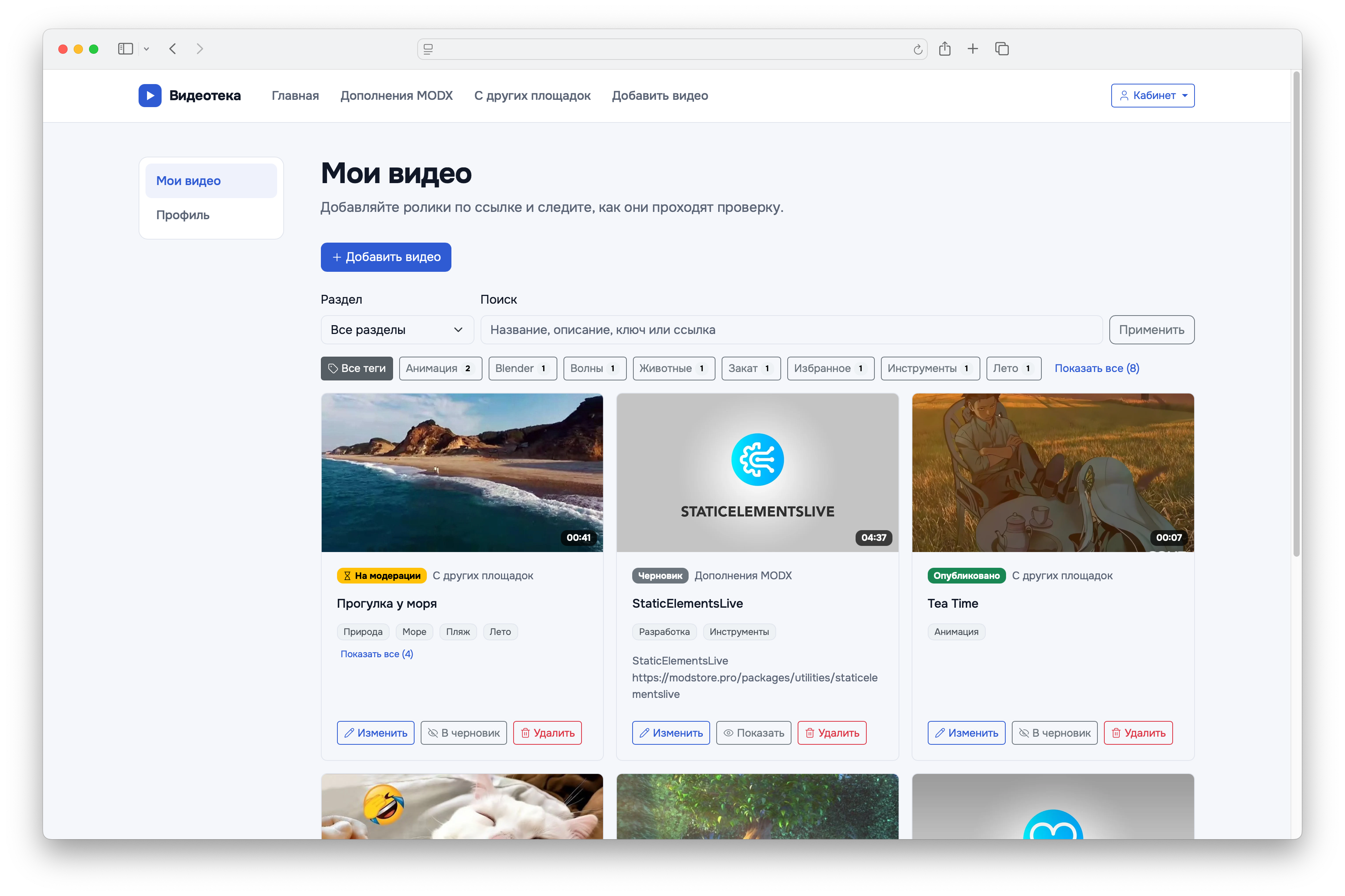
"My videos": statuses, tag cloud, search and author actions.
Installation
Install the ResVideoGallery transport package via the standard MODX package manager (Extras → Installer).
Dependencies
- pdoTools — required: the snippets select videos via pdoFetch, and chunks are rendered via pdoTools (Fenom). pdoTools 3.1.0 or newer is recommended. Earlier 3.x versions (for example, 3.0.3-pl2) have two bugs in pdoTools itself that write to the MODX error log but do not affect the gallery:
Array to string conversioninFetch.phpon every gallery output: the pdoFetch log cannot print nested condition groups;Undefined variable $showLogwhen the page is opened by a user logged in to the manager: pdoPage accesses a parameter that is not in its properties. If you cannot update pdoTools, pass&showLog=`0`to pdoPage.
- Bootstrap 5.3 on the site — the site chunks are built on its classes. Only the styles are needed: the component does not need Bootstrap JavaScript.
- jQuery — only for pdoPage with loading without a page reload (
&ajaxMode): pdoPage itself requires it. The component does not need jQuery.
Initial setup
- Cover media source. On installation, the component creates the file media source "ResVideoGallery Covers" with the
assets/images/videos/directory and writes it to theresvideogallery_cover_sourcesetting. If you want to store covers elsewhere (for example, in cloud storage), specify your own source in this setting: the selected source is not changed when the package is updated. If needed, change the set of thumbnail sizes (resvideogallery_cover_sizes) — see "Covers" in the "System settings" section. - API keys. YouTube requires a YouTube Data API v3 key (
resvideogallery_youtube_api_key), Google Drive requires a Google Drive API key (resvideogallery_google_drive_api_key). The other video services work without keys. See the "Supported video services" section for details. - Templates. By default, the "Video gallery" tab appears on resources with any template. To restrict it to specific templates, use the
resvideogallery_working_templatessetting. - Accepting videos from visitors is disabled by default. If the site will have an upload form, enable
resvideogallery_upload_enabledand check the settings in the "Video uploads by visitors" and "Moderation" sections.
Quick start
All snippets read request parameters (tag filter, search, page), so call them uncached — [[!…]]. The exception is the video upload form: it can also be called cached (see the ResVideoGalleryUpload snippet description).
Gallery with a tag cloud and pagination
modx
[[!ResVideoGalleryTags? &tagsVisible=`15`]]

<div id="pdopage">
    <div class="rows rvg-gallery rvg-hover-reveal row g-3">
        [[!pdoPage?
        &element=`ResVideoGallery`
        &limit=`12`
        &ajaxMode=`button`
        &tplWrapper=``
        ]]
    </div>
    <div class="d-flex justify-content-center mt-4">[[!+page.nav]]</div>
</div>
pdoPage passes all its parameters to the snippet, so the gallery wrapper is disabled (&tplWrapper=``), and the card container is written in the page markup — inside #pdopage, with the rows class. The rvg-hover-reveal class sets the hover effect — see "CSS customization".
Without pdoPage, a single call is enough — the container is provided by the resvideogallery.gallery wrapper chunk:
modx
[[!ResVideoGallery? &limit=`0`]]By default, the videos of the current resource are displayed. Videos of other resources are selected with the &resources and &parents parameters.
Video upload form
modx
[[!ResVideoGalleryUpload? &modal=`1`]]With &modal=`1`, the page shows an "Add video" button, and the form opens in a window. Without it, the form is displayed right on the page. The video goes to the current resource; sections for the visitor to choose from are set with the &resources parameter.
My videos
modx
[[!ResVideoGalleryUpload? &modal=`1` &modalSuccess=`insert`]]

[[!pdoPage?
&element=`ResVideoGalleryAuthor`
&limit=`12`
&tplWrapper=`resvideogallery.author`
]]
<div class="d-flex justify-content-center mt-4">[[!+page.nav]]</div>
Only a user logged in to the site sees the list; for a guest the snippet outputs nothing. With &modalSuccess=`insert`, a video added via the window appears in the list immediately without a page reload.
For "My videos", pdoPage is called without ajaxMode, and the resvideogallery.author wrapper is passed explicitly: it holds the signed list parameters and the API address; without it the card buttons will not work.
For detailed information on all parameters of each snippet, see the "Snippets" section.
Supported video services
The video service is detected from the link automatically. Only links with the http or https scheme are recognized.
| Video service | Recognized links | Requirements | What is fetched |
|---|---|---|---|
| YouTube | youtube.com/watch?v=…, youtube.com/shorts/…, youtube.com/embed/…, youtu.be/…, youtube-nocookie.com/embed/… | YouTube Data API v3 key in resvideogallery_youtube_api_key | Title, description, duration, cover, tags |
| Vimeo | vimeo.com/<id>, vimeo.com/<id>/<hash> ("unlisted" videos), player.vimeo.com/video/<id>, links from channels and groups | — | Title, description, duration, cover |
| RuTube | rutube.ru/video/…, rutube.ru/video/private/…, rutube.ru/shorts/…, rutube.ru/play/embed/… | — | Title, description, duration, cover, tags |
| VK | vk.com/video-…_…, vkvideo.ru/video-…_… (video page), vk.com/video_ext.php?oid=…&id=…&hash=…, vkvideo.ru/video_ext.php?… (player) | — | Title, description, duration, cover |
| Dailymotion | dailymotion.com/video/…, dailymotion.com/embed/video/…, dai.ly/… | — | Title, description, duration, cover, tags |
| Coub | coub.com/view/…, coub.com/embed/… | — | Title, description, duration, cover, tags |
| Google Drive | drive.google.com/file/d/<id>/… | Google Drive API key in resvideogallery_google_drive_api_key; file access "Anyone with the link" | Title, description, duration, cover |
| TikTok | tiktok.com/@author/video/<id>, tiktok.com/embed/…, tiktok.com/player/v1/…; short vm.tiktok.com/…, vt.tiktok.com/…, tiktok.com/t/… | — | Title, description, cover, tags (from caption hashtags) |
instagram.com/p/…, instagram.com/reel/…, instagram.com/reels/…, instagram.com/tv/… (including with a username and /embed), instagr.am/p/… | — | Cover | |
facebook.com/<page>/videos/<id>, facebook.com/watch/?v=<id>, facebook.com/reel/<id>, embed code facebook.com/plugins/video.php?href=…; short fb.watch/…, facebook.com/share/v/…, facebook.com/share/r/… | — | Title, description, tags (from hashtags) — for regular videos; cover |
Google API keys. Restrict the key by the server IP address, not by HTTP referrer: API requests are made from the server and carry no Referer header, so Google will reject a key restricted by site. The YouTube Data API quota is counted per Google Cloud project, not per key: a new key in the same project will not restore an exhausted quota. When the quota runs out, the manager and the visitor see a message about the exhausted request limit.
VK. No key is needed: the data is taken from the video_ext.php player page. For a public video, a link to its page is enough (vk.com/video-…, vkvideo.ru/video-…, including one opened over the feed — vk.com/video?z=video-…). A hidden video available only by link is given by VK for embedding only with the hash parameter — it needs a player link: in the video menu "Share" → "Export", the address from the src of the embed code (from vk.com or vkvideo.ru, both work).
Google Drive. The video must be shared with anyone who has the link: a visitor cannot watch a private file anyway. The resvideogallery_google_drive_html5_player setting shows Google Drive videos in a <video> tag instead of the Google player; Google may not serve files larger than ~100 MB, and then the video will not play.
TikTok, Instagram, Facebook. No keys or tokens are needed. None of the three services provides the duration — the field stays empty. Instagram and Facebook Reels do not provide a title either: it is entered manually (in the visitor form, the "Title" field then becomes required). Instagram and Facebook covers are taken from the embed pages of these services; if the video author has disabled embedding, there will be no cover — choose your own.
Short links from TikTok and Facebook are expanded by the server on save, in "Fetch data" and in the visitor form; the full video address is stored in the database. The server needs internet access for this. Redirects are followed only over https and only within the video service's own domains. If the link is outdated (TikTok redirects it to its home page) or Facebook did not let the server in without logging in, an error appears — paste the full video address.
Vertical videos. TikTok, Instagram and Facebook Reels (a link like facebook.com/reel/…) play in a vertical 9:16 window, and in inline mode the card stretches in height during playback. The card grid stays 16:9: a vertical cover is cropped to the center.
Tags from the video service are saved up to 30 — the first ones in the order the service returned them; duplicates that differ only in case are discarded.
If the video service refuses, the error text explains the reason: no video service recognized the link; the video service does not know such a video; the video service is not configured (no API key); the request limit is exhausted; the short link could not be expanded; the video service did not respond.
Working in the manager
The "Video gallery" tab on the resource page
Videos belong to a resource, so they are managed on the resource page — in the "Video gallery" tab. The tab appears on a saved resource whose template is listed in the resvideogallery_working_templates setting (empty — any template).
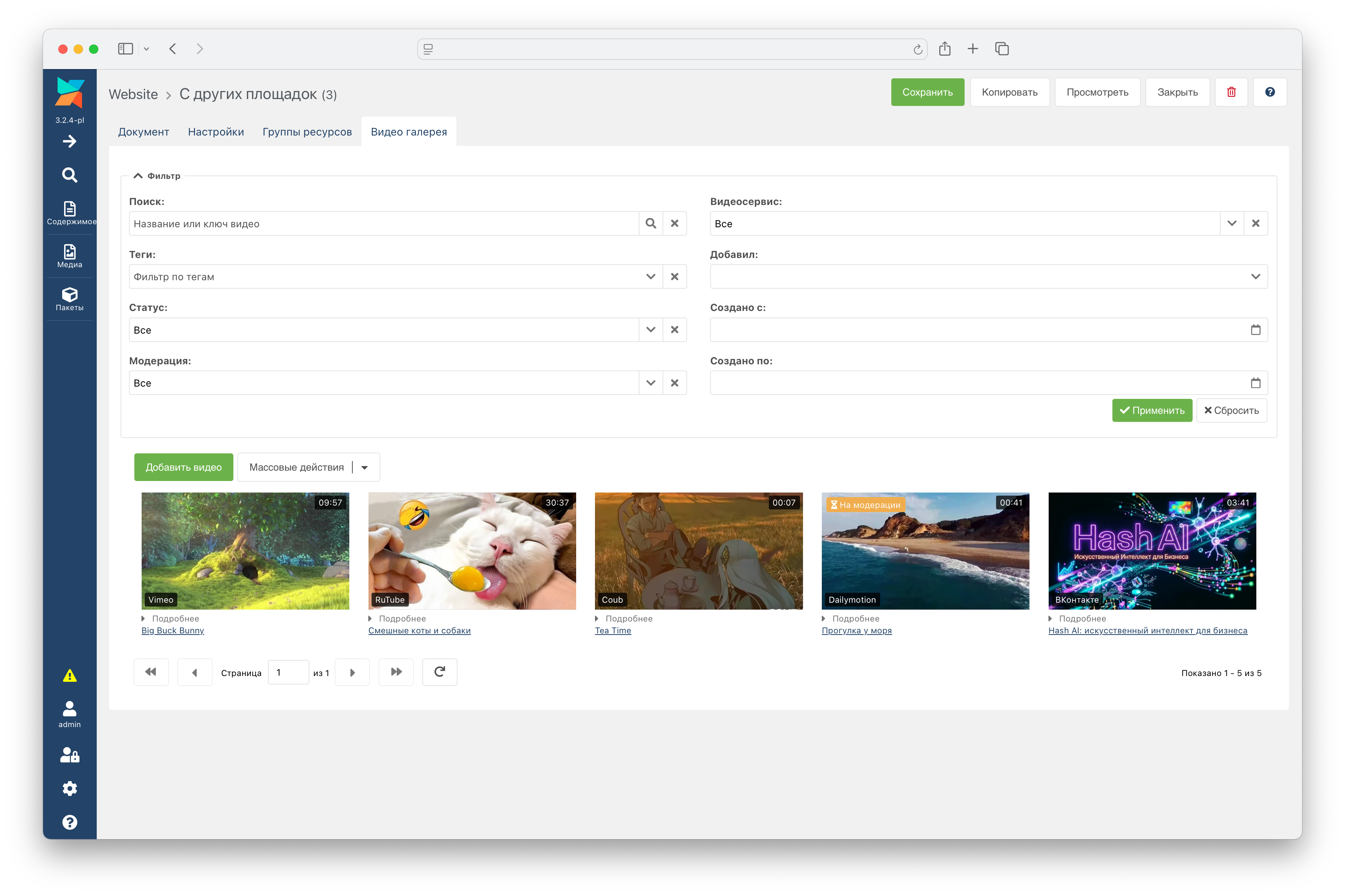
Each video is a card: cover, duration, a "Pending moderation" mark and a collapsible "Details" block with the id, position and author (whether it is expanded or collapsed by default is set by resvideogallery_card_meta_expanded). Clicking the title opens the video on the video service.
- Video order is changed by dragging cards or by a number in the "Position" field of the video window.
- Selecting several cards — with Ctrl/⌘ or Shift.
- Context menu of a card: "Edit", "Approve" (for videos pending moderation), "Open on video service", "Restore cover from video service" (if the current cover was chosen manually), "Delete".
- Bulk actions: enable, disable, approve and delete the selected videos; "Regenerate thumbnails" for all videos of the resource — after changing the size set.
- Delete unused cover files — a bulk action item on the extra page (Extras → ResVideoGallery, which lists the videos of all resources). It removes from the cover source the directories of deleted videos and of sizes no longer in
resvideogallery_cover_sizes. It first shows how many directories will be deleted and deletes them only after confirmation; directories that do not look like covers are left untouched, and their number is reported. - Filter above the videos: search by title and video key, tags, status (active/inactive), moderation, video service, author, date added range.
Video window
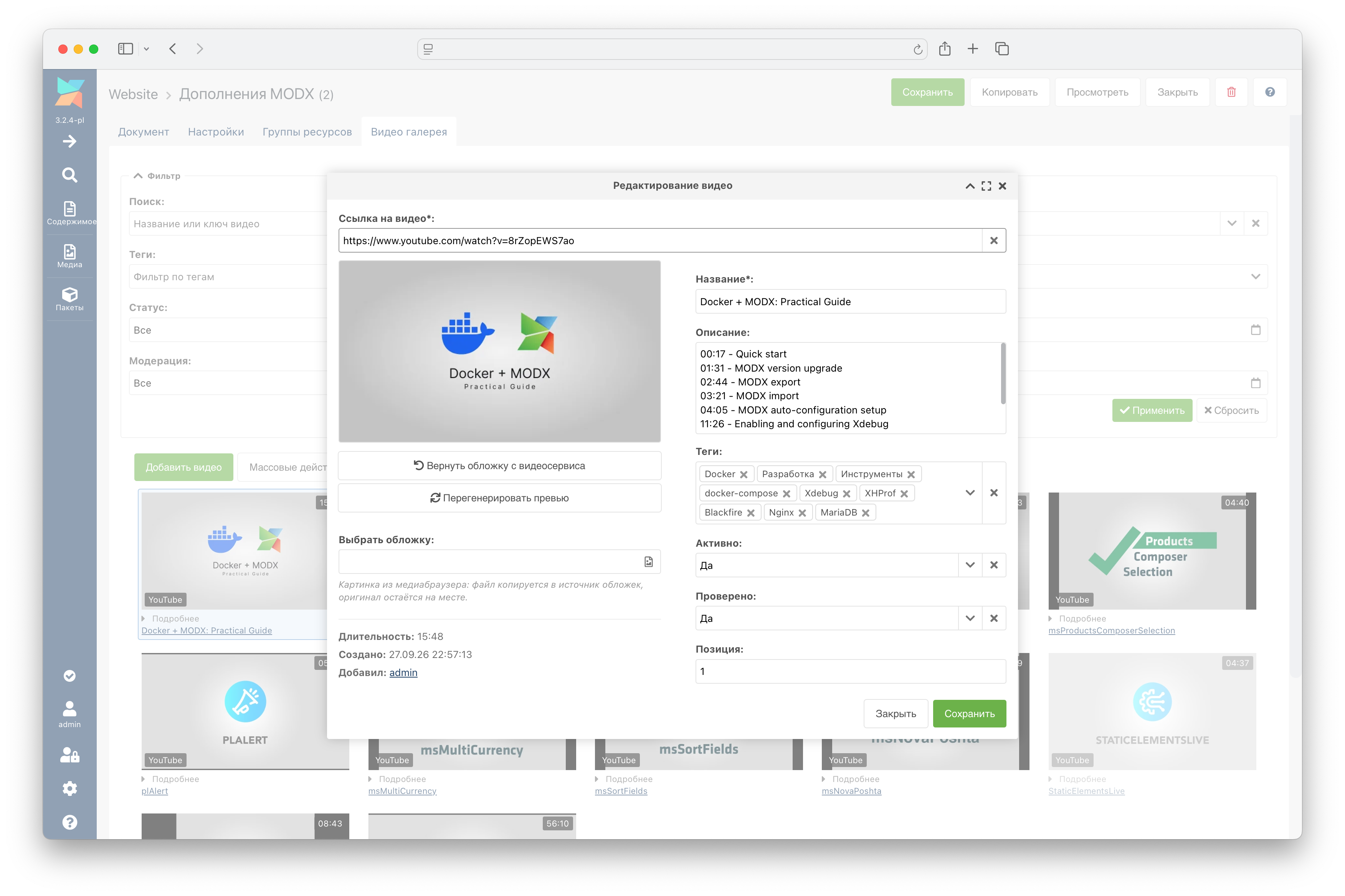
- Video link. Data from the video service is fetched automatically — right after pasting a link or half a second after manual input. If the automatic request did not happen, the button in the link field starts it; while the request is running, a spinner rotates on the button. Once the data is received, the same button (a cross) clears the form: the link, title, description, tags and selected cover. Status, moderation and position are not changed by clearing. If the fields are already filled, the window asks for confirmation before replacing them.
- Cover. By default, the video service cover is used. Your own image is chosen via "Choose cover" — in the media browser you can also upload a file from your computer (jpg, png, webp, avif). The file is copied to the cover source, the original stays in place. The "Restore cover from video service" and "Regenerate thumbnails" buttons work for a saved video.
- Tags — as chips, with suggestions from tags that already exist on the site; new tags can be entered.
- Active — the video is displayed on the site. Verified — the video has passed moderation (see "Moderation").
Component page
The "Video gallery" page in the components menu shows the videos of all resources (newest first) with the same filter and a "Resource" field. There is no dragging here: video order only makes sense within a single resource.
Permissions
| Permission | What it grants |
|---|---|
resvideogallery_menu | Component menu item |
resvideogallery_videos_list | Viewing the video list and tag suggestions |
resvideogallery_videos_view | Opening a video in the window |
resvideogallery_videos_save | Creating and editing videos, ordering, enabling and disabling, approving, working with covers |
resvideogallery_videos_remove | Deleting videos |
Emptying the trash
When the resource trash is emptied, the videos of the deleted resources are deleted too — along with their tags and covers. Only videos of resources that MODX actually deleted are removed. The remove events are fired for each video (see "MODX system events"), and a plugin can keep a video by rejecting the removal.
Snippets
ResVideoGallery - Gallery output
Displays the videos of resources. Works on its own or as a pdoPage element. Videos pending moderation are never displayed.
Parameters
| Name | Description |
|---|---|
| resources | Comma-separated ids of resources whose videos are displayed. A minus before an id excludes the resource. If neither resources nor parents is set — videos of the current resource. |
| parents | Comma-separated parent ids: videos of their child resources are displayed (the parent itself is not included). |
| depth | Search depth of child resources for parents. Default: 10. |
| showInactive | Also display disabled videos and videos outside the publication period. Default: 0. |
| tags | Display only videos with these tags (comma-separated, any of them is enough). |
| tagsVar | Name of the GET parameter of the tag filter — the ResVideoGalleryTags tag cloud filters by it. Default: tags. |
| player | Where to play videos: modal — in a modal window, inline — right inside the card. Default: modal. |
| autoPlay | Start the video right after the player opens. Default: 1. |
| coverSize | Cover thumbnail size from the resvideogallery_cover_sizes set. Empty — from the resvideogallery_cover_default_size setting. |
| videoTagsLimit | How many video tags to display on the card. 0 — all. Default: 0. |
| videoTagsVisible | How many video tags to show at once; the rest are under the "Show all (N)" button. 0 — all. Default: 0. |
| tpl | Card chunk. Default: resvideogallery.card. |
| tplWrapper | Wrapper chunk for all cards, placeholder {$output}. An empty value disables the wrapper — required when calling via pdoPage. Default: resvideogallery.gallery. |
| wrapIfEmpty | Display the wrapper even if there are no videos (it contains the text "No videos found"). Default: 1. |
| limit | How many videos to display. 0 — all. Default: 12. |
| offset | How many videos to skip from the start of the selection. Default: 0. |
| sortby | Sorting — a video field with the RvgVideo. alias, or JSON. Empty — by position in the resource. |
| sortdir | Sort direction: ASC or DESC. |
| where | Additional selection conditions in JSON format. |
| return | What to return: data — card HTML, json — video data in JSON, ids — comma-separated video ids. Default: data. |
| toPlaceholder | Write the result to this placeholder instead of outputting it. |
| outputSeparator | Separator between cards. Default — a line break. |
| totalVar | Placeholder with the total number of videos (read by pdoPage). Default: total. |
| showLog | Show the pdoTools log to the manager. Default: 0. |
Other parameters (select, leftJoin, groupby, etc.) are passed to pdoFetch as is. Specify field names in conditions and sorting with the RvgVideo. alias: rank is a reserved word in MySQL 8.
Example call
modx
[[!ResVideoGallery?
&parents=`5`
&limit=`8`
&player=`inline`
&videoTagsVisible=`3`
]]
ResVideoGalleryTags - Tag cloud for filtering the gallery
Displays the tags of videos from the same resources as the gallery. A tag link filters the gallery on the current page (the tagsVar GET parameter) and resets the pdoPage page. The selected tag is always visible, even if it did not fit into the limit.
Parameters
| Name | Description |
|---|---|
| resources | Comma-separated resource ids, a minus excludes. Default — the current resource. Set them the same way as for the gallery. |
| parents | Comma-separated parent ids. |
| depth | Search depth of child resources. Default: 10. |
| showInactive | Include tags of disabled videos. Default: 0. |
| tagsVar | Name of the GET parameter of the tag filter. Default: tags. |
| pageVarKey | Name of the pdoPage page GET parameter — cloud links reset it. Default: page. |
| sortby | Order: count — most popular first, tag — alphabetically. Default: count. |
| limit | How many tags to display. 0 — all. Default: 0. |
| tagsVisible | How many tags to show at once; the rest are under the "Show all (N)" button. 0 — all. Default: 0. |
| tpl | Cloud chunk. Default: resvideogallery.tags. |
Example call
modx
[[!ResVideoGalleryTags? &limit=`30` &tagsVisible=`12`]]ResVideoGalleryUpload - Video upload form for visitors
Displays a form for adding a video by link: the visitor pastes a link, the data is fetched from the video service automatically, and they can edit the title, description and tags if they wish. While the resvideogallery_upload_enabled setting is disabled, the snippet outputs nothing.
An empty parameter means "as in the system setting"; a parameter overrides the setting.
Parameters
| Name | Description |
|---|---|
| resource | Id of a single resource: the video always goes to it. Combined with resources into a common list. |
| resources | Comma-separated ids of resources where the visitor can add a video. One — the video goes to it; several — the visitor chooses the section in the form. Empty — from the resvideogallery_upload_resources setting, and if that is empty too — the current resource. |
| onlyAuth | 1 — only logged-in users, 0 — guests too. Empty — from the resvideogallery_upload_only_auth setting. |
| userGroups | Comma-separated names of user groups allowed to add videos. Empty — from the resvideogallery_upload_user_groups setting. |
| moderation | 1 — the video waits for review, 0 — goes to the site immediately. Empty — from the resvideogallery_moderation setting. |
| moderationSkipGroups | Comma-separated names of groups whose videos skip moderation. Empty — from the resvideogallery_moderation_skip_groups setting. |
| allowTags | 1 — the visitor can add their own tags to the video service tags (no more than 10). Empty — from the resvideogallery_upload_allow_tags setting. |
| newTags | 1 — any tag can be entered, 0 — only chosen from tags that videos on the site already have. Empty — from the resvideogallery_upload_new_tags setting. |
| tagsSuggestMin | After how many typed characters to show tag suggestions (from 1 to 10). Default: 2. |
| tagsMax | Total number of tags a video can have, including video service tags. 0 — no limit. Empty — from the resvideogallery_upload_tags_max setting. |
| tagsRemove | 1 — the visitor can remove tags that came from the video service. Empty — from the resvideogallery_upload_tags_remove setting. |
| tpl | Form chunk. Default: resvideogallery.upload. |
| modal | 1 — a button instead of the form, the form opens in a modal window. Default: 0. |
| modalButton | Lexicon key of the button text (not the text itself). Default: resvideogallery_upload_modal_button. |
| modalButtonClass | CSS class of the button. Default: btn btn-primary. |
| modalSuccess | What to do after a successful submission: stay — the window stays open, the form is cleared; close — the window closes, the message is shown below the button; insert — like close, and the video immediately appears in "My videos" on the same page. Default: stay. |
| modalCloseDelay | After how many milliseconds to close the window in the close and insert modes (from 0 to 60000). Default: 2000. |
| tplModal | Button and window chunk. Default: resvideogallery.upload.modal. |
How the form works
- Video data is fetched automatically — right when a link is pasted and 600 ms after manual input. The automatic request does not overwrite a title and description entered by the visitor. The "Fetch data" button fills in everything again.
- The server fetches the video service tags again on submission — it does not trust what the form sent. The "10 own tags" limit is not configurable.
- With
&tagsMax, the video service tags come first (without those removed by the visitor), then the visitor's own; everything over the limit is not saved. Excess video service tags are visible in the form but highlighted. - With
&newTags=`0`, "existing tags" are exactly what the suggestions show: tags of videos visible on the site in the form's sections. A tag shorter than&tagsSuggestMincannot be selected — set the threshold no higher than the length of the shortest tags on the site. - The "Clear" button clears the fields, tags and video information.
- Video count limits are set only by settings:
resvideogallery_upload_limit(total per user) andresvideogallery_upload_guest_daily_limit(per guest per day from one address).
Caching. The form can be called cached: only the API address and the signed form parameters get into the markup, and everything that depends on the visitor (whether to allow them, limits, CSRF token) the form requests from the server when the page loads. But if you changed the call parameters or a setting that the form displays (tag field, tag limit), clear the page cache: the cache holds markup with the old values.
Example call
modx
[[!ResVideoGalleryUpload?
&resources=`5,6,7`
&onlyAuth=`0`
&allowTags=`1`
&tagsMax=`15`
&modal=`1`
]]
ResVideoGalleryAuthor - My videos
Displays the videos of the logged-in user — published, drafts and pending review — with statuses and action buttons. For a guest the snippet outputs nothing. Works on its own or as a pdoPage element (without ajaxMode).
Call it only uncached [[!ResVideoGalleryAuthor]]: a cached call would put the first visitor's list into the page cache for everyone.
Parameters
| Name | Description |
|---|---|
| resources | Comma-separated ids of sections whose videos are shown to the author. Empty — all sections. |
| resourceVar | Name of the GET parameter of the section filter. Default: rvg_resource. |
| allowRemove | 1 — the author can delete their video. Empty — from the resvideogallery_allow_remove setting. |
| allowDraft | 1 — the author can move a video from the site to drafts and back. Empty — from the resvideogallery_allow_draft setting. |
| allowEdit | 1 — the author can edit the title and description. Empty — from the resvideogallery_allow_edit setting. |
| allowTags | 1 — the author can edit tags (only together with allowEdit). Empty — from the resvideogallery_allow_edit_tags setting. |
| newTags | 1 — any tag can be entered, 0 — only chosen from existing ones. Empty — from the resvideogallery_edit_new_tags setting. |
| tagsSuggestMin | After how many typed characters to show tag suggestions (from 1 to 10). Default: 2. |
| remoderation | 1 — a video whose title, description or tags were changed by the author goes back to review. Empty — from the resvideogallery_remoderation setting. |
| moderationSkipGroups | Comma-separated names of groups whose videos skip re-review. Empty — from the resvideogallery_moderation_skip_groups setting. |
| tagVar | Name of the tag cloud GET parameter. Default: rvg_tag. |
| tplTags | Tag cloud chunk. Default: resvideogallery.tags. |
| tagsSortby | Cloud order: count — most popular first, tag — alphabetically. Default: count. |
| tagsLimit | How many tags to show in the cloud. 0 — all. Default: 0. |
| tagsVisible | How many cloud tags to show at once; the rest are under the "Show all (N)" button. 0 — all. Default: 0. |
| videoTagsLimit | How many video tags to display on the card. 0 — all. Default: 0. |
| videoTagsVisible | How many video tags to show at once. 0 — all. Default: 0. |
| searchVar | Name of the search GET parameter. Default: rvg_q. |
| pageVarKey | Name of the pdoPage page GET parameter. Default: page. |
| coverSize | Cover thumbnail size. Empty — from the resvideogallery_cover_default_size setting. |
| tpl | Card chunk. Default: resvideogallery.author.card. Chunk name only: @INLINE will work for the list, but a card inserted after adding a video via the window will be rendered with the default chunk. |
| tplWrapper | Wrapper chunk. Default: resvideogallery.author. Do not make it empty: it holds the signed list parameters and the API address. |
| wrapIfEmpty | Display the wrapper even if there are no videos. Default: 1. |
| limit | How many videos to display. 0 — all. Default: 0. |
| sortby | Sorting. Empty — by date added, newest first. |
| sortdir | Sort direction. If sortby is set and sortdir is empty — DESC. |
| toPlaceholder | Write the result to this placeholder instead of outputting it. |
The snippet does not accept the where, parents, tags parameters: it always builds the selection itself — only the author's videos.
Author capabilities
- Statuses: "Published", "Draft", "Pending moderation". "To draft" and "Publish" do not change the review status.
- "Publish" makes the video active and thereby overrides the manager's "Disable". You can hide a video from the author by unchecking "Verified": the author cannot change it.
- Tag cloud — tags of all the author's videos in the selected section, including drafts and videos pending moderation. The section and tag filter together; the selected tag is always visible.
- Search — by video link (exact match), by video key or by text in the title and description; from 2 characters.
- The filter form is displayed if the author has at least one video; the section choice — if there are two or more sections.
- The ▶ button on the cover opens the same player window as in the gallery.
Example call
modx
[[!ResVideoGalleryAuthor?
&allowTags=`1`
&tagsVisible=`15`
&videoTagsVisible=`6`
]]
Chunks and placeholders
All chunks are rendered via pdoTools, the syntax is Fenom. To change the appearance, create a copy of the chunk and specify its name in the snippet parameter.
Important when editing chunks
- Output values from the database and from the request only with the
|escmodifier. After Fenom, MODX parses the HTML once more for[[ ]]tags, and|edoes not escape them: a video title from the video service like[[++mail_smtp_pass]]would output the system setting. - Keep the
data-rvg-*attributes — the component scripts rely on them.
resvideogallery.card
Video card (the ResVideoGallery snippet, tpl parameter).
| Placeholder | Description |
|---|---|
| id | Video ID |
| resource_id | ID of the resource the video belongs to |
| title, description | Title and description |
| url | Link to the video on the video service |
| provider, video_key | Video service (youtube, vimeo, rutube, vkontakte, dailymotion, coub, googledrive, tiktok, instagram, facebook) and video key |
| duration | Duration in seconds |
| duration_formatted | Duration like 03:22 or 1:03:22; empty if unknown |
| cover_url | Address of the cover of the required size or of the placeholder image |
| cover_srcset | The srcset value: thumbnails of the same shape and format as cover_url, with width (… 320w, … 640w); empty for the placeholder image |
| tags | All video tags |
| tagBadges | Tags for display on the card, respecting videoTagsLimit: an array of {tag, extra}, extra — a tag under "Show all" |
| embed_url | Video service player address; embed_autoplay_url — with autoplay |
| player | iframe or html5 (Google Drive with the resvideogallery_google_drive_html5_player setting); for html5 — src and mime_type |
| player_mode | modal or inline — from the player parameter |
| player_ratio | Player aspect ratio: 16x9 or 9x16 (TikTok, Instagram, Facebook Reels) |
| autoplay | 1 — autoplay |
| idx | Card sequence number |
| active, moderated, rank, createdon, createdby, pub_date, unpub_date | Video fields |
The play button is button[data-rvg-play] with the attributes data-rvg-mode, data-rvg-autoplay, data-embed, data-embed-autoplay, data-ratio, data-player, data-src, data-mime, data-title; the cover block is [data-rvg-media] (in inline mode the player takes its place). If your card chunk lacks data-ratio="{$player_ratio|esc}", all videos play in 16:9.
The image sizes attribute in the chunk is designed for the col-12 col-sm-6 col-lg-4 grid (three columns on a wide screen). If you change the grid, adjust sizes too, otherwise the browser will pick thumbnails of the wrong size.
resvideogallery.gallery
Gallery wrapper (the ResVideoGallery snippet, tplWrapper parameter).
| Placeholder | Description |
|---|---|
| output | Rendered cards |
resvideogallery.modal
Player modal window. It is included once per page — by the gallery with &player=`modal` and by "My videos". It is not set by a parameter: to change the window, edit the chunk itself, keeping the data-rvg-modal, data-rvg-modal-title, data-rvg-modal-body, data-rvg-modal-close attributes.
resvideogallery.tags
Tag cloud (the ResVideoGalleryTags snippet, tpl parameter; "My videos" — tplTags parameter).
| Placeholder | Description |
|---|---|
| tags | Array of tags: tag, count (number of videos), active (tag is selected), url (filter link), extra (tag under "Show all") |
| clearUrl | Link without the tag filter |
| hasActive | Whether at least one tag is selected |
resvideogallery.upload
Video upload form (the ResVideoGalleryUpload snippet, tpl parameter).
| Placeholder | Description |
|---|---|
| token | Signed form parameters |
| apiUrl | REST API address |
| formId | Unique form id |
| resources | Sections to choose from (id, pagetitle) — only if there are two or more |
| allowTags | Display the tag field |
| tagsExisting | 1 — existing tags only |
| tagsSuggestMin | Tag suggestion threshold |
| tagsMax | Tag limit (0 — no limit) |
| tagsRemove | Video service tags can be removed |
| modal | The form is displayed in a window |
resvideogallery.upload.modal
Form button and modal window (the ResVideoGalleryUpload snippet with &modal=`1`, tplModal parameter).
| Placeholder | Description |
|---|---|
| form | Rendered form from the tpl chunk |
| formId | Form id |
| buttonText | Button text (from the modalButton key) |
| buttonClass | CSS class of the button |
| success | Mode after submission: stay, close, insert |
| delay | Window close delay, ms |
The form window must not carry the data-rvg-modal attribute — otherwise videos will start opening in the form window.
resvideogallery.author
"My videos" wrapper (the ResVideoGalleryAuthor snippet, tplWrapper parameter).
| Placeholder | Description |
|---|---|
| output | Rendered cards |
| token, apiUrl, formId | Signed list parameters, REST API address, list id |
| cloud | Rendered tag cloud |
| sections | Sections for the filter: id, pagetitle, selected |
| showFilter, showSections | Display the filter form / the section choice |
| search, searchVar | Search string and the name of its GET parameter |
| selected, resourceVar | Selected section and the GET parameter name |
| selectedTag, tagVar | Selected tag and the GET parameter name |
| hasFilter, resetUrl | Whether a filter is set; the "Reset" link |
| filterAction, filterHidden, pageVar | Internal values for the filter form |
resvideogallery.author.card
Card in "My videos" (the ResVideoGalleryAuthor snippet, tpl parameter). All placeholders of the gallery card (except idx) plus:
| Placeholder | Description |
|---|---|
| status | published, draft or moderation |
| statusText, statusBadge | Status label and Bootstrap badge class |
| canRemove, canDraft, canEdit, canTags | Which actions are available to the author |
| tagsExisting, tagsSuggestMin | Tag suggestion mode and threshold in the "Edit" form |
| resourceTitle | Section title |
In your card chunk, output tag badges from tagBadges, not from tags: the videoTagsLimit / videoTagsVisible limits are not applied to tags. You need to add the ▶ button to your chunk yourself.
System settings
The settings are grouped by area (namespace resvideogallery).
Gallery
resvideogallery_working_templates— comma-separated template ids; resources with these templates get the "Video gallery" tab. A minus forbids a template:-7— all except the 7th; a prohibition is stronger than a permission,5,7,-7leaves only the 5th. Empty — any template.resvideogallery_card_meta_expanded— expand the "Details" block on cards in the manager. Collapsed by default.
Video services
resvideogallery_youtube_api_key— YouTube Data API v3 key.resvideogallery_google_drive_api_key— Google Drive API key.resvideogallery_google_drive_html5_player— play Google Drive videos in a<video>tag instead of the Google player. Disabled by default.
Covers
resvideogallery_cover_source— the media source where new covers are written. Already saved covers stay in their source. On installation, if the setting is empty, the component creates the "ResVideoGallery Covers" source (assets/images/videos/). When the component is uninstalled, the source and the cover files remain.resvideogallery_cover_sizes— the set of thumbnail sizes in JSON: size name →width,height,quality(1–100),mode(cover— crop to size,contain— fit inside,max— only downscale,stretch— stretch),format(jpg,png,webp,avif). The size name is lowercase Latin letters, digits and_. After a change, regenerate the thumbnails (a bulk action in the "Video gallery" tab). Cards on the site give the browser not a single image but asrcsetlist: the default size and other sizes with the same aspect ratio and format. The browser picks the thumbnail for the column width and screen density itself — lighter on a phone, sharper on a Retina display. A size of a different shape (for example, square) or a different format is not included in the list.json{ "thumb": {"width": 320, "height": 180, "quality": 80, "mode": "cover", "format": "webp"}, "medium": {"width": 640, "height": 360, "quality": 85, "mode": "cover", "format": "webp"}, "large": {"width": 1280, "height": 720, "quality": 85, "mode": "cover", "format": "webp"} }resvideogallery_cover_default_size— which cover size to show for videos in the manager and on the site (on the site — together with the other sizes of the same shape insrcset). Default:medium.resvideogallery_cover_placeholder— image for videos without a cover;{assets_url}can be used. Default — the component's placeholder image{assets_url}components/resvideogallery/img/cover-placeholder.webp.
A cover is stored in the source as the original <video id>/<hash>.<extension> and thumbnails <video id>/<size>/<hash>.<format>. When a video is deleted, its directory is deleted entirely.
Site frontend
resvideogallery_frontend_css— the component stylesheet on the site. Default:{assets_url}components/resvideogallery/css/web/resvideogallery.min.css. Empty — do not include (for example, if the styles are bundled into the site's own styles).resvideogallery_frontend_js— the component script on the site. Default:{assets_url}components/resvideogallery/js/web/resvideogallery.min.js. Empty — do not include.
Video uploads by visitors
resvideogallery_upload_enabled— the master switch of the upload form: "No" — the form is not displayed, and the server refuses to accept videos. Disabled by default.resvideogallery_upload_only_auth— only logged-in users can add videos. Default: yes.resvideogallery_upload_user_groups— comma-separated names of groups allowed to add videos. Empty — any logged-in user.resvideogallery_upload_limit— the total number of videos one user can have. 0 — no limit.resvideogallery_upload_guest_daily_limit— how many videos a guest can add from one address per day. 0 — no limit. Default: 3.resvideogallery_upload_resources— comma-separated ids of resources where the visitor can add a video. Empty — the resource of the page with the form.resvideogallery_upload_allow_tags— the visitor can add their own tags. Default: no.resvideogallery_upload_new_tags— the visitor can enter any tag ("No" — only choose an existing one). Default: yes.resvideogallery_upload_tags_max— the total number of tags a video can have, including video service tags. 0 — no limit.resvideogallery_upload_tags_remove— the visitor can remove video service tags. Default: no.
Moderation
resvideogallery_moderation— a new visitor video waits for approval in the manager. Default: yes.resvideogallery_remoderation— a video changed by the author goes back to review. Default: yes.resvideogallery_moderation_skip_groups— comma-separated names of groups whose videos skip review.
See the "Moderation" section for details.
My videos
resvideogallery_allow_remove— the author can delete their video (along with tags and cover). Default: yes.resvideogallery_allow_draft— the author can move a video from the site to drafts and back. Default: yes.resvideogallery_allow_edit— the author can edit the title and description. Default: yes.resvideogallery_allow_edit_tags— the author can edit tags (resvideogallery_allow_editis also required). Default: no.resvideogallery_edit_new_tags— the author can enter any tag ("No" — only choose an existing one). Default: yes.
Security
resvideogallery_enable_csrf— check the CSRF token on requests that change data.resvideogallery_enable_rate_limit,resvideogallery_rate_limit_max_attempts,resvideogallery_rate_limit_decay— the request limit per action from one IP address per period. Default: 10 requests per 60 seconds.resvideogallery_trusted_proxies— comma-separated IP addresses of trusted reverse proxies; theX-Forwarded-Forheader is taken into account only for them.resvideogallery_secret— the secret key for signing form parameters. It is filled in automatically on first use. If you change it, pages opened before the change will respond "The form is outdated" or "The page is outdated" until reloaded.
reCAPTCHA 3
resvideogallery_enable_recaptcha,resvideogallery_recaptcha_public_key,resvideogallery_recaptcha_secret_key,resvideogallery_recaptcha_score(minimum score from 0.0 to 1.0),resvideogallery_recaptcha_hidden(hide the badge),resvideogallery_recaptcha_reg_api_script(include the reCAPTCHA script; disable it if it is already included on the site).
Yandex SmartCaptcha
resvideogallery_enable_ya_smartcaptcha,resvideogallery_ya_smartcaptcha_client_key,resvideogallery_ya_smartcaptcha_server_key,resvideogallery_ya_smartcaptcha_verify_actions— comma-separated REST API actions that require verification (for example,videos/upload); empty — all of them.resvideogallery_ya_smartcaptcha_timeout— how many seconds to wait for the Yandex SmartCaptcha server response when verifying a form. Default: 3.
General
resvideogallery_date_format— date format in the manager (PHPdate()syntax). Default:d.m.y H:i:s.- Internal — no need to change:
resvideogallery_tools_handler_class,resvideogallery_storage_handler_class,resvideogallery_ratelimit_store_class,resvideogallery_plugins_handler_classes.
Changing a setting and the page cache. The snippet renders the upload form markup (tag field, tag limit, crosses on video service tags) according to the settings at the time of output. If the form is called cached, clear the page cache after changing such a setting, otherwise the visitor will see the old markup while the server already applies the new value.
Moderation
| Setting | Parameter | Snippet | Default | Meaning |
|---|---|---|---|---|
resvideogallery_moderation | &moderation | ResVideoGalleryUpload | yes | a new visitor video waits for approval |
resvideogallery_remoderation | &remoderation | ResVideoGalleryAuthor | yes | a video whose title, description or tags were changed by the author goes back to review |
resvideogallery_moderation_skip_groups | &moderationSkipGroups | both | empty | groups whose videos skip review both when added and after editing |
- How it is decided. Adding: review is required if it is enabled and the author is not in the groups without moderation. Editing: if something changed, re-moderation is enabled and the author is not in those groups — the video goes to review; otherwise the review status does not change. The final word belongs to a plugin on the
OnResVideoGalleryBeforeVideosSaveevent (see "MODX system events"). - Groups are compared by exact name (case-sensitive); membership in one of them is enough. The rule does not apply to guests.
- A non-empty
&moderationSkipGroupstakes precedence over the setting: the groups from the setting then have no effect. - MODX remembers the user's groups in the session: a user added to a group without moderation will get publication without review after logging in to the site again. Conversely, a user removed from the group keeps publishing without review until they log in again.
- In the manager, videos pending review are marked on the card; they can be selected with the "Moderation" filter and approved from the context menu, with a bulk action or with the "Verified" field in the video window.
- Videos pending review are never displayed on the site — even with
&showInactive. The author sees them in "My videos" with the "Pending moderation" status.
Security
- CSRF. When
resvideogallery_enable_csrfis enabled, requests that change data are checked with a token from the session. "My videos" actions (delete, to draft, edit) check the token always, regardless of the setting. - Request rate. When
resvideogallery_enable_rate_limitis enabled, the number of requests to each action from one IP is limited by the settings. Tag suggestions are limited separately — 60 requests per 60 seconds. - CAPTCHA. reCAPTCHA 3 and Yandex SmartCaptcha are connected to the upload form and "My videos". reCAPTCHA checks every action, SmartCaptcha — the actions from
resvideogallery_ya_smartcaptcha_verify_actions(empty — all). The CAPTCHA is enabled only if both keys are set. - Proxy. The visitor's real IP (for limits and CAPTCHA) behind Cloudflare and load balancers is determined from
X-Forwarded-For— only if the request came from an address inresvideogallery_trusted_proxies. - Signed form parameters. Snippet parameters that affect the visitor's rights (sections, tags, limits, moderation) are sent to the browser signed with the
resvideogallery_secretkey — they cannot be forged by a request from the site. Consequence: if you changed a call parameter, clear the page cache, otherwise the cached page will keep sending the old values. - Links and covers. Only links recognized by one of the video services are saved. A cover is downloaded only over
http/httpsfrom ports 80 and 443 and only from public addresses — internal server and local network addresses are rejected. - Texts from visitors are stripped of HTML; the title is truncated to 255 characters, the description to 1000.
CSS customization
The component styles complement Bootstrap 5.3 and use its variables (--bs-primary, --bs-body-bg, etc.) — Bootstrap theme colors are picked up automatically.
Card hover effect
The effect is set by a single class on the card container (next to rvg-gallery). Both wrapper chunks have rvg-hover-reveal by default; no class — no effect.
rvg-hover— the cover zooms in, the ▶ button grows and takes the primary color.rvg-hover-lift— the card lifts with a shadow.rvg-hover-reveal— the ▶ button appears only on hover, at rest the cover is clean.rvg-hover-color— the cover is black and white and becomes colored on hover.rvg-hover-glow— a border and glow in the primary color.
The effects work only with mouse control: on touch screens the ▶ button is always visible. Motion is disabled with the system "Reduce motion" setting.
CSS variables
css
:root {
    --rvg-card-body-padding: 1.25rem; /* card body padding */
    --rvg-tag-color: #495057;         /* tag badge text */
    --rvg-tag-bg: var(--bs-light);    /* tag badge background */
    --rvg-tag-font-weight: 400;       /* tag badge font weight */
    --rvg-modal-bg: var(--bs-body-bg);/* modal window background */
}
Classes for fine-tuning
- Card:
.rvg-card(gallery),.rvg-author-card("My videos"),.rvg-card__media,.rvg-card__cover,.rvg-card__duration(duration on the cover),.rvg-card__play(▶ button),.rvg-player(player). - Tags:
.badge.rvg-tag(tag badge on the card),.rvg-tags-toggle("Show all" button),.rvg-tags-input(tag field with suggestions). - Window:
.rvg-modal,.rvg-modal__header,.rvg-modal__title,.rvg-modal__close,.rvg-modal__body,.rvg-modal-backdrop; form window —.rvg-modal--form; vertical video window —.rvg-modal--tall, its body and the stretched card ininlinemode —.rvg-ratio-9x16.
JavaScript
The component script starts automatically on page load and requires neither jQuery nor Bootstrap JavaScript. Clicks on ▶ buttons are intercepted at the document level, so they also work for cards loaded by pdoPage via AJAX.
Video upload event
After a video is successfully added, the form fires the rvg:video-uploaded event (it bubbles up to document):
js
document.addEventListener('rvg:video-uploaded', (e) => {
    const {id, resourceId, insert, message} = e.detail;
    // id — ID of the new video, resourceId — the resource it went to,
    // insert — form in a window with &modalSuccess=`insert`, message — message text for the visitor
});
Starting the player from your own code
window.ResVideoGallery.play(button) plays a video from any element with the ▶ button attributes (data-rvg-play, data-embed, data-rvg-mode, etc. — see the resvideogallery.card chunk).
API address
The scripts take the REST API address from the form's data-rvg-api attribute. If it is missing — from window.ResVideoGalleryConfig.apiUrl, and by default — /assets/components/resvideogallery/api.php.
REST API
The upload form and "My videos" work via the component's REST API — you can use it from your own code as well.
Base URL: /assets/components/resvideogallery/api.php?_rest=<action>. The response is JSON of the form { "success": bool, "message": string, "data": {...}, "code": number }. Requests are sent with cookies (credentials: 'include'), the POST request body is JSON.
Rules
- For requests that change data, when the corresponding settings are enabled, the CSRF token (the
csrffield, taken fromGET config), the request rate and the CAPTCHA (captchaTokenfor reCAPTCHA,smart-tokenfor SmartCaptcha) are checked. - Form and "My videos" actions require signed parameters — the
tokenfield from the snippet markup (data-rvg-token). - A refusal comes with
success: false, text inmessageand a code incode:403— CSRF, CAPTCHA;429— request rate exceeded;405— unknown action or method. - "Logged-in user" means a user authorized in the
webcontext.
Actions
| Action | Method | Parameters | Description |
|---|---|---|---|
config | GET | token | CSRF token, CAPTCHA keys, whether this visitor can add videos (allowed, message) |
videos/scrape | POST | {token, url, csrf} | Video data from the video service: {title, description, duration, tags} |
videos/upload | POST | {token, url, title, description, resource_id, tags, csrf} | Add a video; data: {id, active, resourceId}. tags — an array or a comma-separated string |
tags/suggest | GET | token, q | Tag suggestions: {tags: [...]}, up to 10. Token of the upload form or of "My videos" |
author/remove | POST | {token, id, csrf} | Delete your own video |
author/draft | POST | {token, id, active, csrf} | active=0 — to draft, active=1 — publish |
author/update | POST | {token, id, title, description, tags, csrf} | Edit your own video |
author/card | GET | token, id | HTML of your own video card: {html, resourceId} |
Example
js
const api = '/assets/components/resvideogallery/api.php';
const token = document.querySelector('[data-rvg-upload]').dataset.rvgToken;
const config = await fetch(`${api}?_rest=config&token=${encodeURIComponent(token)}`, {credentials: 'include'})
    .then((r) => r.json());

const response = await fetch(`${api}?_rest=videos/upload`, {
    method: 'POST',
    credentials: 'include',
    headers: {'Content-Type': 'application/json'},
    body: JSON.stringify({
        token,
        url: 'https://vimeo.com/1084537',
        title: 'Big Buck Bunny',
        csrf: config.data.csrf
    })
}).then((r) => r.json());
MODX system events
| Event | When | Can reject |
|---|---|---|
OnResVideoGalleryVideosLoad | The gallery has selected videos, before preparing the cards | no |
OnResVideoGalleryVideoPrepare | Before outputting each gallery card | no |
OnResVideoGalleryBeforeVideosSave | Before writing a video: in the manager (create, edit) and on the site (add, edit, "To draft", "Publish") | yes |
OnResVideoGalleryVideosSave | After writing a video | no |
OnResVideoGalleryVideoUploaded | After a visitor adds a video | no |
OnResVideoGalleryBeforeVideosRemove | Before deleting a video: in the manager, in "My videos", when emptying the resource trash | yes |
OnResVideoGalleryVideosRemove | After deleting a video | no |
The manager actions "Enable", "Disable" and "Approve" do not fire the save events.
How to reject. Only $modx->event->output('Reason text'); — the save (removal) will not happen, and the visitor or manager will see this text. return 'Text'; does not reject — MODX only writes the string to the error log. Output consisting only of whitespace is not a rejection. Do not reject with the output '0': on the site it counts as a rejection, but in the manager it does not (this is how the MODX core checks it).
A failure in an "after" plugin (an exception in OnResVideoGalleryVideosSave, etc.) does not cancel the action: the video is already written, the reason is in the error log.
OnResVideoGalleryVideosLoad - Fired after the gallery selects videos
Fired by the ResVideoGallery snippet (except with &return=`ids`). To replace the list, return it in $modx->event->returnedValues['rows'].
Parameters
| Name | Description |
|---|---|
| rows | Video rows from the database |
| videoIds | IDs of the selected videos |
| scriptProperties | Snippet call parameters |
OnResVideoGalleryVideoPrepare - Fired before outputting each gallery card
The row already contains all card placeholders (cover_url, embed_url, tags, player_mode, idx, etc.). To change the card, return the row in $modx->event->returnedValues['row'].
Parameters
| Name | Description |
|---|---|
| row | Card data |
| videoId | Video ID |
| idx | Card sequence number |
php
<?php
/** @var \MODX\Revolution\modX $modx */
if ($modx->event->name === 'OnResVideoGalleryVideoPrepare') {
    $row['title'] = $idx . '. ' . $row['title'];
    $modx->event->returnedValues['row'] = $row;
}
OnResVideoGalleryBeforeVideosSave - Fired before saving a video
Parameters
| Name | Description |
|---|---|
| mode | new — adding, upd — editing |
| id | Video ID (0 when adding) |
| data | A copy of the video data, tags as a list |
| object | The RvgVideo video object (also videos) — fields are changed via $object->set(...) |
| source | manager — the manager, site — the upload form or "My videos" |
| tags | Tags object: $tags->get() — the list, $tags->set([...]) — replace it |
| userId | Author ID (0 — guest); only when source = site |
- Tags are changed only via the
$tagsobject: the plugin cannot change the$data['tags']array. The changed list is cleaned the same way as the form tags; when adding, it is cut by the&tagsMaxlimit. - Moderation —
$object->set('moderated', true|false). By the time of the event, the object already holds the decision based on the settings; the video is written, and the message to the visitor is chosen, according to the plugin's result. - On the site (
source = site), after the plugin the server restores theid,video_key,provider,url,createdbyfields; it strips HTML from and truncates the title and description changed by the plugin. The plugin can change the section (resource_id) only to a section from the form list (&resource/&resources) or from "My videos" (&resources); if the new section already has the same video — rejection.
OnResVideoGalleryVideosSave - Fired after saving a video
Parameters
| Name | Description |
|---|---|
| mode | new or upd |
| id | Video ID |
| object | The RvgVideo video object (also videos) |
| source | manager or site |
| tags | Final list of tags |
| userId | Author ID; only when source = site |
OnResVideoGalleryVideoUploaded - Fired after a visitor adds a video
Fired right after OnResVideoGalleryVideosSave.
Parameters
| Name | Description |
|---|---|
| video | The RvgVideo video object |
| userId | Author ID (0 — guest) |
| moderation | The video is waiting for review |
OnResVideoGalleryBeforeVideosRemove - Fired before deleting a video
Parameters
| Name | Description |
|---|---|
| id | Video ID |
| object | The RvgVideo video object (also videos) |
| source | manager — the manager and emptying the trash, site — "My videos" |
| emptyTrash | true — the video is deleted when emptying the resource trash |
When emptying the trash, a plugin rejection keeps the video — attached to an already deleted resource; a warning is written to the log. Here, as on the site, the output '0' is a rejection.
OnResVideoGalleryVideosRemove - Fired after deleting a video
Parameters — the same as for OnResVideoGalleryBeforeVideosRemove.
Plugin example
php
<?php
/** @var \MODX\Revolution\modX $modx */
if ($modx->event->name !== 'OnResVideoGalleryBeforeVideosSave' || $source !== 'site') {
    return;
}

// Stop word in the title — reject with a message the visitor understands.
if (mb_stripos((string) $object->get('title'), 'casino') !== false) {
    $modx->event->output('The title did not pass the check.');
    return;
}

// Verified authors go straight to the site (the resvideogallery_moderation_skip_groups setting can do the same).
$user = $userId > 0 ? $modx->getObject(\MODX\Revolution\modUser::class, $userId) : null;
if ($user && $user->isMember('Verified')) {
    $object->set('moderated', true);
}

// A tag for all videos from visitors.
$tags->set(array_merge($tags->get(), ['from visitor']));