



TinyMCE support
The component includes a pagebreaker plugin for TinyMCE (TypoMCE) that installs and activates automatically.
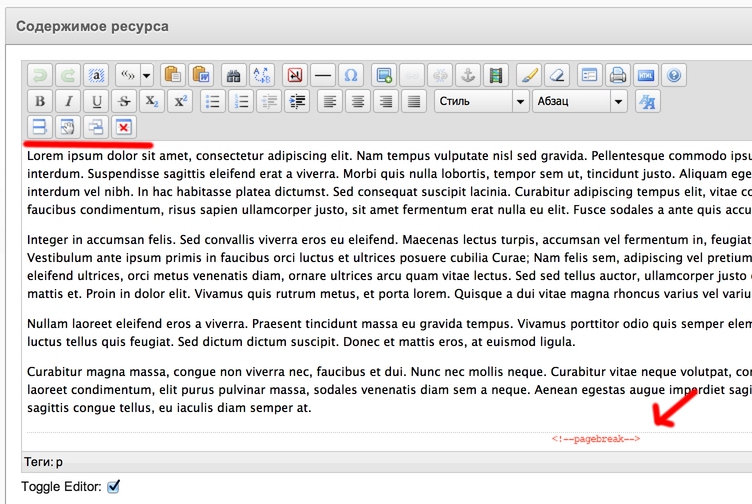
The plugin adds 4 buttons to the editor toolbar:
- Manual break. Inserts a separator at the cursor.
- Auto break by specified character count.
- Auto break every 2000 characters.
- Clear separators
It also shows where separators are inserted.
Auto break
Auto break works by paragraphs. Text is split by p tags, then each block is measured and split into pages.
Example: 10 paragraphs of 1500 characters each. With a 2000-character break you get 5 pages.
- Page split into 10 paragraphs
- First paragraph < 2000 — goes to page 1.
- Second + first = 3000 — exceeds limit, so a separator is added after the second paragraph on page 1.
Thus 10 paragraphs become 5 pages. To change the break, delete all separators and set a new character count.
If there are no p tags, auto break will not work. TinyMCE creates paragraphs on Enter. You can always place separators manually.
Install and remove
Installation is fully automatic. PageBreaker copies its extension to editors, activates it and adds the buttons to the third row.
When the component is removed, its editor extension is removed as well, along with related settings.
No manual steps required — everything is automated.