


msYandexDelivery
Yandex Delivery Platform API (other-day) for MiniShop3 — rates, pickup points, manager requests

properties.msyandexdelivery.offers/create.offers/confirm with offer_id.request/info.request/cancel (while the request is not yet with a courier).There are no push webhooks. Other-day API does not provide them. Refresh status manually or in batch.
Request data lives in table msyandex_requests (model msydRequest) and in order properties.
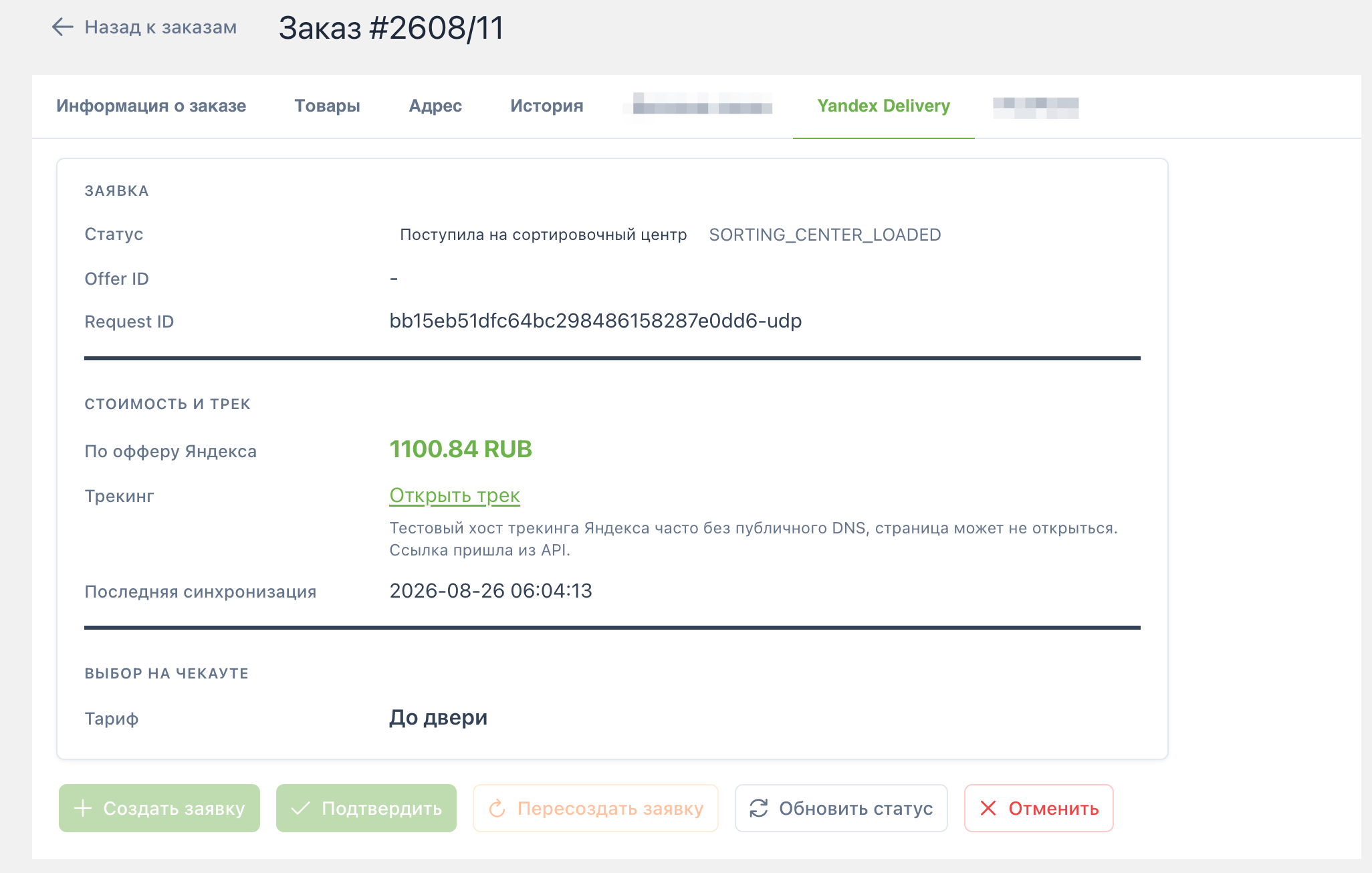
Plugin msYandexDelivery Manager order tab on msOnManagerCustomCssJs (order page) registers the tab via MS3OrderTabsRegistry. VueTools is required.
The tab shows status, offer/request id, price, tracking, and Create / Confirm / Refresh / Cancel.
Cancel is available after the request is confirmed and before the parcel is handed to a courier. It is unavailable for completed requests (delivered, cancelled, returned, failed), orders at a pickup point, returns in progress, and the status “On the way to recipient”. After a successful cancel the tab shows “Cancelled”.
Batch polling pulls current statuses from Yandex Delivery for active requests. Completed ones (delivered, cancelled, returned, failed) are skipped. Requests that have not synced recently are updated first.
Each change is saved on the MiniShop3 order. To auto-update order status or send notifications, hook a plugin to the status-change event (see below).
Task file: core/components/msyandexdelivery/elements/tasks/sync_statuses.php
limit in task properties. Otherwise msyandexdelivery_sync_poll_limit is used.Set a long msyandexdelivery_sync_secret and call the connector:
curl -sS 'https://example.com/assets/components/msyandexdelivery/connector.php?action=sync_statuses&secret=YOUR_SECRET'POST works too. Without the secret and without a manager session the response is unauthorized. If you are already logged into the manager, action=sync_statuses works without the secret.
<?php
/** @var modX $modx */
switch ($modx->event->name) {
    case 'msYandexDeliveryOnStatusChange':
        $orderId = (int) ($modx->event->params['order_id'] ?? 0);
        $normalized = (string) ($modx->event->params['normalized_status'] ?? '');
        // e.g. change MS3 status when delivered
        break;
}
Subscribe the plugin to the event. MODX creates the name on the first invokeEvent, or add msYandexDeliveryOnStatusChange to the package Events list.
Single endpoint: assets/components/msyandexdelivery/connector.php.
| action | Context | Purpose |
|---|---|---|
calculate | web | Rate quote |
select_option | web | Persist selection (ms3_token required) |
list_pickup_points | web / mgr | Pickup point list |
get_order_summary | mgr | Order summary |
create_request | mgr | Create offer |
confirm_request | mgr | Confirm offer |
refresh_status | mgr | Refresh status |
cancel_request | mgr | Cancel request |
sync_statuses | mgr or secret | Batch poll of active requests |
Base host: msyandexdelivery_base_url. Client paths:
| Method | Path |
|---|---|
| POST | /api/b2b/platform/pricing-calculator |
| POST | /api/b2b/platform/offers/create |
| POST | /api/b2b/platform/offers/confirm |
| GET | /api/b2b/platform/request/info |
| GET | /api/b2b/platform/request/actual_info |
| GET | /api/b2b/platform/request/history |
| POST | /api/b2b/platform/request/cancel |
| POST | /api/b2b/platform/location/detect |
| POST | /api/b2b/platform/pickup-points/list |
Service: MsYandexDelivery\Service\YandexDeliveryService. HTTP: MsYandexDelivery\Api\YandexPlatformClient.
| Plugin | Events |
|---|---|
| msYandexDelivery Autoload | OnMODXInit (priority -100) |
| msYandexDelivery Delivery | msOnGetDeliveryCost |
| msYandexDelivery Order persist | msOnSubmitOrder, msOnBeforeCreateOrder, msOnCreateOrder |
| msYandexDelivery Manager order tab | msOnManagerCustomCssJs |