



Order
As with the cart, the whole order process is handled by a dedicated class msOrderHandler, which implements msOrderInterface. You can connect your own class for orders and set it in the ms2_order_handler_class system setting.

Required methods of msOrderInterface:
- initialize - Initializes the class in the context. Can load scripts and styles.
- add - Adds one field to the order.
- remove - Removes one field from the order.
- validate - Validates a field when adding and returns the filtered value.
- get - Returns the full order contents.
- set - Overwrites order contents with the given array.
- submit - Submits the order; it must already have delivery and required fields.
- clean - Full order clear.
- getCost - Gets delivery cost. The request is passed to
msDeliveryInterface.
How it works
By default the order is a data array in the session. You add data to it with add(); that data must pass validate(). Keeping the order in the session gives at least two benefits: step-by-step checkout and protection from accidental page refresh. What you put in the order does not matter as long as by the time you call submit() it has the required fields and delivery. You set required fields yourself in the manager:
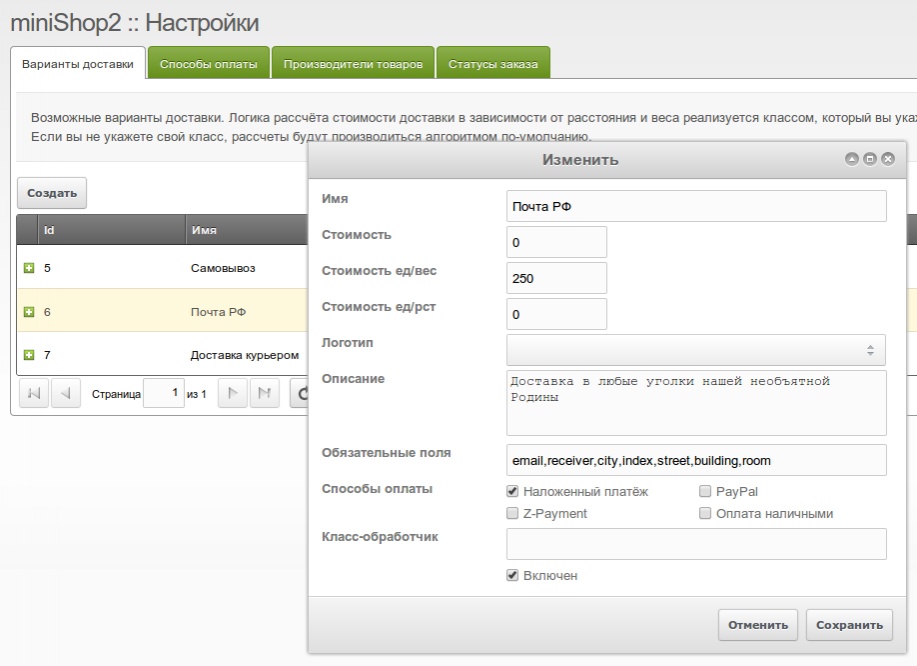
As the screenshot shows, delivery is linked to possible payment methods. This is optional, but the standard order form is built with them in mind.
Form on the site
In fact there is no form on the site. Because each field change is sent to the server via ajax, a form is not needed. When a field is sent to the server it goes through validate(), and the result is sent back. So we validate and save to the order at once. The user gets instant saving of any change and immediately sees what was entered incorrectly. The standard class validation is very gentle. It does not just say "yes" or "no"; it tries to normalize the data and only rarely rejects. For example, extra spaces are trimmed, buyer name is capitalized, phone is stripped of non-digits, etc. When switching delivery and payment, it checks that they are active and compatible.
And as already mentioned, each delivery method has its own required fields. So for mail you need a postal code, for courier delivery only an address. For pickup we only need buyer name and email. No point asking for unnecessary data. These rules apply as soon as delivery is switched. Order cost is also recalculated based on its parameters.
Logic
All data is already in the session; you only need to call submit() and it does the rest:
- You can pass an order data array to this method; it will be validated and will replace what is already there. This allows using classic forms. Before validating, the msOnSubmitOrder event is fired.
- Delivery presence is checked. If delivery is not set or is disabled in the manager — error.
- The class gets required fields for the delivery. It checks that they are all set in the order. If not — error, inputs are highlighted in red on the site.
- No more checks. We get the user id by email or phone. If there is no such user, we register one with a random password and add to groups from ms2_order_user_groups.
- We get cart status, get delivery cost from the delivery class (or default). Create the
msOrderorder object. - We also create: recipient address
msOrderAddress, order productsmsOrderProduct, fill them and attach to the order. - We fire msOnBeforeCreateOrder with the order object and attached address and products.
- The order is saved, msOnCreateOrder is fired and order status is set to 2 ("New"). Emails are sent to buyer and manager if enabled for the status.
- Cart and order are cleared.
- Finally we get the msPayment payment object and run its class if set. From then on it handles the order, sending the buyer to payment or another page.
The buyer does not see any of this and simply gets a server response saying where to go next. If no payment method is set for the order or it has no custom class, the current page just reloads with ?msorder=order_id to show the success chunk. Cart output is hidden; user auth in the context and match to the order are checked to protect the displayed data.
So either the payment class handles the order, or the buyer sees a chunk with their order details.
System events
The msOrderHandler class fires certain events when working with the order. Here they are as a plugin template:
php
<?php

switch ($modx->event->name) {
  // Adding fields to order
  case 'msOnBeforeAddToOrder'; break; // receives $key with field name, $value - field value
  case 'msOnAddToOrder'; break; // receives $key with field name, $value - field value

  // Removing fields from order
  case 'msOnBeforeRemoveFromOrder'; break; // receives $key with field name
  case 'msOnRemoveFromOrder'; break; // receives $key with field name

  // Order field validation
  case 'msOnBeforeValidateOrderValue'; break; // receives $key, $value and $order (msOrderHandler)
  case 'msOnValidateOrderValue'; break; // receives $key, $value and $order (msOrderHandler)

  // Order submission
  case 'msOnSubmitOrder'; break; // optional $data array with overridable fields

  // Creating order
  case 'msOnBeforeCreateOrder'; break; // receives $msOrder object and $order (msOrderHandler)
  case 'msOnCreateOrder'; break; // receives $msOrder object and $order (msOrderHandler)

  // Clearing order
  case 'msOnBeforeEmptyOrder'; break; // receives $order (msOrderHandler)
  case 'msOnEmptyOrder'; break; // receives $order (msOrderHandler)

  // Getting order cost
  case 'msOnBeforeGetOrderCost'; break; // receives $order, $cart, $with_cart, $only_cost
  case 'msOnGetOrderCost'; break; // receives $order, $cart, $with_cart, $only_cost, $cost, $delivery_cost

  // Order status change (payment, cancel, etc.)
  case 'msOnBeforeChangeOrderStatus': break; // receives $order (msOrder), $status and $old_status
  case 'msOnChangeOrderStatus': break; // receives $order (msOrder), $status and $old_status
}
All events receive the $order variable. In cart and order handler events (add, remove, validate, empty, getCost, submit) it is an msOrderHandler class instance. In status change events (msOnChangeOrderStatus etc.) it is an msOrder object.
Example
Let's connect our own order class and override email validation in it.
- Create and connect your extending class. Then in it write
php
<?php

class myOrderHandler extends msOrderHandler {

}
That inherits the original order class.
Now set the new class myOrderHandler in the ms2_order_handler_class system setting. If something goes wrong you can always switch back. After that ms2 uses your class, which in turn inherits from the standard one.
Now we can change any order-creation method; we change
msOrderHandler::validate().
php
<?php
class myOrderHandler extends msOrderHandler {
  public function validate($key, $value) {
    switch ($key) {
      case 'email':
        // replace filter_var() with a simple regex
        // $value = filter_var($value, FILTER_VALIDATE_EMAIL) ? $value : @$this->order[$key];
        $value = preg_match('/.+@.+\..+/i', $value) ? trim($value) : @$this->order[$key];
      break;
      // You can also override other validators

      // If a field not listed here is sent — pass to default class
      default:
        return parent::validate($key, $value);
    }

    if ($value === false) {
      $value = '';
    }

    return $value;
  }
}
Done. We inherited the method and changed email validation. Similarly we can add or change validation for other fields, or change the whole order flow.