


Alex Soin
Author
You can adapt this tool to your needs. Clone the project repository and edit the files.
The src folder contains content (actual files) and data (configuration).
Everything in src/content/core is copied into the site’s core folder.
./src/
├── content/
│   ├── core/
│   │   └── elements/
│   │       ├── chunks/
│   │       ├── templates/
│   │       └── zoomx/
│   │           ├── controllers/
│   │           ├── plugins/
│   │           ├── snippets/
│   │           └── templates/
│   ├── pages/
│   ├── plugins/
│   ├── snippets/
│   └── templates/
└── data/
    ├── addons.php
    ├── clientConfig.php
    ├── plugins.php
    ├── providers.php
    ├── resources.php
    ├── settings.php
    ├── snippets.php
    ├── templates.php
└── tvs.phpEdit src/data/addons.php to change the list of extras. It contains an array of providers and package names.
<?php
return [
  "modx.com" => [
    'FormIt',
    'ClientConfig',
    // ...
  ],
  "modstore.pro" => [
    'Ace',
    'autoRedirector',
    'pdoTools',
    // ...
  ]
];
To add an extra, find it on the provider site (e.g. modstore.pro), copy the package name and add it to the right provider array.
Edit src/data/settings.php to change system settings. It is an array of setting keys and values.
<?php
return [
  'log_deprecated' => 0,
  'locale' => 'ru_RU.utf8',
  'allow_multiple_emails' => 0,
  'server_protocol' => 'http',
  'friendly_alias_realtime' => 1,
  'friendly_alias_restrict_chars' => 'alphanumeric',
  'friendly_alias_translit' => 'russian-fixed',
  // ...
];
Use 0 for “No” and 1 for “Yes”. If a setting is missing, copy its key from the Manager system settings and add it to the array.

Edit src/data/plugins.php for the plugin list. Keys are the plugin content file names (in src/content/plugins/) without .php.
<?php
return [
  'ignore' => [
    'name' => 'ignore',
    'description' => 'Wraps output in an ignore tag',
    'events' => [
      'pdoToolsOnFenomInit' => []
    ]
  ],
  // ...
];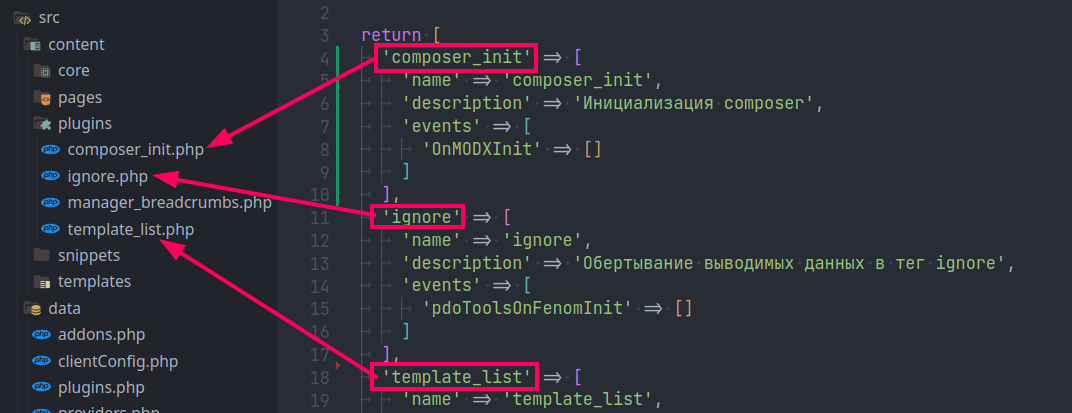
To add a plugin, add an entry with the content file name as key, set name, description, and events, then create the .php file in src/content/plugins/.
Snippets work the same way; edit src/data/snippets.php:
<?php
return [
  'version' => [
    'name' => 'version',
    'description' => 'Outputs a version query string for included script/style',
  ]
];Edit src/data/clientConfig.php for ClientConfig categories and fields:
<?php
return [
  [
    'label' => 'General',
    'description' => '',
    'items' => [
      ['key' => 'policy', 'xtype' => 'modx-panel-tv-file', 'label' => 'Privacy policy', 'value' => '#'],
      ['key' => 'year_start', 'xtype' => 'numberfield', 'label' => 'Copyright year', 'value' => date('Y')],
      ['key' => 'emailto', 'xtype' => 'textfield', 'label' => 'Contact email', 'value' => ''],
    ],
  ],
  // ...
];
label – tab/category nameitems – list of fieldsxtype – field typekey – field keylabel – field labelvalue – default valueA step is a function that runs during setup (e.g. installing extras or adding plugins).
To add a custom step, add a new method to the MoxiPack class in ./app.php, e.g. exampleStep:
<?php
// ...
class MoxiPack extends MoxiModx
{
  // ...

  /**
   * Example custom step
   *
   * @return void
   */
  public function exampleStep()
  {
    $this->log("Custom step completed");
  }

  // ...
}
Inside the method you can use $this->modx. Use $this->log("message", "info"|"error"|"warning") for logging.
Example:
$this->log("Error message", "error");Register the step in the steps() method of the MoxiHelp class in ./app.php:
<?php
// ...
class MoxiHelp
{
  // ...

  static function steps()
  {
    return [
      ["name" => "providers", "desc" => "Adding package providers", ],
      ["name" => "addons", "desc" => "Installing extras", ],
      ["name" => "copyCore", "desc" => "Copying core folder", ],
      ["name" => "templates", "desc" => "Adding templates", ],
      ["name" => "resources", "desc" => "Adding resources", ],
      ["name" => "settings", "desc" => "Changing settings", ],
      ["name" => "snippets", "desc" => "Adding snippets", ],
      ["name" => "plugins", "desc" => "Adding plugins", ],
      ["name" => "tvs", "desc" => "Adding TV fields", ],
      ["name" => "clientConfig", "desc" => "ClientConfig setup", ],
      ["name" => "exampleStep", "desc" => "Custom step", ],
      ["name" => "managerCustomize", "desc" => "Manager customization", ],
      ["name" => "renameHtaccess", "desc" => "Renaming ht.access to .htaccess", ],
      ["name" => "removeChangelog", "desc" => "Removing changelog", ],
      ["name" => "clearCache", "desc" => "Clearing cache", ],
    ];
  }

  // ...
}
name – method name to rundesc – step descriptionSteps run in order. Place your custom step after the one it should follow; here exampleStep runs after clientConfig.